 PH
PHUseful Windows Command Prompt Tricks
To see hidden content you must react:
1. Command History
Using this command, you can track down your command history. This will turn out to be useful when you are trying to look for some command that you’ve used in the past, but can’t remember.
- doskey /history
2. Run multiple commands
If you are feeling the need to run two commands after another, you can do so easily. Add this to your collection of CMD häçks. You just need to put “&&” between each command and save some time. For example, here’s how to run ipconfig and paint.
- ipconfig && mspaint
3. Use Function keys and become a pro user
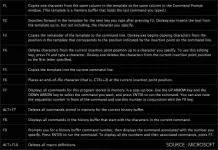
One out of the very useful CMD tricks to use function keys. There is a lot these keys can do to improve your CMD experience.
Here’s the list:
4. See PC driver list
Using a simple command, you can see all the drivers installed on your computer. All you need to do is run the driverquery command, and you’ll be seeing a list of all the drivers along with their name, type, and other information.
- driverquery
5. Send an output to clipboard
Very often you might have felt the need to save the output of a command? Usually, people use copy and paste. However, using a simple command, you can send the command’s output to the clipboard. Here’s how to send the ipconfig information:
- ipconfig | clip
6. Abort a command
This handy Windows CMD trick comes to rescue when you have pressed the enter key and you need to stop the command in its tracks? To do it, you need to do a Ctrl+C. However, it isn’t a magic trick that can undo an undoable thing.
7. Create Wi-Fi hotspot right from the command prompt
Before opening the Command Prompt to execute the commands needed for this, you need to open Control Panel and find Change adapter settings in the Network and Sharing option. There, click on the connection you are using and click on Properties. Now find the sharing tab and check the option “Allow other network users to connect through this computer’s internet connection.”
Now open the Command Prompt with administrative privileges and enter the following command:
- netsh wlan set hostednetwork mode=allow ssid=Youthotspotname key=yourpassword
After it’s enabled, enter the following command to start the Wi-Fi hotspot
- netsh wlan start hostednetwork
To stop it, simply enter this command:
- netsh wlan stop hostednetwork
8. Scan system files for problems
The sfc /scannow command runs a system file checker tool that scans Windows system files and looks for problems. If some files are missing or corrupted, this command fixes them.
- sfc /scannow
To see hidden content you must react:
1. Command History
Using this command, you can track down your command history. This will turn out to be useful when you are trying to look for some command that you’ve used in the past, but can’t remember.
- doskey /history
2. Run multiple commands
If you are feeling the need to run two commands after another, you can do so easily. Add this to your collection of CMD häçks. You just need to put “&&” between each command and save some time. For example, here’s how to run ipconfig and paint.
- ipconfig && mspaint
3. Use Function keys and become a pro user
One out of the very useful CMD tricks to use function keys. There is a lot these keys can do to improve your CMD experience.
Here’s the list:
4. See PC driver list
Using a simple command, you can see all the drivers installed on your computer. All you need to do is run the driverquery command, and you’ll be seeing a list of all the drivers along with their name, type, and other information.
- driverquery
5. Send an output to clipboard
Very often you might have felt the need to save the output of a command? Usually, people use copy and paste. However, using a simple command, you can send the command’s output to the clipboard. Here’s how to send the ipconfig information:
- ipconfig | clip
6. Abort a command
This handy Windows CMD trick comes to rescue when you have pressed the enter key and you need to stop the command in its tracks? To do it, you need to do a Ctrl+C. However, it isn’t a magic trick that can undo an undoable thing.
7. Create Wi-Fi hotspot right from the command prompt
Before opening the Command Prompt to execute the commands needed for this, you need to open Control Panel and find Change adapter settings in the Network and Sharing option. There, click on the connection you are using and click on Properties. Now find the sharing tab and check the option “Allow other network users to connect through this computer’s internet connection.”
Now open the Command Prompt with administrative privileges and enter the following command:
- netsh wlan set hostednetwork mode=allow ssid=Youthotspotname key=yourpassword
After it’s enabled, enter the following command to start the Wi-Fi hotspot
- netsh wlan start hostednetwork
To stop it, simply enter this command:
- netsh wlan stop hostednetwork
8. Scan system files for problems
The sfc /scannow command runs a system file checker tool that scans Windows system files and looks for problems. If some files are missing or corrupted, this command fixes them.
- sfc /scannow