PH
PH(BEST METHOD) TO FLASH STOCK ROM OR CUSTOM ROM SAMSUNG PHONE TRU ODIN .
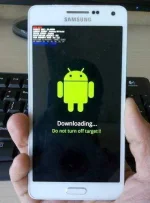
The Odin Mode on Samsung is a download mode which allows users to flash the device or introduce a new firmware. To enter this mode,
you only need to hold and press the Volume Down, Power and Home buttons at the same time and then select Continue option by pressing the Volume Up button to begin the downloading.
TOOLS FOR FLASHING AND REQUIRMENTS FOR SAMSUNG PHONES TRU PC OR LAPTOPS .
1. GOOD CABLE AND ATLEAST 60% CHARGED BATTERY .
2.UNIVERSAL SAMSUNG DRIVER (MAKE SURE TO GET THE LATEST VERSION ALWAYS)
Link : You do not have permission to view the full content of this post. Log in or register now.
3. ODIN (LATEST VERSION LINK BELOW)
Link : You do not have permission to view the full content of this post. Log in or register now.
AND FOR FIRMWARES TRY TO FIND YOUR PHONE HERE : You do not have permission to view the full content of this post. Log in or register now.
ROAD TO ODIN MODE WITHOUT BOOTLOOP OR DEAD .
This method is a little tedious, so follow the steps carefully:
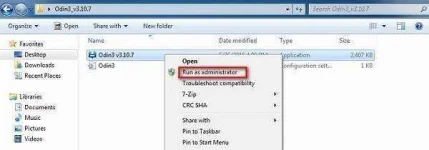
STEP 1: Download a suitable firmware, driver software, and Odin flashing tool. Once done, right click on the downloaded Odin file to select “Run as Administrator”.
STEP 2: Boot the device into Download Mode by pressing the power, volume down and home button together. When the phone vibrates, release the power button only.
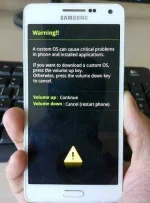
STEP 3: Now you must gently press the volume up button and you will see the Download Mode Screen.
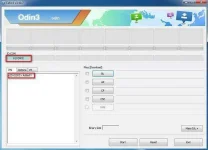
STEP 4: Once you connect your device to the PC using a USB cable, Odin will recognize your device automatically and in the Odin window you will see a message saying “Added”.
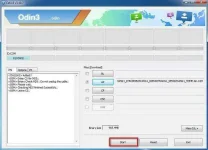
STEP 5: Now look for the downloaded firmware by clicking on “PDA” or “AP” on the Odin window and then click “Start” as shown in the pic below.
Then wait to success . After getting success unplug your phone and and open your phone 1st time boot always take 10 to 15mins please be patient and that's it congrats you successfully flash your samsung phone ..
Please always make a backup before proceeding to those steps OK ? For your peace of mind if ever

Thankyou and Goodluck .
Edited ✌✌
The Odin Mode on Samsung is a download mode which allows users to flash the device or introduce a new firmware. To enter this mode,
you only need to hold and press the Volume Down, Power and Home buttons at the same time and then select Continue option by pressing the Volume Up button to begin the downloading.
TOOLS FOR FLASHING AND REQUIRMENTS FOR SAMSUNG PHONES TRU PC OR LAPTOPS .
1. GOOD CABLE AND ATLEAST 60% CHARGED BATTERY .
2.UNIVERSAL SAMSUNG DRIVER (MAKE SURE TO GET THE LATEST VERSION ALWAYS)
Link : You do not have permission to view the full content of this post. Log in or register now.
3. ODIN (LATEST VERSION LINK BELOW)
Link : You do not have permission to view the full content of this post. Log in or register now.
AND FOR FIRMWARES TRY TO FIND YOUR PHONE HERE : You do not have permission to view the full content of this post. Log in or register now.
ROAD TO ODIN MODE WITHOUT BOOTLOOP OR DEAD .
This method is a little tedious, so follow the steps carefully:
STEP 1: Download a suitable firmware, driver software, and Odin flashing tool. Once done, right click on the downloaded Odin file to select “Run as Administrator”.
STEP 2: Boot the device into Download Mode by pressing the power, volume down and home button together. When the phone vibrates, release the power button only.
STEP 3: Now you must gently press the volume up button and you will see the Download Mode Screen.
STEP 4: Once you connect your device to the PC using a USB cable, Odin will recognize your device automatically and in the Odin window you will see a message saying “Added”.
STEP 5: Now look for the downloaded firmware by clicking on “PDA” or “AP” on the Odin window and then click “Start” as shown in the pic below.
Then wait to success . After getting success unplug your phone and and open your phone 1st time boot always take 10 to 15mins please be patient
and that's it congrats you successfully flash your samsung phone ..Please always make a backup before proceeding to those steps OK ? For your peace of mind if ever
Thankyou and Goodluck .
Edited ✌✌