 PH
PHKuririChan
Forum Veteran
KernelSU-Next for Samsung Galaxy A20s (SM-A207F / msm8953)
You do not have permission to view the full content of this post. Log in or register now. You do not have permission to view the full content of this post. Log in or register now.

-orange.svg)

Custom kernel for the Samsung Galaxy A20s (
SM-A207F / msm8953 / sdm450) with built-in KernelSU-Next legacy root support, full SELinux Enforcing compatibility, and performance fixes. Supported Devices
| Device Model | Codename | Platform | Android Version |
|---|---|---|---|
Samsung Galaxy A20s (SM-A207F) | a20s / a20sxx | Qualcomm Snapdragon 450 (msm8953) | Android 11 (One UI 3.1) |
Samsung Galaxy A20s (SM-A207M) | a20s | Qualcomm Snapdragon 450 (msm8953) | Android 11 (One UI 3.1) |
Samsung Galaxy A20s (SM-A2070) | a20s | Qualcomm Snapdragon 450 (msm8953) | Android 11 (One UI 3.1) |
 Features
- KernelSU-Next Legacy Integrated: Built directly into the kernel source (
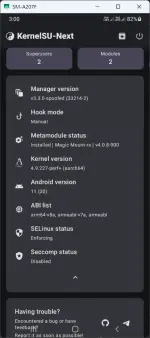
v3.2.0-legacy) running in Manual Hook Mode for Linux 4.9. - SELinux Enforcing Supported: Full root privilege separation under
u:r:ksu:s0without requiring permissive mode. - OverlayFS Enabled (
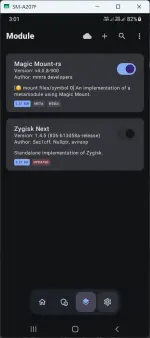
CONFIG_OVERLAY_FS=y): Full support for systemless root modules (ZygiskNext, ZygiskKSU, etc.). - Connectivity & Battery Drain Fix:
CONFIG_CNSS_GENL=yenabled to fix the Qualcommcnss-daemon~61% CPU spinning loop. - Samsung SAR Compatible Installer: Custom AnyKernel3 configuration configured for System-as-Root boot partitions without ramdisk unpack errors.
 Downloads & Releases
- Kernel Package: Download
KSU-Next-Kernel-A20s.zipfrom the You do not have permission to view the full content of this post. Log in or register now. section. - Boot Fix:
Fixboot.zip(Required for Samsung A20s boot compatibility). - Manager App: Download the latest KernelSU-Next Manager APK from the You do not have permission to view the full content of this post. Log in or register now..
 Installation Guide
WARNING: Unlocking your bootloader will wipe your device data and trip Samsung Knox (0x1). Always back up your critical files before flashing custom kernels.
Prerequisites:
- Bootloader unlocked on your Samsung Galaxy A20s.
- Custom recovery installed (TWRP or OrangeFox).
- Downloaded
KSU-Next-Kernel-A20s.zipandFixboot.ziponto an SD card or internal storage.
Step-by-Step Flashing:
- Boot into Recovery: Power off your phone, then hold
Volume Up + Poweruntil the TWRP / OrangeFox splash screen appears. - Backup (Recommended): Go to Backup and create a backup of your
BootandDTBOpartitions. - Flash Kernel: Tap Install, select
KSU-Next-Kernel-A20s.zip, and swipe to confirm flash. - Flash Fixboot (Crucial): Select
Fixboot.zipand swipe to confirm flash. (This step fixes the Samsung A20s boot verification/encryption bug.) - Reboot: Wipe
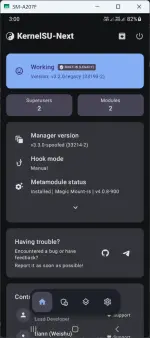
Dalvik / ART Cache(optional but recommended), then tap Reboot System. - Install Manager: Once booted into Android, install the KernelSU-Next Manager APK, open the app, and verify that the status displays Working (BUILT-IN (LEGACY)).
 Building from Source
Requirements:
- OS: Linux (Debian 12 / Ubuntu 22.04 LTS / WSL2)
- Build Tools:
make,bc,bison,flex,cpio,zip,python3 - Toolchains: AArch64 GCC 4.9 & ARM32 GCC 4.9
Compilation Steps:
Bash:
# 1. Clone kernel repository & toolchains
git clone https://github.com/yiesko/android_kernel_samsung_a20s -b main kernel_a20s
cd kernel_a20s
# 2. Setup KernelSU-Next legacy driver
curl -LSs "https://raw.githubusercontent.com/KernelSU-Next/KernelSU-Next/next/kernel/setup.sh" | bash -s legacy
# 3. Export toolchain variables
export ARCH=arm64
export CROSS_COMPILE=/path/to/toolchains/gcc-arm64/bin/aarch64-linux-android-
export CROSS_COMPILE_ARM32=/path/to/toolchains/gcc-arm32/bin/arm-linux-androideabi-
# 4. Generate defconfig & compile
make O=out a20s_eur_open_defconfig
make -j$(nproc) O=out
# Output binary will be at: out/arch/arm64/boot/Image.gz-dtb Troubleshooting & FAQ
- Q: The phone is stuck at the Samsung boot logo.
A: FlashFixboot.zipimmediately afterKSU-Next-Kernel-A20s.zipbefore rebooting into system. - Q: KernelSU Manager says "Unsupported" or "Not Installed".
A: Verify that you flashedKSU-Next-Kernel-A20s.zipwithout errors and installed the KernelSU-Next Manager (not standard KernelSU). - Q: Root is not working in ADB Shell.
A: In the KernelSU-Next Manager, go to the Superuser tab and grant root permission toShell(UID 2000) or your target app.
 Credits & Acknowledgements
- You do not have permission to view the full content of this post. Log in or register now. for the Samsung Galaxy A20s kernel source tree and patches.
- You do not have permission to view the full content of this post. Log in or register now. by rifsxd and contributors.
- You do not have permission to view the full content of this post. Log in or register now. by tiann.
- You do not have permission to view the full content of this post. Log in or register now. by osm0sis.
- Samsung Open Source Release Center (OSRC) for the base kernel source.
Download