 PH
PHDora The Explorer
Forum Guru
To speed up the Internet speed on your Android phone, there are a number of things you can do:
If you’re suffering from slow internet on your Android device, there are a few ways you can speed things up. None of these will turn your 4G LTE phone into a 5G supersonic powerhouse, but they could at the very least cut down your browser’s load time or even fix a lag issue.
Before you start, make sure you’re not connected to a WiFi network and that mobile data is turned on. To turn on mobile data, access your quick settings and make sure it is highlighted. You can also go to the regular settings menu and turn it on from there.
Download Performance-Boosting Apps
Apps that remove clutter or duplicate files can help keep phones in optimal working condition. There are many performance enhancers out there. Here are three:
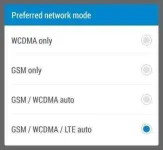
If you're having consistent trouble with web speeds, your settings may need checking. Go into Settings and find Mobile Network Settings. The precise name of the menu will vary from device to device, so have a look around. You need to make sure that your phone is connected to the correct kind of network and that it hasn’t been restricted to 3G only.
Most areas in the world run onGSM/WCDMA/LTE networks, so give these a try first. If they don’t work try looking up what your region uses. Some phones have the option to find networks automatically, which is always a bonus.
Disable or Uninstall Unused Apps & Widgets
Most apps and widgets are relatively benign, but some use up a ton of data while they run in the background. A great is example is Facebook.
The first step is to remove any widgets from your home screens that you don’t use. These are usually the biggest offenders and are easy to ditch. Just tap and hold on the widget and drag it up to the Remove icon at the top of the screen. This will not delete the app from your phone but merely remove the widget from the home screen and make it inactive.
To totally delete an app you need to enter the Applications Menu. From here the procedure can vary from device to device. Sometimes you can just tap and hold, but usually you have to find the menu button and hit either Edit or Delete Apps.
Some apps cannot be deleted. These apps are placed on your phone by the manufacturer, by Google or by your carrier.
Install an Ad Blocker
Ads can use up a lot of resources--not just processing power, but mobile data as well. Finding a good ad blocking solution on Android is tough, but there is an ad blocking web browser that will keep your web pages ad-free. You can find the You do not have permission to view the full content of this post. Log in or register now. in the Google Play store.
If you've completed all of the above steps and are still have issues with your Internet speed on your Android phone, it might be time to shop around and You do not have permission to view the full content of this post. Log in or register now. in your area.
Ctto
- Install performance-enhancing apps to remove any clutter on your phone
- Check your network settings and make sure you're on the best connection possible
- Remove unnecessary widgets and apps running in the background
- Install an ad blocker
- Restart your Android phone
- Clear the cache on your cell phone
If you’re suffering from slow internet on your Android device, there are a few ways you can speed things up. None of these will turn your 4G LTE phone into a 5G supersonic powerhouse, but they could at the very least cut down your browser’s load time or even fix a lag issue.
Before you start, make sure you’re not connected to a WiFi network and that mobile data is turned on. To turn on mobile data, access your quick settings and make sure it is highlighted. You can also go to the regular settings menu and turn it on from there.
Download Performance-Boosting Apps
Apps that remove clutter or duplicate files can help keep phones in optimal working condition. There are many performance enhancers out there. Here are three:
- You do not have permission to view the full content of this post. Log in or register now.: includes both phone booster and antivirus. It cleans junk files, notifications, viruses while performing other tasks such as batter and phone boost.
- You do not have permission to view the full content of this post. Log in or register now.: cleans and organizes your phone and can also reduce battery consumption.
- You do not have permission to view the full content of this post. Log in or register now.: cleans up your phone RAM and frees it up from any background app activity. It can also scan your phone for any junk that you can delete with a single click.
If you're having consistent trouble with web speeds, your settings may need checking. Go into Settings and find Mobile Network Settings. The precise name of the menu will vary from device to device, so have a look around. You need to make sure that your phone is connected to the correct kind of network and that it hasn’t been restricted to 3G only.
Most areas in the world run onGSM/WCDMA/LTE networks, so give these a try first. If they don’t work try looking up what your region uses. Some phones have the option to find networks automatically, which is always a bonus.
Disable or Uninstall Unused Apps & Widgets
Most apps and widgets are relatively benign, but some use up a ton of data while they run in the background. A great is example is Facebook.
The first step is to remove any widgets from your home screens that you don’t use. These are usually the biggest offenders and are easy to ditch. Just tap and hold on the widget and drag it up to the Remove icon at the top of the screen. This will not delete the app from your phone but merely remove the widget from the home screen and make it inactive.
To totally delete an app you need to enter the Applications Menu. From here the procedure can vary from device to device. Sometimes you can just tap and hold, but usually you have to find the menu button and hit either Edit or Delete Apps.
Some apps cannot be deleted. These apps are placed on your phone by the manufacturer, by Google or by your carrier.
Install an Ad Blocker
Ads can use up a lot of resources--not just processing power, but mobile data as well. Finding a good ad blocking solution on Android is tough, but there is an ad blocking web browser that will keep your web pages ad-free. You can find the You do not have permission to view the full content of this post. Log in or register now. in the Google Play store.
If you've completed all of the above steps and are still have issues with your Internet speed on your Android phone, it might be time to shop around and You do not have permission to view the full content of this post. Log in or register now. in your area.
Ctto