 PH
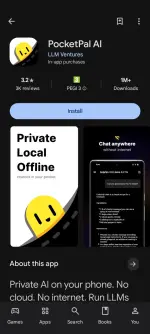
PHTired of cloud AIs leaking your chats or needing constant internet? PocketPal AI lets you download real open-source language models once and run them 100% offline on your phone — zero telemetry, zero account, everything stays on-device.
Step-by-step (under 5 minutes after the model finishes downloading)
1. Open the Google Play Store, search PocketPal AI (developer: LLM Ventures / package com.pocketpalai), and install it. No sign-up required.
2. Launch the app → tap the menu (☰) → Models.
3. Browse the ready-to-download list (or tap + → Add from Hugging Face). Pick a quantized model that fits your device:
- Mid-range / 6–8 GB RAM → start with a 2–4 B parameter Q4_K_M model (≈1.5–3 GB).
- Flagship / 8 GB+ RAM → try larger ones (Gemma, Qwen, Phi, etc.).
Tap Download (use Wi-Fi; models are a few GB).
4. When the download finishes, tap Load on that model.
5. Switch to the Chat tab and start typing. Airplane mode works. All inference happens locally on your CPU/GPU/NPU.
That’s it. You now have a private AI assistant that works underground, on a plane, or with mobile data turned off.
Insider pro-tip
After loading a model, open its settings and set N Predict (max tokens) to 2048–4096 and lower temperature (0.6–0.8) for tighter, less rambling answers. On weaker phones, enable Auto Offload/Load so the model unloads when you switch apps and reloads instantly when you return — keeps RAM free without reloading every time.
Drop a reaction if this saved you from another cloud AI or data bill.
Step-by-step (under 5 minutes after the model finishes downloading)
1. Open the Google Play Store, search PocketPal AI (developer: LLM Ventures / package com.pocketpalai), and install it. No sign-up required.
2. Launch the app → tap the menu (☰) → Models.
3. Browse the ready-to-download list (or tap + → Add from Hugging Face). Pick a quantized model that fits your device:
- Mid-range / 6–8 GB RAM → start with a 2–4 B parameter Q4_K_M model (≈1.5–3 GB).
- Flagship / 8 GB+ RAM → try larger ones (Gemma, Qwen, Phi, etc.).
Tap Download (use Wi-Fi; models are a few GB).
4. When the download finishes, tap Load on that model.
5. Switch to the Chat tab and start typing. Airplane mode works. All inference happens locally on your CPU/GPU/NPU.
That’s it. You now have a private AI assistant that works underground, on a plane, or with mobile data turned off.
Insider pro-tip
After loading a model, open its settings and set N Predict (max tokens) to 2048–4096 and lower temperature (0.6–0.8) for tighter, less rambling answers. On weaker phones, enable Auto Offload/Load so the model unloads when you switch apps and reloads instantly when you return — keeps RAM free without reloading every time.
Drop a reaction if this saved you from another cloud AI or data bill.