 PH
PH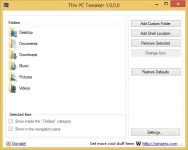
Attention to all This PC Tweaker users, the Navigation Pane editor feature was dropped from the RTM release of This PC Tweaker 1.0 due to bugs and stability issues. It will be released as a separate app very soon.
Version 1.2.0.1 is available, PLEASE UPGRADE THE APP ASAP and follow the instructions in the change log below! The previous version had a bug!
This application allows you to customize items inside the "Computer/This PC" folder and many other things

The features list of the This PC Tweaker
With This PC Tweaker, you will be able to perform the following customizations:
- to add any folder to the Computer/This PC folder. Really any.
- to remove any folder from the Computer/This PC folder.
- to change the icon for any folder inside Computer/This PC.
- to add any shell location like Administrative tools, God Mode, Network Connections
- you can pin or unpin Computer/This PC items from the Navigation Pane of Explorer in Windows 8.1, Windows 8 and even in Windows 7!
- You can remove or add any item from the Folders category inside the Computer/This PC folder.
- to restore defaults with one click.
You do not have permission to view the full content of this post.
Log in or register now.