 PH
PHThis basic how to guide will explains about how to find serial keys of software stored in windows 7,windows 8 and as well as windows xp operating system.
Serial keys are the important one for every commercial software and without serial key they don’t work longer in your pc.If worked that is partially only with few functions.In some cases we lost serial keys of software by formatting windows operating system or lost the software cd or accidentally delete the serial key text file in pc.
Reason is whatever it may be you cannot retrieve it back easily without using any special software.Actually every serial key will be available on registry editor but we cannot find it from registry easily because it have bunch of settings.If you mistakenly delete any entry on registry editor it will cause you system crash.
So we need some special software for this purpose.Here I share one freeware to find the lost serial key of all software in all windows operating systems.
How to Find Serial Keys of Software in Windows?
1. First you need to download that small freeware from below.
Serial Key Finder
2. Now install it on your pc by double click on the setup file.
3. After completing the installation it gives two options one is launch application and another one read me file.
4.If you want to know which software serial keys can be recovered using this software open the read me file.
5. Click on finish to launch the Bytexis license explorer application.
6. It asks you to click on next button to start the scanning process for finding serial keys of installed software in your pc.
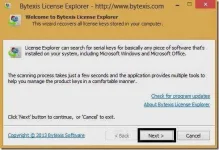
7. After clicking on the next button it shows the available serial keys on your pc.
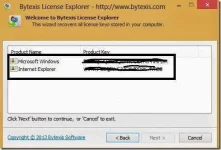
Here in my pc no commercial software like adobe Photoshop are not available,so it shows only two Microsoft products Microsoft windows and Internet Explorer.
I hope it is the best freeware to find the lost serial keys on your windows operating system.
Serial keys are the important one for every commercial software and without serial key they don’t work longer in your pc.If worked that is partially only with few functions.In some cases we lost serial keys of software by formatting windows operating system or lost the software cd or accidentally delete the serial key text file in pc.
Reason is whatever it may be you cannot retrieve it back easily without using any special software.Actually every serial key will be available on registry editor but we cannot find it from registry easily because it have bunch of settings.If you mistakenly delete any entry on registry editor it will cause you system crash.
So we need some special software for this purpose.Here I share one freeware to find the lost serial key of all software in all windows operating systems.
How to Find Serial Keys of Software in Windows?
1. First you need to download that small freeware from below.
Serial Key Finder
2. Now install it on your pc by double click on the setup file.
3. After completing the installation it gives two options one is launch application and another one read me file.
4.If you want to know which software serial keys can be recovered using this software open the read me file.
5. Click on finish to launch the Bytexis license explorer application.
6. It asks you to click on next button to start the scanning process for finding serial keys of installed software in your pc.
7. After clicking on the next button it shows the available serial keys on your pc.
Here in my pc no commercial software like adobe Photoshop are not available,so it shows only two Microsoft products Microsoft windows and Internet Explorer.
I hope it is the best freeware to find the lost serial keys on your windows operating system.