 PH
PHHello Guys! Rardzuu here! So yeah, I'm going to share you one of my favorite theme created by You do not have permission to view the full content of this post.
Log in or register now. of DeviantArt.

NOTICE:
PLEASE FOLLOW ALL THE STEPS FOR INSTALLING THIS SKINPACK. Failure to follow may cause system error and data loss. "Me" (Rardzuu) and alexgal23 is NOT RESPONSIBLE FOR ANY DATA LOSS ON YOUR COMPUTER while using this program/skinpack.
FIRST THINGS FIRST /!\
> Go to start menu and type "uac" on the search bar. Then click the "Change User Account Contol Settings". Then set the rule to "Never Notify". This will allow you to freely modify your system using the applications that included in this tutorial.
INSTRUCTIONS:
1. Download the You do not have permission to view the full content of this post. Log in or register now..
2. Extract the compressed file contents so you can install them properly.
3. If this is your first time installing a 3rd party theme on your computer, I suggest to p@tch it first using UNIVERSAL THEME P@TCHER that was included in the package. The p@tcher comes with 32-BIT AND 64-BIT versions. Run the program and p@tch the 3 files needed to allow 3rd party themes run on your computer.
(NOTE: If you're not sure what version your computer can support, I recommend you to download You do not have permission to view the full content of this post. Log in or register now. to IDENTIFY WHAT SYSTEM ARCHITECTURE YOUR COMPUTER IS. Skip this note if you know what version your computer can run.)
Restart your computer after you p@tched the files to take effect.
4. Extract Flaty SkinPack installer (ex: Desktop) to start installation. Make sure to create a Restore Point first before installing the SkinPack so you can rollback if something's unexpected things happen such as power loss.
Check all the boxes to get all the features of the SkinPack. Do not perform any task while installing the theme.
5. Wait the installer to finish. Restart the computer after the installation to make the theme take effect.
And hola! Welcome to your new-looking desktop appearance powered by Flaty!
IT'S TIME FOR *CLAP CLAP* BONUS APPS! (YEEEY!)
Can't get enough of the appearance of your new theme? Let's replace some of your system applications with modified ones!
NOTE AGAIN: This is only recommended for experienced modders. So again if you want to test these make sure to create a Restore Point first before proceeding.
The applications below was also modded by alexgal23 that was intended to his another theme (Windows 10 Transformation Pack) that I'm going to download sometime this year or next year.
Windows Media Player 12 Windows 10 Style
You do not have permission to view the full content of this post. Log in or register now.
Black and White System Tray
You do not have permission to view the full content of this post. Log in or register now.
Windows Photo Viewer Windows 10 Style
You do not have permission to view the full content of this post. Log in or register now.
The apps above contains the default and modified applications so you can replace and restore the programs easily without going directly to your system folders.
USER'S NOTES:
> If the links for the files is not working or expired, please let me know by sending me a message or email me at rardzzjr23@gmail.com
> If any of this files detected as a malware, that might be a false positive. All the programs above was tested and verified as secure by alexgal23 and also by me.
Y E E T
Big thanks for alexgal23 for this wonderful SkinPack he provided. Visit his DeviantArt profile at You do not have permission to view the full content of this post. Log in or register now. and leave a message saying "Thank you for wonderful creations!"
MY NOTES:
This theme is only for sharing purposes. "Me" (Rardzuu) or you (the user) have no rights to sell this anywhere in the internet or on any physical copy. But you have the rights to share it freely as long as you want. I don't claim any of this work. I just sharing it here so everyone can experience a new level of customization experience.
WANT MORE CUSTOMIZATION LIKE THIS ONE BELOW?
Follow me to get updates for this release and upcoming releases!
ALSO, SUBSCRIBE TO You do not have permission to view the full content of this post. Log in or register now. to prevent T-Series to dethrone Pewds!
NOTICE:
PLEASE FOLLOW ALL THE STEPS FOR INSTALLING THIS SKINPACK. Failure to follow may cause system error and data loss. "Me" (Rardzuu) and alexgal23 is NOT RESPONSIBLE FOR ANY DATA LOSS ON YOUR COMPUTER while using this program/skinpack.
FIRST THINGS FIRST /!\
> Go to start menu and type "uac" on the search bar. Then click the "Change User Account Contol Settings". Then set the rule to "Never Notify". This will allow you to freely modify your system using the applications that included in this tutorial.
INSTRUCTIONS:
1. Download the You do not have permission to view the full content of this post. Log in or register now..
2. Extract the compressed file contents so you can install them properly.
3. If this is your first time installing a 3rd party theme on your computer, I suggest to p@tch it first using UNIVERSAL THEME P@TCHER that was included in the package. The p@tcher comes with 32-BIT AND 64-BIT versions. Run the program and p@tch the 3 files needed to allow 3rd party themes run on your computer.
(NOTE: If you're not sure what version your computer can support, I recommend you to download You do not have permission to view the full content of this post. Log in or register now. to IDENTIFY WHAT SYSTEM ARCHITECTURE YOUR COMPUTER IS. Skip this note if you know what version your computer can run.)
Restart your computer after you p@tched the files to take effect.
4. Extract Flaty SkinPack installer (ex: Desktop) to start installation. Make sure to create a Restore Point first before installing the SkinPack so you can rollback if something's unexpected things happen such as power loss.
Check all the boxes to get all the features of the SkinPack. Do not perform any task while installing the theme.
5. Wait the installer to finish. Restart the computer after the installation to make the theme take effect.
And hola! Welcome to your new-looking desktop appearance powered by Flaty!
IT'S TIME FOR *CLAP CLAP* BONUS APPS! (YEEEY!)
Can't get enough of the appearance of your new theme? Let's replace some of your system applications with modified ones!
NOTE AGAIN: This is only recommended for experienced modders. So again if you want to test these make sure to create a Restore Point first before proceeding.
The applications below was also modded by alexgal23 that was intended to his another theme (Windows 10 Transformation Pack) that I'm going to download sometime this year or next year.
Windows Media Player 12 Windows 10 Style
You do not have permission to view the full content of this post. Log in or register now.
Black and White System Tray
You do not have permission to view the full content of this post. Log in or register now.
Windows Photo Viewer Windows 10 Style
You do not have permission to view the full content of this post. Log in or register now.
The apps above contains the default and modified applications so you can replace and restore the programs easily without going directly to your system folders.
USER'S NOTES:
> If the links for the files is not working or expired, please let me know by sending me a message or email me at rardzzjr23@gmail.com
> If any of this files detected as a malware, that might be a false positive. All the programs above was tested and verified as secure by alexgal23 and also by me.
Y E E T
Big thanks for alexgal23 for this wonderful SkinPack he provided. Visit his DeviantArt profile at You do not have permission to view the full content of this post. Log in or register now. and leave a message saying "Thank you for wonderful creations!"
MY NOTES:
This theme is only for sharing purposes. "Me" (Rardzuu) or you (the user) have no rights to sell this anywhere in the internet or on any physical copy. But you have the rights to share it freely as long as you want. I don't claim any of this work. I just sharing it here so everyone can experience a new level of customization experience.
WANT MORE CUSTOMIZATION LIKE THIS ONE BELOW?
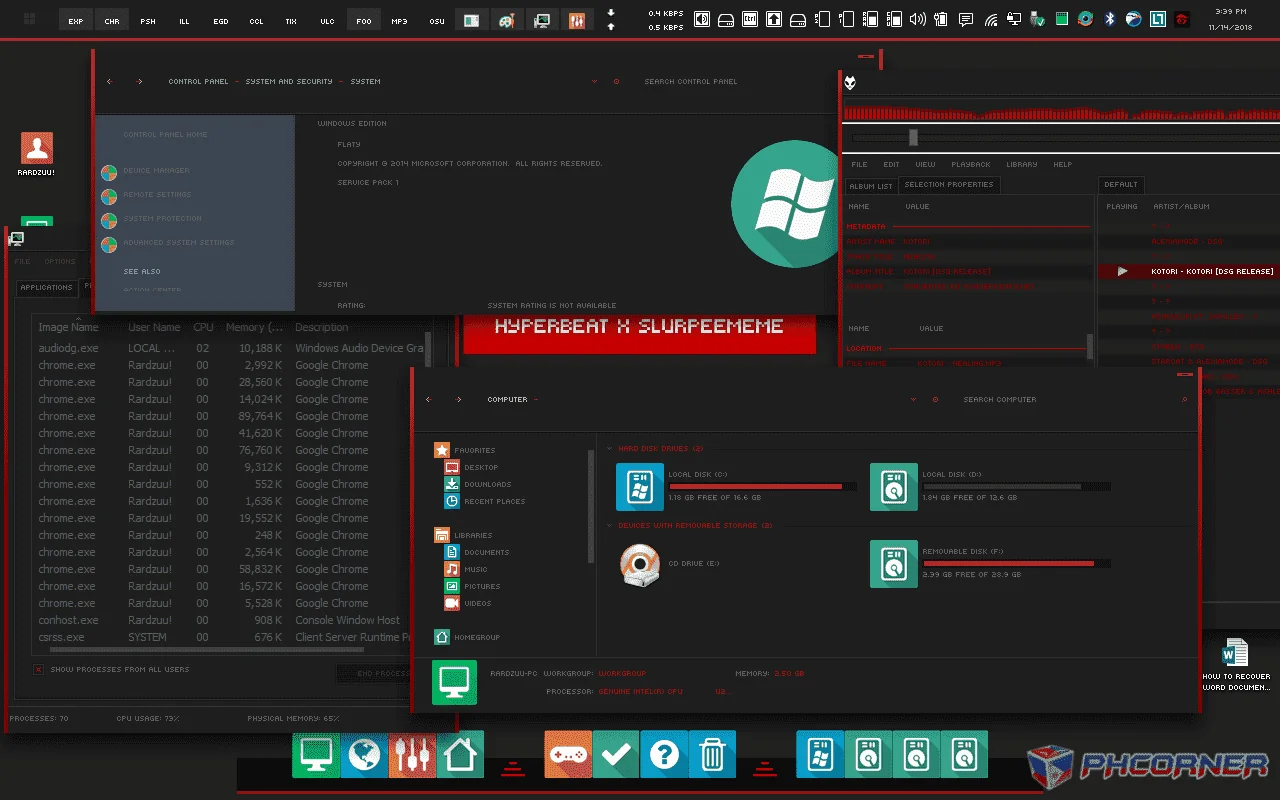
Follow me to get updates for this release and upcoming releases!
ALSO, SUBSCRIBE TO You do not have permission to view the full content of this post. Log in or register now. to prevent T-Series to dethrone Pewds!

