PH
PHwatchTOWER28
Enthusiast
anu pong ginigawa mo?flashing ba o nvram erase?Ayaw mo mag install ung Huawei DriverAyaw rin po mag 100% ung usbboot
936 din ba ang modem na kinakalikot mopo?
anu pong ginigawa mo?flashing ba o nvram erase?Ayaw mo mag install ung Huawei Driver
Stock globe tattoo firmware ang dito saakin gusto ko gawing huawei reloaded at openline. 936 po gamit koanu pong ginigawa mo?flashing ba o nvram erase?
936 din ba ang modem na kinakalikot mopo?
Stock globe tattoo firmware ang dito saakin gusto ko gawing huawei reloaded at openline. 936 po gamit ko
hahaha nakakatakot tuloy mag flash magbabalak pa naman akoAyaw mo mag install ung Huawei Driver
Nag lipat na aq sir ng USB port same problem. Pag jumper ko at saksak USB tumunog naman ung pc ko pero pag start na ng nvrameraser waiting for devices lang. Alam ko naga cause ng problema is baka ung Huawei_Driver ayaw niya mag install sa pc. Naka run as admin. Naga crash ung Huawei driver installer.try mo palit cable or lipat ka ng usb port ng pc..
Nag lipat na aq sir ng USB port same problem. Pag jumper ko at saksak USB tumunog naman ung pc ko pero pag start na ng nvrameraser waiting for devices lang. Alam ko naga cause ng problema is baka ung Huawei_Driver ayaw niya mag install sa pc. Naka run as admin. Naga crash ung Huawei driver installer.
Ayaw parin sirwag mo run sa admin.. silent installer siya means walang lalabas na installing siya.. tpos try mo restart..wag mo din tanggalin ung jumper ifixed mo lang muna
try mo rin ienter pag lumabas ung waiting for device..need mo pa ienter un..
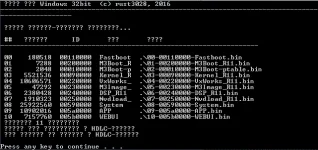
hindi ko alam kung ayaw mag 100% ung usbbot tapos stuck siya sa ??????11??????? at HDLC errorAyaw parin sir
sa win 7 ka nalang magflash bossAyaw parin sir
Win 7 64bit sp1 ang os ko. Pero negative parin ayaw mag 100% si Usbboot.sa win 7 ka nalang magflash boss
ganun ba, ok naman sakin eh win 7 64 sp1 dinWin 7 64bit sp1 ang os ko. Pero negative parin ayaw mag 100% si Usbboot.
Eh paano nyo po ginawa sir? Ayaw talaga saakin mag load or ma detect ng pc ung modem ko kahit Naka jumper na ng maayos? Puwede ko po ba kayo sir ma contact?ganun ba, ok naman sakin eh win 7 64 sp1 din
dapat hindi muna iilaw pag nagjumper ka, run mo muna ung Balong_USB_Loader_1.0.1.10 kung ayaw hindi ko na alam hehe, try mo disable anti-virus mo or install mo visual c++..Eh paano nyo po ginawa sir? Ayaw talaga saakin mag load or ma detect ng pc ung modem ko kahit Naka jumper na ng maayos? Puwede ko po ba kayo sir ma contact?
Wala talaga sir naka disable na po lahat at pag naga balong aq eto lumalabas. EDIT: hindi ko na talaga alam kung bakit ito lang lumalabas. Ayaw lumabas ung comport 1dapat hindi muna iilaw pag nagjumper ka, run mo muna ung Balong_USB_Loader_1.0.1.10 kung ayaw hindi ko na alam hehe, try mo disable anti-virus mo or install mo visual c++..
Sir paano nyo po na install ung mga drivers? Puwede po paturo?salamat TS done unlock isa ko modem, pinahirapan ako sa mga drivers hirap mag connect manual install yon sapol walang error...
ito mga nainstall kong usb driver nya download mo na langWala talaga sir naka disable na po lahat at pag naga balong aq eto lumalabas. EDIT: hindi ko na talaga alam kung bakit ito lang lumalabas. Ayaw lumabas ung comport 1
Sir may konting pag asa na tayo. Ni reformat ko ung old desktop ko ng 32bit na win 7 tapos tig install ko na lahat ng drivers. Lumabas na ung Comport 1 at huawei Comport 3. Kaso ayaw parin mag 100% si usbboot. Kailangan po ba mag install ng Net Framework? Paano ba i connect ung PdaNet?ito mga nainstall kong usb driver nya download mo na lang
You do not have permission to view the full content of this post. Log in or register now.
oo kelangan din net framework install kana rin ng visual c++Sir may konting pag asa na tayo. Ni reformat ko ung old desktop ko ng 32bit na win 7 tapos tig install ko na lahat ng drivers. Lumabas na ung Comport 1 at huawei Comport 3. Kaso ayaw parin mag 100% si usbboot. Kailangan po ba mag install ng Net Framework? Paano ba i connect ung PdaNet?