PH
PHSophiaAlexis
Forum Veteran
NOTE: HIGHLY ADVISABLE TO USE THIS METHOD TO ALL UDP TEAM MEMBERS ESPECIALLY WHEN YOU SHARE YOUR SERVER--like sa MT ni Captain Underpants
Mas preferred ako sa site na ito kasi mabilis/madedeploy agad unlike sa iba aabotin ka pang 2 days para maaprove ang SUBDNS mo.
Use your fake email-add(gmail):
Pwede gamitin dito ang dot tricks ng gmail para makagawa ng maraming subdomain--kasi may 5 free subdomain bawat account
OPTION 1
1. Register/Login You do not have permission to view the full content of this post. Log in or register now.
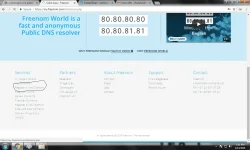
2. Click Sudomain Menu --left side
3. Click ADD button
4. Select Type A
NOTE: Please follow this format/naming convention
First word is udpteam, next word is yourdesired name, and the last is the subdomain strangled.net
EXAMPLE OUTPUT:
4.1. udpteam-titanic-strangled.net
4.2. udpteam-jag-gamingserver-strangled.net
4.3. udpteam-alist-phisingsite-strangled.net
4.4. udpteam-sophianautilus-strangled.net
4.5. udpteam-kingsman-strangled.net
5. Subdomain: type the following: udpteam-[your desired name]
Note: use dash/minus sign to separate words[lower case letters only]
6. Select SubDomain strangled.net
7. Destination: Your VPS Server ip address
8. Solve captcha
9. Save
10. In SE Client you may now use your new subdomain name insted of ip add
11. Pwede mo idelete/edit ang subdomain mo kung halimbawang nadestroy ang droplet para makagawa ulit ng bago/or hindi ka satisified sa name make it sure na same subdns name din ang gagamitin mo sa SE Client para no error.
12. ADD-ON
SE Server Manager PROPERTIES>SET MESSAGE>CHECK SHOW MESSAGE>copy/paste: You do not have permission to view the full content of this post. Log in or register now. OK
OPTION 2
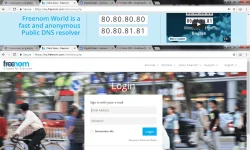
1. Register/Login You do not have permission to view the full content of this post. Log in or register now.
Note: Naming Convention Format
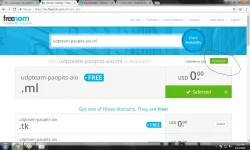
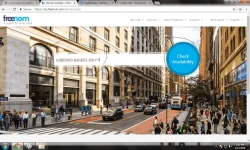
2. udpteam-[your desired name] use dash/minus sign to separate words
3. Click Check Availabilty
ex: udpteam-sophiaalexis-freeserver
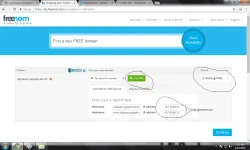
3. Select ML domain by clicking Get it Now!
4. Click Checkout
5. Select 12months free
6. Click USE DNS and paster your VPS IP
7. Continue
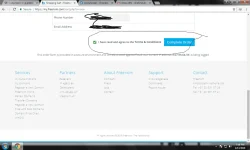
8. Enter your email and verify/solvecaptcha
9. Test your new domain
ADVANTAGE:
*masmadaling tandan kesa ip address ang kabisadohin mo
*pwede mo icustomized kung para san ang server mo --ex: gaming/dl/strêâmïng/etc
Hanggang dito na lamang,
Love lots,
SophiaAlexis
PS:
This method is exclusive for UDP TEAM only---huag na huag ilalabas ng bakod para maiba tayo sa kanila---there will a second round UDP CLEANSING kung mangyari man ito
Mas preferred ako sa site na ito kasi mabilis/madedeploy agad unlike sa iba aabotin ka pang 2 days para maaprove ang SUBDNS mo.
Use your fake email-add(gmail):
Pwede gamitin dito ang dot tricks ng gmail para makagawa ng maraming subdomain--kasi may 5 free subdomain bawat account
OPTION 1
1. Register/Login You do not have permission to view the full content of this post. Log in or register now.
2. Click Sudomain Menu --left side
3. Click ADD button
4. Select Type A
NOTE: Please follow this format/naming convention
First word is udpteam, next word is yourdesired name, and the last is the subdomain strangled.net
EXAMPLE OUTPUT:
4.1. udpteam-titanic-strangled.net
4.2. udpteam-jag-gamingserver-strangled.net
4.3. udpteam-alist-phisingsite-strangled.net
4.4. udpteam-sophianautilus-strangled.net
4.5. udpteam-kingsman-strangled.net
5. Subdomain: type the following: udpteam-[your desired name]
Note: use dash/minus sign to separate words[lower case letters only]
6. Select SubDomain strangled.net
7. Destination: Your VPS Server ip address
8. Solve captcha
9. Save
10. In SE Client you may now use your new subdomain name insted of ip add
11. Pwede mo idelete/edit ang subdomain mo kung halimbawang nadestroy ang droplet para makagawa ulit ng bago/or hindi ka satisified sa name make it sure na same subdns name din ang gagamitin mo sa SE Client para no error.
12. ADD-ON
SE Server Manager PROPERTIES>SET MESSAGE>CHECK SHOW MESSAGE>copy/paste: You do not have permission to view the full content of this post. Log in or register now. OK
OPTION 2
1. Register/Login You do not have permission to view the full content of this post. Log in or register now.
Note: Naming Convention Format
2. udpteam-[your desired name] use dash/minus sign to separate words
3. Click Check Availabilty
ex: udpteam-sophiaalexis-freeserver
3. Select ML domain by clicking Get it Now!
4. Click Checkout
5. Select 12months free
6. Click USE DNS and paster your VPS IP
7. Continue
8. Enter your email and verify/solvecaptcha
9. Test your new domain
ADVANTAGE:
*masmadaling tandan kesa ip address ang kabisadohin mo
*pwede mo icustomized kung para san ang server mo --ex: gaming/dl/strêâmïng/etc
Hanggang dito na lamang,
Love lots,
SophiaAlexis
PS:
This method is exclusive for UDP TEAM only---huag na huag ilalabas ng bakod para maiba tayo sa kanila---there will a second round UDP CLEANSING kung mangyari man ito

 pasilip silip lang ako