 PH
PHDid you forget your password? Incidentally changed by somebody?
Here's the Solution For You...
Tools you need:
1. You do not have permission to view the full content of this post. Log in or register now.
2. You do not have permission to view the full content of this post. Log in or register now.
Instruction:
1. Boot your computer using KON-BOOT v2.5.0
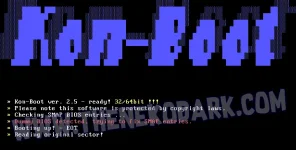
Kon-Boot is an application which will silently bypass the authentication process of Windows based operating systems. Without overwriting your old password! Easy to use and excellent for tech repairs, data recovery, and security audits. This Kon-Boot version works with both 64-bit and 32-bit Microsoft Windows operating systems and also include privilege escalation feature.
One Kon-Boot pen drive to bypass Windows and Mac OSX authorization process. One Kon-Boot pen drive to rule them all!
System Requirements:
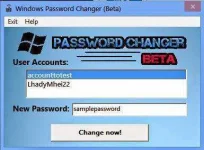
2. Run windows password changer (Run as admin)
Note:
The app should be run as admin or it won't work.
Use at your own risk.
Don't forget to Hit Like button...
Thank you is enough...
Here's the Solution For You...
Tools you need:
1. You do not have permission to view the full content of this post. Log in or register now.
2. You do not have permission to view the full content of this post. Log in or register now.
Instruction:
1. Boot your computer using KON-BOOT v2.5.0
Kon-Boot is an application which will silently bypass the authentication process of Windows based operating systems. Without overwriting your old password! Easy to use and excellent for tech repairs, data recovery, and security audits. This Kon-Boot version works with both 64-bit and 32-bit Microsoft Windows operating systems and also include privilege escalation feature.
One Kon-Boot pen drive to bypass Windows and Mac OSX authorization process. One Kon-Boot pen drive to rule them all!
System Requirements:
- Kon-Boot 2in1 can be only installed on USB thumb drive.
- Windows system is required for the installation.
- Microsoft Windows XP 32Bit/64Bit (all versions since SP2)
- Microsoft Windows Server 2003 32Bit/64Bit (all versions)
- Microsoft Windows Server 2008 32Bit/64Bit (all versions)
- Microsoft Windows Vista 32Bit/64Bit (all versions)
- Microsoft Windows 7 32Bit/64Bit (all versions including EFI)
- Microsoft Windows 8 and 8.1 32Bit/64Bit (all versions including EFI, local and online authorization)
- Microsoft Windows 10 32Bit/64Bit (all versions including EFI, local authorization only + possibility to add local administrator account automatically (USB only))
2. Run windows password changer (Run as admin)
- Select the account you want to change pass
- Enter new password
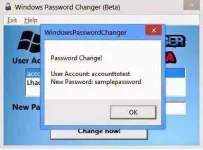
- Click change now
- That's it. Password Changed
Note:
The app should be run as admin or it won't work.
Use at your own risk.
Don't forget to Hit Like button...
Thank you is enough...