 PH
PremiumCourses
Honorary Poster
Free Download Text-R Professional 3.000 Multilingual + Portable | 60.7/93 Mb
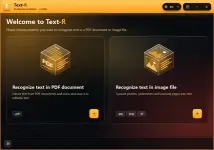
Text-R Professional is an OCR (Optical Character Recognition) application designed to extract editable text from scanned documents, PDF files, and images. It converts text that would otherwise remain trapped inside scanned pages into editable content, helping users avoid the time-consuming process of manually retyping entire documents.
The software analyzes document images and recognizes their text, then exports the results into editable PDF or RTF files that can be opened and modified in compatible word-processing applications. It also aims to preserve the original formatting and page structure, reducing the amount of manual correction needed after recognition.
Text-R Professional combines built-in dictionaries with specialized OCR filters to improve recognition quality. It can also process skewed text and rotated document pages, making it useful for digitizing paper records, scanned forms, printed materials, and archived documents.
Software Overview
Text-R Professional provides a practical way to transform image-based documents into searchable and editable files. Unlike ordinary PDF viewers, which may only display scanned pages as images, its OCR engine identifies characters and converts them into text that can be edited or reused.
The application supports recognition from both PDF documents and image files. After processing, users can save the extracted content as an editable PDF or an RTF document for further editing in Microsoft Word and other compatible applications.
Document formatting is another important part of the workflow. Text-R is designed to retain the appearance of the original source as closely as possible, including its layout. Its recognition tools also account for common scanning problems such as tilted text and rotated pages.
Key Features
- Optical Character Recognition: Extract editable text from scanned documents, PDF files, and images.
- PDF Text Recognition: Convert image-based PDF documents into files containing editable text.
- Image-to-Text Conversion: Recognize printed content from scanned pages and image files.
- Editable PDF Output: Save recognized content as a new PDF document with editable text.
- RTF Export: Export recognized text into Rich Text Format for editing in Word-compatible applications.
- Layout Preservation: Retain the original document formatting and structure as closely as possible.
- Built-In Dictionaries: Use integrated dictionaries to support the text recognition process.
- Professional OCR Filters: Apply specialized recognition filters to improve text extraction quality.
- Skewed Text Recognition: Process documents containing tilted or misaligned text.
- Rotated Page Detection: Recognize text on rotated document pages.
- Document Digitization: Convert paper-based records and scanned archives into editable digital documents.
- Standard and Portable Editions: Choose between the regular installation version and the portable release.
Why Choose Text-R Professional
Text-R Professional is useful when you need to work with documents that contain scanned pages rather than selectable text. It replaces much of the repetitive typing involved in digitizing printed material by automatically recognizing characters and converting them into editable files.
Its support for PDF and image sources makes it suitable for processing different types of scanned documents. Built-in dictionaries, OCR filters, and handling of skewed or rotated pages provide additional assistance when working with imperfect scans.
The ability to export results as editable PDF or RTF files also makes it easier to continue editing, reorganize, or reuse recognized content in other applications.
System Requirements
- Operating Systems:
- Windows 11
- Windows 10 (32-bit and 64-bit)
- Windows 8.1 (32-bit and 64-bit)
- Windows 8 (32-bit and 64-bit)
- Windows 7 (32-bit and 64-bit)
- Windows Vista (32-bit and 64-bit)
- Windows XP (32-bit and 64-bit)
- Windows Server 2016 and 2019 (32-bit and 64-bit)
- Windows Server 2012 (32-bit and 64-bit)
- Windows Server 2008 (32-bit and 64-bit)
- Windows Server 2003 (32-bit and 64-bit)
Frequently Asked Questions
What is Text-R Professional used for?
It is an OCR application that extracts text from scanned documents, image files, and PDF files, converting the recognized content into editable documents.
Can Text-R recognize text in scanned PDFs?
Yes. It can process PDF files containing scanned pages and convert their image-based text into editable content.
Which formats can I save recognized text in?
The software supports exporting recognized content as editable PDF and RTF documents.
Can it recognize rotated or skewed documents?
Yes. Its OCR features are designed to handle rotated pages and skewed text during recognition.
Does OCR preserve the original formatting?
Text-R aims to retain the source document's formatting and layout as closely as possible. The final result may still require review, particularly when the original scan is low quality or contains complex formatting.
Home Page
Code:
https://www.ascompsoftware.com/Product Information
- Software Name: Text-R Professional
- Version: 3.000
- Architecture: 32-bit and 64-bit Windows support
- Languages: Multilingual
- License type: Full Version + Portable
- File Size: 60.7 Mb / 93 Mb
Download ( Rapidgator )
You do not have permission to view the full content of this post. Log in or register now.
You do not have permission to view the full content of this post. Log in or register now.
FreeDL
You do not have permission to view the full content of this post. Log in or register now.
You do not have permission to view the full content of this post. Log in or register now.