 PH
PHSa mga Gusto ng malulupet na wallpaper eto try niyo "Audio Vizualiser" Using "Wallpaper Engine" For Pc
Note: Kapag 64 bit ang Pc mo buksan mo ung File na Pang 64 bit kung 32 bit naman ang gamit mo na windows Gamiitn mo ung File na pang 32 bit Like nento >>
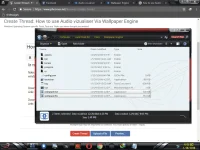
Download Link: >> Wallpaper Engine For Pc (Steam)
Link: >> You do not have permission to view the full content of this post. Log in or register now.
Download Link: >> Audio vizualiser For Pc (Via Wallpaper Engine)
Link: >> You do not have permission to view the full content of this post. Log in or register now.
Tutorial Kung panu i Set up ung File ::> Sundan lng at intindihin ng maigi <# <3
Link: >>
Note: Kapag 64 bit ang Pc mo buksan mo ung File na Pang 64 bit kung 32 bit naman ang gamit mo na windows Gamiitn mo ung File na pang 32 bit Like nento >>
Download Link: >> Wallpaper Engine For Pc (Steam)
Link: >> You do not have permission to view the full content of this post. Log in or register now.
Download Link: >> Audio vizualiser For Pc (Via Wallpaper Engine)
Link: >> You do not have permission to view the full content of this post. Log in or register now.
Tutorial Kung panu i Set up ung File ::> Sundan lng at intindihin ng maigi <# <3
Link: >>
 mukhang maganda e