 PH
PH-
Welcome to PHCorner Forums! Sign up for free to unlock full access and exclusive privileges, including:
- Asking questions about computer and mobile issues
- Discovering internet tips for your mobile network and computer
You are using an out of date browser. It may not display this or other websites correctly.
You should upgrade or use an alternative browser.
You should upgrade or use an alternative browser.
🔒 Closed Patulong po sa sa pagseset ng bakground image sa panel.
- Thread starter euls020
- Start date
- Status
- Not open for further replies.
Shinsuke Nishizono
Wimpy Kid
Kaya naman. Maghanap ka lang sa google kung panno.
ah salamt po. background image ba po?Kaya naman. Maghanap ka lang sa google kung panno.
Shinsuke Nishizono
Wimpy Kid
Oo. Send to back yung image parang ms word. Search mo na lang kung panno.ah salamt po. background image ba po?
Pasensya na po. di ko po magets eh. Baguhan pa po kase ako sa ganto. Grade 12 palang po ako eh. kailangan ko lang pong malagyan ng image po yung gitna nyya. bali centerGrid po naghahawak sa gitna po nyan. pasensya po kung napaka slow ko po. Pasensya po.Oo. Send to back yung image parang ms word. Search mo na lang kung panno.
---
import java.awt.*;
import java.awt.event.*;
import java.applet.Applet;
import java.text.*;
import javax.swing.*;
public class Area extends Applet implements ItemListener, ActionListener, KeyListener{
private final double regularLomi = 30.00, specialLomi = 40.00, jumboLomi = 50.00, sisigLomi = 50.00, sisigOverload = 80.00, addsPepsi = 8.00, addsRC = 8.00, addsMdew = 13.00, addsCola = 50.00, addsSprite = 55.00;
Panel topPanel, centerQuantityPanel, centerAddsPanel, centerPricePanel, bottomPanel, centerFlow, southFlow, centerGrid,gridQ, flowQ, gridA, flowA;
Label labelCO, labelRegular, labelSpecial, labelJumbo, labelAdds, labelPrice, labelDisplay, labelCustomer,label, label2;
JRadioButton regularJRadio, specialJRadio, jumboJRadio, slomiJRadio, sOverJRadio;
TextField txtRegular, txtSpecial, txtJumbo, txtPrice, txtSLomi, txtSOver, txtPepsi, txtRC, txtMdew, txtCola, txtSprite;
Choice choice;
Button cmdOk;
JCheckBox pepsiJCheck, rcJCheck, mdewJCheck, colaJCheck, spriteJCheck;
public void init()
{
setSize(925,613);
setLayout(new BorderLayout(0,0));
topPanel = new Panel();
topPanel.setBackground(new Color(0,118,157));
topPanel.setLayout(new FlowLayout());
centerQuantityPanel = new Panel();
centerQuantityPanel.setLayout(new GridLayout(3,3,5,5));
gridQ = new Panel();
gridQ.setLayout(new GridLayout(3,2,5,5));
flowQ = new Panel();
flowQ.setLayout(new FlowLayout());
centerGrid = new Panel();
centerGrid.setLayout(new GridLayout(5,1,1,1));
centerFlow = new Panel();
centerFlow.setLayout(new FlowLayout());
southFlow = new Panel();
southFlow.setLayout(new FlowLayout());
centerAddsPanel = new Panel();
centerAddsPanel.setLayout(new GridLayout(3,3,5,5));
gridA = new Panel();
gridA.setLayout(new GridLayout(3,2,5,5));
flowA = new Panel();
flowA.setLayout(new FlowLayout());
centerPricePanel = new Panel();
centerPricePanel.setLayout(new FlowLayout());
bottomPanel = new Panel();
bottomPanel.setBackground(new Color(0,118,157));
bottomPanel.setLayout(new FlowLayout());
labelCO = new Label("Chenelens Lomi House");
labelCO.setBackground(new Color(0,118,157));
labelCO.setForeground(new Color(255,255,255));
labelCO.setFont(new Font("Arial",Font.BOLD,60));
label2 = new Label(" ");
label2.setFont(new Font("Arial",Font.BOLD,40));
labelAdds = new Label("Add-ons");
labelAdds.setFont(new Font("Arial",Font.BOLD,40));
labelAdds.setForeground(new Color(0,0,205));
label = new Label(" ");
label.setFont(new Font("Arial",Font.BOLD,40));
labelPrice = new Label("Total price of your order : ");
labelPrice.setForeground(new Color(200,0,0));
labelPrice.setFont(new Font("Arial",Font.BOLD,18));
labelDisplay = new Label("PHP 0.00 ");
labelDisplay.setForeground(new Color(235,0,0));
labelDisplay.setFont(new Font("Arial",Font.BOLD,37));
labelCustomer = new Label("Customer/s Table :");
labelCustomer.setForeground(new Color(0,0,157));
labelCustomer.setFont(new Font("Arial",Font.BOLD,18));
txtRegular = new TextField("0",2);
txtRegular.setEnabled(false);
txtRegular.setFont(new Font("Arial",Font.BOLD,16));
txtRegular.addMouseListener(new MouseAdapter() {
public void mouseClicked(MouseEvent e) {
txtRegular.setText("");
}
});
txtSpecial = new TextField("0",2);
txtSpecial.setEnabled(false);
txtSpecial.setFont(new Font("Arial",Font.BOLD,16));
txtSpecial.addMouseListener(new MouseAdapter() {
public void mouseClicked(MouseEvent e) {
txtSpecial.setText("");
}
});
txtJumbo = new TextField("0",2);
txtJumbo.setEnabled(false);
txtJumbo.setFont(new Font("Arial",Font.BOLD,16));
txtJumbo.addMouseListener(new MouseAdapter() {
public void mouseClicked(MouseEvent e) {
txtJumbo.setText("");
}
});
txtSLomi = new TextField("0",2);
txtSLomi.setEnabled(false);
txtSLomi.setFont(new Font("Arial",Font.BOLD,16));
txtSLomi.addMouseListener(new MouseAdapter() {
public void mouseClicked(MouseEvent e) {
txtSLomi.setText("");
}
});
txtSOver = new TextField("0",2);
txtSOver.setEnabled(false);
txtSOver.setFont(new Font("Arial",Font.BOLD,16));
txtSOver.addMouseListener(new MouseAdapter() {
public void mouseClicked(MouseEvent e) {
txtSOver.setText("");
}
});
txtPepsi = new TextField("0",2);
txtPepsi.setEnabled(false);
txtPepsi.setFont(new Font("Arial",Font.BOLD,16));
txtPepsi.addMouseListener(new MouseAdapter() {
public void mouseClicked(MouseEvent e) {
txtPepsi.setText("");
}
});
txtRC = new TextField("0",2);
txtRC.setEnabled(false);
txtRC.setFont(new Font("Arial",Font.BOLD,16));
txtRC.addMouseListener(new MouseAdapter() {
public void mouseClicked(MouseEvent e) {
txtRC.setText("");
}
});
txtMdew = new TextField("0",2);
txtMdew.setEnabled(false);
txtMdew.setFont(new Font("Arial",Font.BOLD,16));
txtMdew.addMouseListener(new MouseAdapter() {
public void mouseClicked(MouseEvent e) {
txtMdew.setText("");
}
});
txtCola = new TextField("0",2);
txtCola.setEnabled(false);
txtCola.setFont(new Font("Arial",Font.BOLD,16));
txtCola.addMouseListener(new MouseAdapter() {
public void mouseClicked(MouseEvent e) {
txtCola.setText("");
}
});
txtSprite = new TextField("0",2);
txtSprite.setEnabled(false);
txtSprite.setFont(new Font("Arial",Font.BOLD,16));
txtSprite.addMouseListener(new MouseAdapter() {
public void mouseClicked(MouseEvent e) {
txtSprite.setText("");
}
});
regularJRadio = new JRadioButton("Regular --- 30 ", false);
regularJRadio.setFont(new Font("Arial",Font.BOLD,16));
specialJRadio = new JRadioButton("Special --- 40", false);
specialJRadio.setFont(new Font("Arial",Font.BOLD,16));
jumboJRadio = new JRadioButton("Jumbo --- 50", false);
jumboJRadio.setFont(new Font("Arial",Font.BOLD,16));
slomiJRadio = new JRadioButton("Sisig Lomi --- 50", false);
slomiJRadio.setFont(new Font("Arial",Font.BOLD,16));
sOverJRadio = new JRadioButton("Sisig OverLoad --- 80 ", false);
sOverJRadio.setFont(new Font("Arial",Font.BOLD,16));
pepsiJCheck = new JCheckBox("Pepsi - 8",false);
pepsiJCheck.setFont(new Font("Arial",Font.BOLD,16));
rcJCheck = new JCheckBox("RC - 8",false);
rcJCheck.setFont(new Font("Arial",Font.BOLD,16));
mdewJCheck = new JCheckBox("Mountain Dew - 13 ",false);
mdewJCheck.setFont(new Font("Arial",Font.BOLD,16));
colaJCheck = new JCheckBox("1.5 Coca-Cola - 50 ",false);
colaJCheck.setFont(new Font("Arial",Font.BOLD,16));
spriteJCheck = new JCheckBox("1.5 Sprite - 55",false);
spriteJCheck.setFont(new Font("Arial",Font.BOLD,16));
choice = new Choice();
choice.addItem("Table 1");
choice.addItem("Table 2");
choice.addItem("Table 3");
choice.addItem("Table 4");
choice.addItem("Table 5");
choice.addItemListener(this);
choice.setPreferredSize(new Dimension(150, 70));
choice.setForeground(new Color(255,255,255));
choice.setBackground(new Color(0,118,157));
choice.setFont(new Font("Arial",Font.BOLD,20));
cmdOk=new Button ("Order");
cmdOk.setBackground(new Color(0,200,157));
cmdOk.setForeground(new Color(255,255,255));
cmdOk.setFont(new Font("Arial",Font.BOLD,16));
regularJRadio.addActionListener(this);
specialJRadio.addActionListener(this);
jumboJRadio.addActionListener(this);
slomiJRadio.addActionListener(this);
sOverJRadio.addActionListener(this);
pepsiJCheck.addActionListener(this);
rcJCheck.addActionListener(this);
mdewJCheck.addActionListener(this);
colaJCheck.addActionListener(this);
spriteJCheck.addActionListener(this);
txtRegular.addKeyListener(this);
txtSLomi.addKeyListener(this);
txtSpecial.addKeyListener(this);
txtSOver.addKeyListener(this);
txtJumbo.addKeyListener(this);
txtPepsi.addKeyListener(this);
txtRC.addKeyListener(this);
txtMdew.addKeyListener(this);
txtCola.addKeyListener(this);
txtSprite.addKeyListener(this);
cmdOk.addActionListener(this);
}
public void start() {
topPanel.add(labelCO);
centerQuantityPanel.add(regularJRadio);
centerQuantityPanel.add(txtRegular);
centerQuantityPanel.add(specialJRadio);
centerQuantityPanel.add(txtSpecial);
centerQuantityPanel.add(jumboJRadio);
centerQuantityPanel.add(txtJumbo);
gridQ.add(slomiJRadio);
gridQ.add(txtSLomi);
gridQ.add(sOverJRadio);
gridQ.add(txtSOver);
flowQ.add(centerQuantityPanel);
flowQ.add(label2);
flowQ.add(gridQ);
centerAddsPanel.add(pepsiJCheck);
centerAddsPanel.add(txtPepsi);
centerAddsPanel.add(rcJCheck);
centerAddsPanel.add(txtRC);
centerAddsPanel.add(mdewJCheck);
centerAddsPanel.add(txtMdew);
gridA.add(colaJCheck);
gridA.add(txtCola);
gridA.add(spriteJCheck);
gridA.add(txtSprite);
flowA.add(centerAddsPanel);
flowA.add(label);
flowA.add(gridA);
centerFlow.add(labelAdds);
southFlow.add(labelCustomer);
southFlow.add(choice);
centerPricePanel.add(labelPrice);
centerPricePanel.add(labelDisplay);
centerGrid.add(flowQ);
centerGrid.add(centerFlow);
centerGrid.add(flowA);
centerGrid.add(centerPricePanel);
centerGrid.add(southFlow);
add(centerGrid);
bottomPanel.add(cmdOk);
add(topPanel, BorderLayout.NORTH);
add(bottomPanel, BorderLayout.SOUTH);
}
}
ito naman po yung ginawa ko. base sa pag kakaintindi ko po. kaso mali po eh.Oo. Send to back yung image parang ms word. Search mo na lang kung panno.
----
import java.awt.*;
import java.awt.event.*;
import java.applet.Applet;
import java.text.*;
import javax.swing.*;
public class Area extends Applet implements ItemListener, ActionListener, KeyListener{
private final double regularLomi = 30.00, specialLomi = 40.00, jumboLomi = 50.00, sisigLomi = 50.00, sisigOverload = 80.00, addsPepsi = 8.00, addsRC = 8.00, addsMdew = 13.00, addsCola = 50.00, addsSprite = 55.00;
Panel topPanel, centerQuantityPanel, centerAddsPanel, centerPricePanel, bottomPanel, centerFlow, southFlow,gridQ, flowQ, gridA, flowA;
Label labelCO, labelRegular, labelSpecial, labelJumbo, labelAdds, labelPrice, labelDisplay, labelCustomer,label, label2;
JRadioButton regularJRadio, specialJRadio, jumboJRadio, slomiJRadio, sOverJRadio;
TextField txtRegular, txtSpecial, txtJumbo, txtPrice, txtSLomi, txtSOver, txtPepsi, txtRC, txtMdew, txtCola, txtSprite;
BackGroundPanel centerGrid;
Choice choice;
Button cmdOk;
Image backGround;
JCheckBox pepsiJCheck, rcJCheck, mdewJCheck, colaJCheck, spriteJCheck;
public void init()
{
backGround = getImage(getCodeBase(), "file:///C:/Users/Windows7/workspace/John%20Byron/6218548.jpg");
centerGrid = new BackGroundPanel();
centerGrid.setLayout(new GridLayout(5,1,1,1));
centerGrid.setBackGroundImage(backGround);
setSize(925,613);
setLayout(new BorderLayout(0,0));
topPanel = new Panel();
topPanel.setBackground(new Color(0,118,157));
topPanel.setLayout(new FlowLayout());
centerQuantityPanel = new Panel();
centerQuantityPanel.setLayout(new GridLayout(3,3,5,5));
gridQ = new Panel();
gridQ.setLayout(new GridLayout(3,2,5,5));
flowQ = new Panel();
flowQ.setLayout(new FlowLayout());
centerFlow = new Panel();
centerFlow.setLayout(new FlowLayout());
southFlow = new Panel();
southFlow.setLayout(new FlowLayout());
centerAddsPanel = new Panel();
centerAddsPanel.setLayout(new GridLayout(3,3,5,5));
gridA = new Panel();
gridA.setLayout(new GridLayout(3,2,5,5));
flowA = new Panel();
flowA.setLayout(new FlowLayout());
centerPricePanel = new Panel();
centerPricePanel.setLayout(new FlowLayout());
bottomPanel = new Panel();
bottomPanel.setBackground(new Color(0,118,157));
bottomPanel.setLayout(new FlowLayout());
labelCO = new Label("Chenelens Lomi House");
labelCO.setBackground(new Color(0,118,157));
labelCO.setForeground(new Color(255,255,255));
labelCO.setFont(new Font("Arial",Font.BOLD,60));
label2 = new Label(" ");
label2.setFont(new Font("Arial",Font.BOLD,40));
labelAdds = new Label("Add-ons");
labelAdds.setFont(new Font("Arial",Font.BOLD,40));
labelAdds.setForeground(new Color(0,0,205));
label = new Label(" ");
label.setFont(new Font("Arial",Font.BOLD,40));
labelPrice = new Label("Total price of your order : ");
labelPrice.setForeground(new Color(200,0,0));
labelPrice.setFont(new Font("Arial",Font.BOLD,18));
labelDisplay = new Label("PHP 0.00 ");
labelDisplay.setForeground(new Color(235,0,0));
labelDisplay.setFont(new Font("Arial",Font.BOLD,37));
labelCustomer = new Label("Customer/s Table :");
labelCustomer.setForeground(new Color(0,0,157));
labelCustomer.setFont(new Font("Arial",Font.BOLD,18));
txtRegular = new TextField("0",2);
txtRegular.setEnabled(false);
txtRegular.setFont(new Font("Arial",Font.BOLD,16));
txtRegular.addMouseListener(new MouseAdapter() {
public void mouseClicked(MouseEvent e) {
txtRegular.setText("");
}
});
txtSpecial = new TextField("0",2);
txtSpecial.setEnabled(false);
txtSpecial.setFont(new Font("Arial",Font.BOLD,16));
txtSpecial.addMouseListener(new MouseAdapter() {
public void mouseClicked(MouseEvent e) {
txtSpecial.setText("");
}
});
txtJumbo = new TextField("0",2);
txtJumbo.setEnabled(false);
txtJumbo.setFont(new Font("Arial",Font.BOLD,16));
txtJumbo.addMouseListener(new MouseAdapter() {
public void mouseClicked(MouseEvent e) {
txtJumbo.setText("");
}
});
txtSLomi = new TextField("0",2);
txtSLomi.setEnabled(false);
txtSLomi.setFont(new Font("Arial",Font.BOLD,16));
txtSLomi.addMouseListener(new MouseAdapter() {
public void mouseClicked(MouseEvent e) {
txtSLomi.setText("");
}
});
txtSOver = new TextField("0",2);
txtSOver.setEnabled(false);
txtSOver.setFont(new Font("Arial",Font.BOLD,16));
txtSOver.addMouseListener(new MouseAdapter() {
public void mouseClicked(MouseEvent e) {
txtSOver.setText("");
}
});
txtPepsi = new TextField("0",2);
txtPepsi.setEnabled(false);
txtPepsi.setFont(new Font("Arial",Font.BOLD,16));
txtPepsi.addMouseListener(new MouseAdapter() {
public void mouseClicked(MouseEvent e) {
txtPepsi.setText("");
}
});
txtRC = new TextField("0",2);
txtRC.setEnabled(false);
txtRC.setFont(new Font("Arial",Font.BOLD,16));
txtRC.addMouseListener(new MouseAdapter() {
public void mouseClicked(MouseEvent e) {
txtRC.setText("");
}
});
txtMdew = new TextField("0",2);
txtMdew.setEnabled(false);
txtMdew.setFont(new Font("Arial",Font.BOLD,16));
txtMdew.addMouseListener(new MouseAdapter() {
public void mouseClicked(MouseEvent e) {
txtMdew.setText("");
}
});
txtCola = new TextField("0",2);
txtCola.setEnabled(false);
txtCola.setFont(new Font("Arial",Font.BOLD,16));
txtCola.addMouseListener(new MouseAdapter() {
public void mouseClicked(MouseEvent e) {
txtCola.setText("");
}
});
txtSprite = new TextField("0",2);
txtSprite.setEnabled(false);
txtSprite.setFont(new Font("Arial",Font.BOLD,16));
txtSprite.addMouseListener(new MouseAdapter() {
public void mouseClicked(MouseEvent e) {
txtSprite.setText("");
}
});
regularJRadio = new JRadioButton("Regular --- 30 ", false);
regularJRadio.setFont(new Font("Arial",Font.BOLD,16));
specialJRadio = new JRadioButton("Special --- 40", false);
specialJRadio.setFont(new Font("Arial",Font.BOLD,16));
jumboJRadio = new JRadioButton("Jumbo --- 50", false);
jumboJRadio.setFont(new Font("Arial",Font.BOLD,16));
slomiJRadio = new JRadioButton("Sisig Lomi --- 50", false);
slomiJRadio.setFont(new Font("Arial",Font.BOLD,16));
sOverJRadio = new JRadioButton("Sisig OverLoad --- 80 ", false);
sOverJRadio.setFont(new Font("Arial",Font.BOLD,16));
pepsiJCheck = new JCheckBox("Pepsi - 8",false);
pepsiJCheck.setFont(new Font("Arial",Font.BOLD,16));
rcJCheck = new JCheckBox("RC - 8",false);
rcJCheck.setFont(new Font("Arial",Font.BOLD,16));
mdewJCheck = new JCheckBox("Mountain Dew - 13 ",false);
mdewJCheck.setFont(new Font("Arial",Font.BOLD,16));
colaJCheck = new JCheckBox("1.5 Coca-Cola - 50 ",false);
colaJCheck.setFont(new Font("Arial",Font.BOLD,16));
spriteJCheck = new JCheckBox("1.5 Sprite - 55",false);
spriteJCheck.setFont(new Font("Arial",Font.BOLD,16));
choice = new Choice();
choice.addItem("Table 1");
choice.addItem("Table 2");
choice.addItem("Table 3");
choice.addItem("Table 4");
choice.addItem("Table 5");
choice.addItemListener(this);
choice.setPreferredSize(new Dimension(150, 70));
choice.setForeground(new Color(255,255,255));
choice.setBackground(new Color(0,118,157));
choice.setFont(new Font("Arial",Font.BOLD,20));
cmdOk=new Button ("Order");
cmdOk.setBackground(new Color(0,200,157));
cmdOk.setForeground(new Color(255,255,255));
cmdOk.setFont(new Font("Arial",Font.BOLD,16));
regularJRadio.addActionListener(this);
specialJRadio.addActionListener(this);
jumboJRadio.addActionListener(this);
slomiJRadio.addActionListener(this);
sOverJRadio.addActionListener(this);
pepsiJCheck.addActionListener(this);
rcJCheck.addActionListener(this);
mdewJCheck.addActionListener(this);
colaJCheck.addActionListener(this);
spriteJCheck.addActionListener(this);
txtRegular.addKeyListener(this);
txtSLomi.addKeyListener(this);
txtSpecial.addKeyListener(this);
txtSOver.addKeyListener(this);
txtJumbo.addKeyListener(this);
txtPepsi.addKeyListener(this);
txtRC.addKeyListener(this);
txtMdew.addKeyListener(this);
txtCola.addKeyListener(this);
txtSprite.addKeyListener(this);
cmdOk.addActionListener(this);
}
public void start() {
topPanel.add(labelCO);
centerQuantityPanel.add(regularJRadio);
centerQuantityPanel.add(txtRegular);
centerQuantityPanel.add(specialJRadio);
centerQuantityPanel.add(txtSpecial);
centerQuantityPanel.add(jumboJRadio);
centerQuantityPanel.add(txtJumbo);
gridQ.add(slomiJRadio);
gridQ.add(txtSLomi);
gridQ.add(sOverJRadio);
gridQ.add(txtSOver);
flowQ.add(centerQuantityPanel);
flowQ.add(label2);
flowQ.add(gridQ);
centerAddsPanel.add(pepsiJCheck);
centerAddsPanel.add(txtPepsi);
centerAddsPanel.add(rcJCheck);
centerAddsPanel.add(txtRC);
centerAddsPanel.add(mdewJCheck);
centerAddsPanel.add(txtMdew);
gridA.add(colaJCheck);
gridA.add(txtCola);
gridA.add(spriteJCheck);
gridA.add(txtSprite);
flowA.add(centerAddsPanel);
flowA.add(label);
flowA.add(gridA);
centerFlow.add(labelAdds);
southFlow.add(labelCustomer);
southFlow.add(choice);
centerPricePanel.add(labelPrice);
centerPricePanel.add(labelDisplay);
centerGrid.add(flowQ);
centerGrid.add(centerFlow);
centerGrid.add(flowA);
centerGrid.add(centerPricePanel);
centerGrid.add(southFlow);
add(centerGrid);
bottomPanel.add(cmdOk);
add(topPanel, BorderLayout.NORTH);
add(bottomPanel, BorderLayout.SOUTH);
txtRegular.selectAll();
txtSLomi.selectAll();
txtSpecial.selectAll();
txtSOver.selectAll();;
txtJumbo.selectAll();
txtPepsi.selectAll();
txtRC.selectAll();
txtMdew.selectAll();
txtCola.selectAll();;
txtSprite.selectAll();
}
class BackGroundPanel extends Panel {
Image backGround;
BackGroundPanel() {
super();
}
public void paint(Graphics g) {
// get the size of this panel (which is the size of the applet),
// and draw the image
g.drawImage(getBackGroundImage(), 0, 0,
(int)getBounds().getWidth(), (int)getBounds().getHeight(), this);
}
public void setBackGroundImage(Image backGround) {
this.backGround = backGround;
}
private Image getBackGroundImage() {
return backGround;
}
}
}
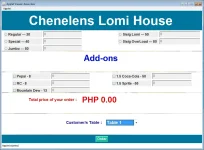
Shinsuke Nishizono
Wimpy Kid
I don't know kung magegets mo ito.Pasensya na po. di ko po magets eh. Baguhan pa po kase ako sa ganto. Grade 12 palang po ako eh. kailangan ko lang pong malagyan ng image po yung gitna nyya. bali centerGrid po naghahawak sa gitna po nyan. pasensya po kung napaka slow ko po. Pasensya po.
---
import java.awt.*;
import java.awt.event.*;
import java.applet.Applet;
import java.text.*;
import javax.swing.*;
public class Area extends Applet implements ItemListener, ActionListener, KeyListener{
private final double regularLomi = 30.00, specialLomi = 40.00, jumboLomi = 50.00, sisigLomi = 50.00, sisigOverload = 80.00, addsPepsi = 8.00, addsRC = 8.00, addsMdew = 13.00, addsCola = 50.00, addsSprite = 55.00;
Panel topPanel, centerQuantityPanel, centerAddsPanel, centerPricePanel, bottomPanel, centerFlow, southFlow, centerGrid,gridQ, flowQ, gridA, flowA;
Label labelCO, labelRegular, labelSpecial, labelJumbo, labelAdds, labelPrice, labelDisplay, labelCustomer,label, label2;
JRadioButton regularJRadio, specialJRadio, jumboJRadio, slomiJRadio, sOverJRadio;
TextField txtRegular, txtSpecial, txtJumbo, txtPrice, txtSLomi, txtSOver, txtPepsi, txtRC, txtMdew, txtCola, txtSprite;
Choice choice;
Button cmdOk;
JCheckBox pepsiJCheck, rcJCheck, mdewJCheck, colaJCheck, spriteJCheck;
public void init()
{
setSize(925,613);
setLayout(new BorderLayout(0,0));
topPanel = new Panel();
topPanel.setBackground(new Color(0,118,157));
topPanel.setLayout(new FlowLayout());
centerQuantityPanel = new Panel();
centerQuantityPanel.setLayout(new GridLayout(3,3,5,5));
gridQ = new Panel();
gridQ.setLayout(new GridLayout(3,2,5,5));
flowQ = new Panel();
flowQ.setLayout(new FlowLayout());
centerGrid = new Panel();
centerGrid.setLayout(new GridLayout(5,1,1,1));
centerFlow = new Panel();
centerFlow.setLayout(new FlowLayout());
southFlow = new Panel();
southFlow.setLayout(new FlowLayout());
centerAddsPanel = new Panel();
centerAddsPanel.setLayout(new GridLayout(3,3,5,5));
gridA = new Panel();
gridA.setLayout(new GridLayout(3,2,5,5));
flowA = new Panel();
flowA.setLayout(new FlowLayout());
centerPricePanel = new Panel();
centerPricePanel.setLayout(new FlowLayout());
bottomPanel = new Panel();
bottomPanel.setBackground(new Color(0,118,157));
bottomPanel.setLayout(new FlowLayout());
labelCO = new Label("Chenelens Lomi House");
labelCO.setBackground(new Color(0,118,157));
labelCO.setForeground(new Color(255,255,255));
labelCO.setFont(new Font("Arial",Font.BOLD,60));
label2 = new Label(" ");
label2.setFont(new Font("Arial",Font.BOLD,40));
labelAdds = new Label("Add-ons");
labelAdds.setFont(new Font("Arial",Font.BOLD,40));
labelAdds.setForeground(new Color(0,0,205));
label = new Label(" ");
label.setFont(new Font("Arial",Font.BOLD,40));
labelPrice = new Label("Total price of your order : ");
labelPrice.setForeground(new Color(200,0,0));
labelPrice.setFont(new Font("Arial",Font.BOLD,18));
labelDisplay = new Label("PHP 0.00 ");
labelDisplay.setForeground(new Color(235,0,0));
labelDisplay.setFont(new Font("Arial",Font.BOLD,37));
labelCustomer = new Label("Customer/s Table :");
labelCustomer.setForeground(new Color(0,0,157));
labelCustomer.setFont(new Font("Arial",Font.BOLD,18));
txtRegular = new TextField("0",2);
txtRegular.setEnabled(false);
txtRegular.setFont(new Font("Arial",Font.BOLD,16));
txtRegular.addMouseListener(new MouseAdapter() {
public void mouseClicked(MouseEvent e) {
txtRegular.setText("");
}
});
txtSpecial = new TextField("0",2);
txtSpecial.setEnabled(false);
txtSpecial.setFont(new Font("Arial",Font.BOLD,16));
txtSpecial.addMouseListener(new MouseAdapter() {
public void mouseClicked(MouseEvent e) {
txtSpecial.setText("");
}
});
txtJumbo = new TextField("0",2);
txtJumbo.setEnabled(false);
txtJumbo.setFont(new Font("Arial",Font.BOLD,16));
txtJumbo.addMouseListener(new MouseAdapter() {
public void mouseClicked(MouseEvent e) {
txtJumbo.setText("");
}
});
txtSLomi = new TextField("0",2);
txtSLomi.setEnabled(false);
txtSLomi.setFont(new Font("Arial",Font.BOLD,16));
txtSLomi.addMouseListener(new MouseAdapter() {
public void mouseClicked(MouseEvent e) {
txtSLomi.setText("");
}
});
txtSOver = new TextField("0",2);
txtSOver.setEnabled(false);
txtSOver.setFont(new Font("Arial",Font.BOLD,16));
txtSOver.addMouseListener(new MouseAdapter() {
public void mouseClicked(MouseEvent e) {
txtSOver.setText("");
}
});
txtPepsi = new TextField("0",2);
txtPepsi.setEnabled(false);
txtPepsi.setFont(new Font("Arial",Font.BOLD,16));
txtPepsi.addMouseListener(new MouseAdapter() {
public void mouseClicked(MouseEvent e) {
txtPepsi.setText("");
}
});
txtRC = new TextField("0",2);
txtRC.setEnabled(false);
txtRC.setFont(new Font("Arial",Font.BOLD,16));
txtRC.addMouseListener(new MouseAdapter() {
public void mouseClicked(MouseEvent e) {
txtRC.setText("");
}
});
txtMdew = new TextField("0",2);
txtMdew.setEnabled(false);
txtMdew.setFont(new Font("Arial",Font.BOLD,16));
txtMdew.addMouseListener(new MouseAdapter() {
public void mouseClicked(MouseEvent e) {
txtMdew.setText("");
}
});
txtCola = new TextField("0",2);
txtCola.setEnabled(false);
txtCola.setFont(new Font("Arial",Font.BOLD,16));
txtCola.addMouseListener(new MouseAdapter() {
public void mouseClicked(MouseEvent e) {
txtCola.setText("");
}
});
txtSprite = new TextField("0",2);
txtSprite.setEnabled(false);
txtSprite.setFont(new Font("Arial",Font.BOLD,16));
txtSprite.addMouseListener(new MouseAdapter() {
public void mouseClicked(MouseEvent e) {
txtSprite.setText("");
}
});
regularJRadio = new JRadioButton("Regular --- 30 ", false);
regularJRadio.setFont(new Font("Arial",Font.BOLD,16));
specialJRadio = new JRadioButton("Special --- 40", false);
specialJRadio.setFont(new Font("Arial",Font.BOLD,16));
jumboJRadio = new JRadioButton("Jumbo --- 50", false);
jumboJRadio.setFont(new Font("Arial",Font.BOLD,16));
slomiJRadio = new JRadioButton("Sisig Lomi --- 50", false);
slomiJRadio.setFont(new Font("Arial",Font.BOLD,16));
sOverJRadio = new JRadioButton("Sisig OverLoad --- 80 ", false);
sOverJRadio.setFont(new Font("Arial",Font.BOLD,16));
pepsiJCheck = new JCheckBox("Pepsi - 8",false);
pepsiJCheck.setFont(new Font("Arial",Font.BOLD,16));
rcJCheck = new JCheckBox("RC - 8",false);
rcJCheck.setFont(new Font("Arial",Font.BOLD,16));
mdewJCheck = new JCheckBox("Mountain Dew - 13 ",false);
mdewJCheck.setFont(new Font("Arial",Font.BOLD,16));
colaJCheck = new JCheckBox("1.5 Coca-Cola - 50 ",false);
colaJCheck.setFont(new Font("Arial",Font.BOLD,16));
spriteJCheck = new JCheckBox("1.5 Sprite - 55",false);
spriteJCheck.setFont(new Font("Arial",Font.BOLD,16));
choice = new Choice();
choice.addItem("Table 1");
choice.addItem("Table 2");
choice.addItem("Table 3");
choice.addItem("Table 4");
choice.addItem("Table 5");
choice.addItemListener(this);
choice.setPreferredSize(new Dimension(150, 70));
choice.setForeground(new Color(255,255,255));
choice.setBackground(new Color(0,118,157));
choice.setFont(new Font("Arial",Font.BOLD,20));
cmdOk=new Button ("Order");
cmdOk.setBackground(new Color(0,200,157));
cmdOk.setForeground(new Color(255,255,255));
cmdOk.setFont(new Font("Arial",Font.BOLD,16));
regularJRadio.addActionListener(this);
specialJRadio.addActionListener(this);
jumboJRadio.addActionListener(this);
slomiJRadio.addActionListener(this);
sOverJRadio.addActionListener(this);
pepsiJCheck.addActionListener(this);
rcJCheck.addActionListener(this);
mdewJCheck.addActionListener(this);
colaJCheck.addActionListener(this);
spriteJCheck.addActionListener(this);
txtRegular.addKeyListener(this);
txtSLomi.addKeyListener(this);
txtSpecial.addKeyListener(this);
txtSOver.addKeyListener(this);
txtJumbo.addKeyListener(this);
txtPepsi.addKeyListener(this);
txtRC.addKeyListener(this);
txtMdew.addKeyListener(this);
txtCola.addKeyListener(this);
txtSprite.addKeyListener(this);
cmdOk.addActionListener(this);
}
public void start() {
topPanel.add(labelCO);
centerQuantityPanel.add(regularJRadio);
centerQuantityPanel.add(txtRegular);
centerQuantityPanel.add(specialJRadio);
centerQuantityPanel.add(txtSpecial);
centerQuantityPanel.add(jumboJRadio);
centerQuantityPanel.add(txtJumbo);
gridQ.add(slomiJRadio);
gridQ.add(txtSLomi);
gridQ.add(sOverJRadio);
gridQ.add(txtSOver);
flowQ.add(centerQuantityPanel);
flowQ.add(label2);
flowQ.add(gridQ);
centerAddsPanel.add(pepsiJCheck);
centerAddsPanel.add(txtPepsi);
centerAddsPanel.add(rcJCheck);
centerAddsPanel.add(txtRC);
centerAddsPanel.add(mdewJCheck);
centerAddsPanel.add(txtMdew);
gridA.add(colaJCheck);
gridA.add(txtCola);
gridA.add(spriteJCheck);
gridA.add(txtSprite);
flowA.add(centerAddsPanel);
flowA.add(label);
flowA.add(gridA);
centerFlow.add(labelAdds);
southFlow.add(labelCustomer);
southFlow.add(choice);
centerPricePanel.add(labelPrice);
centerPricePanel.add(labelDisplay);
centerGrid.add(flowQ);
centerGrid.add(centerFlow);
centerGrid.add(flowA);
centerGrid.add(centerPricePanel);
centerGrid.add(southFlow);
add(centerGrid);
bottomPanel.add(cmdOk);
add(topPanel, BorderLayout.NORTH);
add(bottomPanel, BorderLayout.SOUTH);
}
}
Add mo ito sa code mo..
First load mo muna ng image mo by using ToolKit class or ImageIO class.
Then sa toolkit.createimage magaadd ka ng image via string value.
PHP:
Image img = Toolkit.getDefaultToolkit().createImage("background.jpg");ImageIO magagamit mo dito.
PHP:
Image img = ImageIO.read(new File("background.jpg");Step 2. Sa pagaadd ng image kailangan naka indicate ng component sa image.
Para sa AWT method na ito para mapatongan ng paint method sa console or sa project na ginagawa mo.
You can use drawImage by typing this code.
PHP:
public void paint(Graphics g)
{
    // Draw the previously loaded image to Component.
    g.drawImage(img, 0, 0, null);

    // Draw sprites, and other things.
    // ....
}
Para sa Swing , gagawin mo is override mo na si paintComponent method sa jComponent and then draw mo na yung image na nagawa na ni AWT method.
PHP:
public void paintComponent(Graphics g)
{
    // Draw the previously loaded image to Component.
    g.drawImage(img, 0, 0, null);

    // Draw sprites, and other things.
    // ....
}
So eto na magiging output niyan.
PHP:
class BackgroundPanel extends Panel
{
    // The Image to store the background image in.
    Image img;
    public BackgroundPanel()
    {
        // Loads the background image and stores in img object.
        img = Toolkit.getDefaultToolkit().createImage("background.jpg");
    }

    public void paint(Graphics g)
    {
        // Draws the img to the BackgroundPanel.
        g.drawImage(img, 0, 0, null);
    }
}
Ayan.
di ko po magets eh. palagay nalang po sa codes ko. dami ko na po na try eh. pasensya po.I don't know kung magegets mo ito.
Add mo ito sa code mo..
First load mo muna ng image mo by using ToolKit class or ImageIO class.
Then sa toolkit.createimage magaadd ka ng image via string value.
PHP:Image img = Toolkit.getDefaultToolkit().createImage("background.jpg");
ImageIO magagamit mo dito.
PHP:Image img = ImageIO.read(new File("background.jpg");
Step 2. Sa pagaadd ng image kailangan naka indicate ng component sa image.
Para sa AWT method na ito para mapatongan ng paint method sa console or sa project na ginagawa mo.
You can use drawImage by typing this code.
PHP:public void paint(Graphics g) { // Draw the previously loaded image to Component. g.drawImage(img, 0, 0, null); // Draw sprites, and other things. // .... }
Para sa Swing , gagawin mo is override mo na si paintComponent method sa jComponent and then draw mo na yung image na nagawa na ni AWT method.
PHP:public void paintComponent(Graphics g) { // Draw the previously loaded image to Component. g.drawImage(img, 0, 0, null); // Draw sprites, and other things. // .... }
So eto na magiging output niyan.
PHP:class BackgroundPanel extends Panel { // The Image to store the background image in. Image img; public BackgroundPanel() { // Loads the background image and stores in img object. img = Toolkit.getDefaultToolkit().createImage("background.jpg"); } public void paint(Graphics g) { // Draws the img to the BackgroundPanel. g.drawImage(img, 0, 0, null); } }
Ayan.
Shinsuke Nishizono
Wimpy Kid
Ikaw maglalagay niyan hindi ako. Kasi sariling gawa mo iyan.di ko po magets eh. palagay nalang po sa codes ko. dami ko na po na try eh. pasensya po.
Ah cge po. ty po sa tulongIkaw maglalagay niyan hindi ako. Kasi sariling gawa mo iyan.
di ko po na pagana. nailagay ko naman po eh. diba po mapapaltan na po yung centerGrid = new Panel(); ng centerGrid = BackgroundPanel();Ah cge po. ty po sa tulong
Shinsuke Nishizono
Wimpy Kid
Oo. It should be na magagawa mo yan. Check ka na lang sa ibang string na nakakaaffect sa value ng project mo.di ko po na pagana. nailagay ko naman po eh. diba po mapapaltan na po yung centerGrid = new Panel(); ng centerGrid = BackgroundPanel();
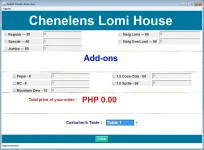
boss parang tama na yung unang senend ko sayo na pic. nagkakaroon sya ng background kaso. natatakpan po sya ng grid panel. parang kelangan na lang po yatang gawin na transparentOo. It should be na magagawa mo yan. Check ka na lang sa ibang string na nakakaaffect sa value ng project mo.
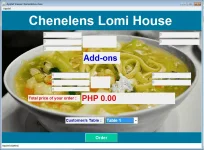
iito na po. medyo ayos na nung ginawa ko pong JPanel yung mga Panel. kaso di ko po makita yung mga button.View attachment 273109
boss parang tama na yung unang senend ko sayo na pic. nagkakaroon sya ng background kaso. natatakpan po sya ng grid panel. parang kelangan na lang po yatang gawin na transparent
- Status
- Not open for further replies.
Similar threads
-
👥 Referral Patulong po sa Lucky Watch Withdrawal(magbabayad po ako sa makakatulong)
- Started by dong_khim
- Replies: 3
-
-
❓ Help Patulong po sa mga Tech , about CP
- Started by Engiyearner
- Replies: 2
About this Thread
-
13Replies
-
723Views
-
2Participants
Last reply from:
euls020
euls020
New Topics
-
How to Redeem Your 1 Billion Tokens in Muse AI
- Started by Keinz
- Replies: 1
- 💻 Coding & Programming
-
CODING AI Is FREE on Cline Desktop ( LIMITED TIME )
- Started by Keinz
- Replies: 0
- 💻 Coding & Programming
-
Scan and fix compromised wordpress website
- Started by caredebs
- Replies: 0
- 💻 Coding & Programming
-
Zefame Free Service Automated
- Started by mtplay
- Replies: 2
- 💻 Coding & Programming
-
Newbie Coding/Programming Question.
- Started by zhaenarez25
- Replies: 10
- 💻 Coding & Programming
-
Cαиνα TEAMS LINK
- Started by Keinz
- Replies: 2
- 💻 Coding & Programming
-
Spotify 3M Redeem Links
- Started by Keinz
- Replies: 4
- 💻 Coding & Programming
-
1 YEAR AI SUBSCRIPTION FREE NO CREDIT CARD REQUIRED
- Started by Keinz
- Replies: 19
- 💻 Coding & Programming
Trending Topics
Online now
- Members online
- 371
- Guests online
- 7,947
- Total visitors
- 8,318