PH
PHXiaomi Mi Flash tool
Mi Flash tool is the one stop shop for Flashing Mi handsets as all Xiaomi devices are supported.
Xiaomi Mi Flash tool – Features:
The Xiaomi Mi Flash tool is intended to be used with only Xiaomi devices. Following are some of the highlight features of the tool.
Support for multiple devices
The Xiaomi Mi Flash tool works on almost all Xiaomi Mi devices which is a big plus as you wont be needing to download separate iterations for different devices.
Comes with USB Drivers
Rather than leaving users to find out the correct USB drivers, the Xiaomi Mi Flash tool installs with latest official drivers which work across the board for all Xiaomi phones and tablets.
Connect multiple devices
The Mi Flash tool doesn’t limit the user to flashing one device at a time rather it allows for flashing of several devices at once. You can configure more than one device and then start updating them.
Single Installer file
The installation of Mi Flash tool is quite straight forward as you would only need to run the installerwizard once and it would set up all the files for you.
Choice of flashing options
If your firmware doesn’t require you to flash all partitions, the Mi Flash tool supports 3 flashing options. One, flash all, second, flash all except storage and third, flash all except data and storage. By default, many firmware require flash all option.
How to Flash Firmware using Xiaomi Mi Flash tool
Step 1: Download any or latest MIUI 8 Fastboot ROM you want to install. Make sure the file is ending in .tgz extension and not .zip. Extract the ROM package using either WinRAR or 7Zip in your computer.
Step 2: Enable Developer Options on your phone. Doing so is easy. Just go to Settings>>About phones >> tap on the MIUI Version 7 times. You can skip this step if you have it enabled previously.
Step 3: Enable USB Debugging on your phone. Go to Settings >> Additional Settings>>Developer Options >> enable USB Debugging.
Step 4: Reboot your phone into Fastboot mode. Turn your phone off completely first, and then press Volume Down (-) and Power buttons simultaneously until you have seen Mi Bunny Fastboot logo.
Step 5: Now open up Mi Flash tool you have installed earlier.
Step 6: Connect your phone into your computer using its USB cable.
Step 7: Locate the extracted MIUI 8 Fastboot ROM. You can do that in two ways
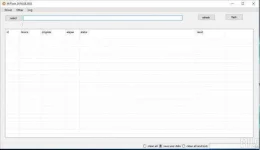
Step 8: In MiFlash, click on the “Browse” button >> locate the location of MIUI 8 ROM folder.
Step 9: Open up Windows Explorer >> go to the folder of MIUI 8 ROM >> and copy the path from Windows Explorer to MiFlash (see the blue square line below)
Step 10: Next, click the “Refresh” button and make sure the Mi Flash tool can recognize your device properly. Otherwise, it might be something wrong with installed USB drivers so you might have to reinstall it.
Step 11: Finally, and if your device can be recognized properly, simply click the “Flash” button to start installing MIUI ROM onto your device. Just wait till the progress bar displayed is fully green. It indicates the flashing process completed.
There will be a case that you get error during flashing. The easiest workaround is to check whether you have copied the ROM path correctly or you may also try to choose “Flash All” or “Flash all except data and storage” option in the bottom.
Step 12: Eventually, your device should now automatically reboot into normal mode. It usually takes longer time than usual but that’s normal.
Devices with unlocked bootloader will remain have their bootloader unlocked upon flashing. Those who want to re-lock bootloader need to flash a script named “flash_all_lock” which is included within the ROM package.
Xiaomi Mi Flash tool Here
You do not have permission to view the full content of this post. Log in or register now.
Xiaomi Mi Firmware Here
You do not have permission to view the full content of this post. Log in or register now.
Mi Flash tool is the one stop shop for Flashing Mi handsets as all Xiaomi devices are supported.
Xiaomi Mi Flash tool – Features:
The Xiaomi Mi Flash tool is intended to be used with only Xiaomi devices. Following are some of the highlight features of the tool.
Support for multiple devices
The Xiaomi Mi Flash tool works on almost all Xiaomi Mi devices which is a big plus as you wont be needing to download separate iterations for different devices.
Comes with USB Drivers
Rather than leaving users to find out the correct USB drivers, the Xiaomi Mi Flash tool installs with latest official drivers which work across the board for all Xiaomi phones and tablets.
Connect multiple devices
The Mi Flash tool doesn’t limit the user to flashing one device at a time rather it allows for flashing of several devices at once. You can configure more than one device and then start updating them.
Single Installer file
The installation of Mi Flash tool is quite straight forward as you would only need to run the installerwizard once and it would set up all the files for you.
Choice of flashing options
If your firmware doesn’t require you to flash all partitions, the Mi Flash tool supports 3 flashing options. One, flash all, second, flash all except storage and third, flash all except data and storage. By default, many firmware require flash all option.
How to Flash Firmware using Xiaomi Mi Flash tool
Step 1: Download any or latest MIUI 8 Fastboot ROM you want to install. Make sure the file is ending in .tgz extension and not .zip. Extract the ROM package using either WinRAR or 7Zip in your computer.
Step 2: Enable Developer Options on your phone. Doing so is easy. Just go to Settings>>About phones >> tap on the MIUI Version 7 times. You can skip this step if you have it enabled previously.
Step 3: Enable USB Debugging on your phone. Go to Settings >> Additional Settings>>Developer Options >> enable USB Debugging.
Step 4: Reboot your phone into Fastboot mode. Turn your phone off completely first, and then press Volume Down (-) and Power buttons simultaneously until you have seen Mi Bunny Fastboot logo.
Step 5: Now open up Mi Flash tool you have installed earlier.
Step 6: Connect your phone into your computer using its USB cable.
Step 7: Locate the extracted MIUI 8 Fastboot ROM. You can do that in two ways
Step 8: In MiFlash, click on the “Browse” button >> locate the location of MIUI 8 ROM folder.
Step 9: Open up Windows Explorer >> go to the folder of MIUI 8 ROM >> and copy the path from Windows Explorer to MiFlash (see the blue square line below)
Step 10: Next, click the “Refresh” button and make sure the Mi Flash tool can recognize your device properly. Otherwise, it might be something wrong with installed USB drivers so you might have to reinstall it.
Step 11: Finally, and if your device can be recognized properly, simply click the “Flash” button to start installing MIUI ROM onto your device. Just wait till the progress bar displayed is fully green. It indicates the flashing process completed.
There will be a case that you get error during flashing. The easiest workaround is to check whether you have copied the ROM path correctly or you may also try to choose “Flash All” or “Flash all except data and storage” option in the bottom.
Step 12: Eventually, your device should now automatically reboot into normal mode. It usually takes longer time than usual but that’s normal.
Devices with unlocked bootloader will remain have their bootloader unlocked upon flashing. Those who want to re-lock bootloader need to flash a script named “flash_all_lock” which is included within the ROM package.
Xiaomi Mi Flash tool Here
You do not have permission to view the full content of this post. Log in or register now.
Xiaomi Mi Firmware Here
You do not have permission to view the full content of this post. Log in or register now.