 PH
PHjaysonkrian
Eternal Poster
ASUS SkinPACK
Support: Windows 10 RS1 (x86_x64) - All Languages - All Version
Note: Please unistall old or other version of skin packs before install new one. if your theme not changed or its like classic windows you need to install uxtheme patcher.
Use it at your own risk!
You’re advised to Create a System Restore Point before installing skinpack.
SCREENSHOTS:
How to Install?
Carefully Follow this steps!!!!
1. Download and extract the attachments
2. Stop all Applications
3. Turn Off your antivirus ( this is safe promise, antivirus think that skin packs are viruses because it changes the system like the icons, pointers, etc..
4. Click the skinpack ASUS.exe
5. Wait the installer to appear. Check the RESTORE POINT to create restore point.
6. Then click next, while installing avoid using different commands on your laptop to prevent failed operations.
7. After the installation it is advised to Restart your laptop.
PLEASE, IF YOUR NOT FAMILIAR ON USING SKINPACKS DO NOT ATTEMPT TO INSTALL THIS OKAY!!!!!
AT DUN NAMAN PO SA NAKAINSTALL NA NITO
MASAYA NA PO AKO SA THANKS NYO PARA SIPAGIN AKO MAGPOST NG OTHER THEMES
Support: Windows 10 RS1 (x86_x64) - All Languages - All Version
Note: Please unistall old or other version of skin packs before install new one. if your theme not changed or its like classic windows you need to install uxtheme patcher.
Use it at your own risk!
You’re advised to Create a System Restore Point before installing skinpack.
SCREENSHOTS:
How to Install?
Carefully Follow this steps!!!!
1. Download and extract the attachments
2. Stop all Applications
3. Turn Off your antivirus ( this is safe promise, antivirus think that skin packs are viruses because it changes the system like the icons, pointers, etc..
4. Click the skinpack ASUS.exe
5. Wait the installer to appear. Check the RESTORE POINT to create restore point.
6. Then click next, while installing avoid using different commands on your laptop to prevent failed operations.
7. After the installation it is advised to Restart your laptop.
PLEASE, IF YOUR NOT FAMILIAR ON USING SKINPACKS DO NOT ATTEMPT TO INSTALL THIS OKAY!!!!!
AT DUN NAMAN PO SA NAKAINSTALL NA NITO
MASAYA NA PO AKO SA THANKS NYO PARA SIPAGIN AKO MAGPOST NG OTHER THEMES
Attachments
-
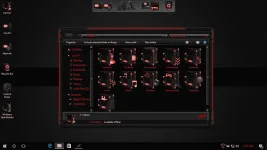 asus1.webp155.5 KB · Views: 44
 -
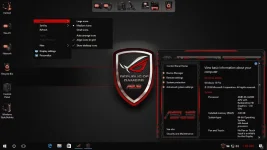 asus2.webp157.2 KB · Views: 41
 -
SkinPack ASUS.part1.rar2 MB · Views: 21
-
SkinPack ASUS.part2.rar2 MB · Views: 18
-
SkinPack ASUS.part3.rar2 MB · Views: 16
-
SkinPack ASUS.part4.rar2 MB · Views: 16
-
SkinPack ASUS.part5.rar2 MB · Views: 16
-
SkinPack ASUS.part6.rar1.6 MB · Views: 16