 PH
PHCarlos2026
Contributor


Microsoft Office 2016-2019-2021-2024-365 demonstrates well how the approach to creating documents and working with them has changed today. Many of us start working on one computer, continue it on another, and demonstrate on a third, while simultaneously managing to make minor edits on a laptop, tablet or even a smartphone. Therefore, Office 2016-2024 was made conceptually different. Almost all key elements in it were developed from scratch, and applications are focused on a single style of work regardless of the hardware platform. They are designed to provide familiar functionality on any device, automatically adjusting their interface to the parameters of the current screen and available system resources.
System requirements:
Windows 8.1, 10,11, Windows Server 2016, 2019 and 2022
It won't install on Windows 7, for Windows 7
Processor: 1 gigahertz (GHz) or more.
Free space on hard disk: 10 gigabytes (GB).
Graphics adapter: graphics device Microsoft DirectX 9 or higher.
Additional requirements for using some features.
Touch capabilities require a tablet or monitor that supports multi-touch technology.
To access the Windows Store to download and run apps, you need an active internet connection and a screen resolution of at least 1024 × 768 pixels.
It won't install on Windows 7, for Windows 7
Processor: 1 gigahertz (GHz) or more.
Free space on hard disk: 10 gigabytes (GB).
Graphics adapter: graphics device Microsoft DirectX 9 or higher.
Additional requirements for using some features.
Touch capabilities require a tablet or monitor that supports multi-touch technology.
To access the Windows Store to download and run apps, you need an active internet connection and a screen resolution of at least 1024 × 768 pixels.
Treatment: Included [Ohook medicine AIO (MAS 3.0) ]
List of Office Versions in this build
Microsoft Office Mondo 2016 (Retail/Volume)
Microsoft Office Professional Plus 2016 (Retail/Volume)
Microsoft Office Professional Plus 2019 (Retail/Volume)
Microsoft Office Professional Plus 2021 (Retail/Volume)
Microsoft Office Professional Plus 2024 (Retail/Volume)
Microsoft Office Professional 2016 (Retail)
Microsoft Office Professional 2019 (Retail)
Microsoft Office Professional 2021 (Retail)
Microsoft Office Professional 2024 (Retail)
Microsoft Office Standard 2016 (Retail/Volume)
Microsoft Office Standard 2019 (Retail/Volume)
Microsoft Office Standard 2021 (Retail/Volume)
Microsoft Office Standard 2024 (Retail/Volume)
Microsoft Project Professional 2016 (Retail/Volume)
Microsoft Project Professional 2019 (Retail/Volume)
Microsoft Project Professional 2021 (Retail/Volume)
Microsoft Project Standard 2016 (Retail/Volume)
Microsoft Project Standard 2019 (Retail/Volume)
Microsoft Project Standard 2021 (Retail/Volume)
Microsoft Project Standard 2024 (Retail/Volume)
Microsoft Visio Professional 2016 (Retail/Volume)
Microsoft Visio Professional 2019 (Retail/Volume)
Microsoft Visio Professional 2021 (Retail/Volume)
Microsoft Visio Professional 2024 (Retail/Volume)
Microsoft Visio Standard 2016 (Retail/Volume)
Microsoft Visio Standard 2019 (Retail/Volume)
Microsoft Visio Standard 2021 (Retail/Volume)
Microsoft Visio Standard 2024 (Retail/Volume)
Microsoft Office Home Business 2016 (Retail)
Microsoft Office Home Business 2019 (Retail)
Microsoft Office Home Business 2021 (Retail)
Microsoft Office Home Business 2024 (Retail)
Microsoft Office Home Student 2016 (Retail)
Microsoft Office Home Student 2019 (Retail)
Microsoft Office Home Student 2021 (Retail)
Microsoft Office Home 2024 (Retail)
Microsoft Office 365 (Home Premium)
Microsoft Office 365 (Education Cloud)
Microsoft Office 365 Apps for Business (Retail)
Microsoft Office 365 Apps for Enterprise (Retail)
Microsoft Office 365 Small Business Premium (Retail)
List of Language (Primary)
Arabic
English
Spanish
German
Dutch
Chinese
French
Italian
Turkish
Russian
Portuguese
Urdu
Hindi
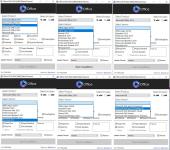
Extract the .rar file
Run The Setup
Medicine Included (Run as Admin)
Spoiler: Language Pack Install Detail
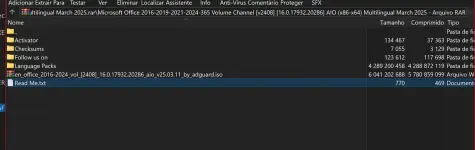
This release contains One ISO image and 12 executable svf files (Language).
All exe files are created from the original ISO for each language.
This is done using SmartVersion, a program that calculates the difference
between two files (one of which is used as a source) and then creates an svf file based on this difference.
EXE files must be located next to the ISO image.
To get the original ISO image with the interface language you have chosen, run the executable file and wait until the operation is completed.
In a few minutes (depending on the power of your computer) you will get the original ISO image.
For example, to get an image with Russian localization, you need to run the file ru_office_2016-2024_16.0.17932.20286_aio_v25.03.11_by_adguard.exe.
You do not have permission to view the full content of this post. Log in or register now.

