 PH
PH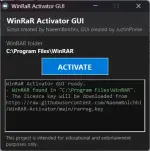
WHAT IT IS
------------------------------------------------------------------------A small Windows app (single .exe) that installs a WinRAR registration
key (rarreg.key) into your WinRAR folder. WinRAR is trial ("nagware")
software; installing a rarreg.key is how a purchased licence is applied.
This tool automates that step and adds a simple one-button interface.
You are responsible for the key you install. If you do not own a valid
WinRAR licence, using someone else's key is software piracy and violates
WinRAR's licence agreement. Buy a licence at You do not have permission to view the full content of this post. Log in or register now. if
you use WinRAR regularly.
WHAT'S IN THIS ZIP
------------------------------------------------------------------------
WinRaR Ac†ïvâ†ør GUI.exe The application.
Manual Activation\ A rarreg.key for installing by hand,
rarreg.key without running the app (see below).
readme.txt This file.
REQUIREMENTS
------------------------------------------------------------------------
- Windows 7 SP1 or newer (built and tested on Windows 11).
- .NET Framework 4.x (already present on Windows 8/10/11; on Windows 7
you may need to install it).
- Administrator rights - the app writes into the WinRAR folder under
Program Files, so it requests elevation (UAC prompt) on launch.
- An internet connection - this build downloads the key (see below).
HOW TO USE IT (AUTOMATIC)
------------------------------------------------------------------------
Automatic mode REQUIRES an internet connection - it downloads the key.
With no connection it stops and reports "no internet connection" without
changing anything; use the Manual Activation method below instead.
1. Make sure WinRAR is installed.
2. Run "WinRaR Ac†ïvâ†ør GUI.exe" and accept the UAC prompt.
3. The window shows the detected WinRAR folder. If WinRAR is not found
automatically, click ACTIVATE and pick the folder that contains
WinRAR.exe.
4. Click ACTIVATE. The log at the bottom shows each step:
- the WinRAR folder in use
- the licence key is downloaded from the built-in URL
- any existing rarreg.key is backed up to rarreg.key.bak
- the new key is written into the WinRAR folder
- WinRAR is restarted so the change takes effect
5. The button turns green ("ACTIVATED!") when it finishes.
The download URL is compiled into this exe, so no extra files are
needed. To use a different key source instead, either:
- put a "keyurl.txt" beside the exe with an https address on the first
line, or
- run it with a command-line argument: -url https://.../rarreg.key
Runtime settings (argument, then keyurl.txt) override the built-in URL.
HOW TO USE IT (MANUAL, NO INTERNET)
------------------------------------------------------------------------
If you cannot or do not want to download, you can install the key in the
"Manual Activation" folder by hand:
1. Close WinRAR.
2. Copy "Manual Activation\rarreg.key" into your WinRAR program folder,
usually C:\Program Files\WinRAR
(Explorer will ask for administrator permission to copy there.)
3. Start WinRAR.
LIGHT / DARK THEME
------------------------------------------------------------------------
The window follows your Windows app theme automatically and switches
live if you change it. On Windows 7/8 it always uses the light theme.
ANTIVIRUS
------------------------------------------------------------------------
Microsoft Defender and other scanners may flag this exe (for example as
"Trojan:Win32/Bearfoos.A!ml"). This is a heuristic ("!ml" = machine-
learning guess), driven by the exe's traits, not by a known-malware
signature: it is a small, unsigned program that asks for administrator
rights, writes into Program Files, restarts another program, and
downloads a file from the internet - and is named "Ac†ïvâ†ør". Those are
normal for what this tool does, but together they resemble a downloader,
so the scanner objects.
The exe is not infected, but because it downloads and installs a licence
key, some scanners will quarantine it regardless. If you trust it, you
can restore it from your antivirus's protection history and add an
exclusion. That is your decision to make.
TROUBLESHOOTING
------------------------------------------------------------------------
"Access denied ... run as administrator"
Right-click the exe and choose "Run as administrator".
"WinRAR was not found"
Click ACTIVATE and select the folder containing WinRAR.exe.
"no internet connection" / "could not reach the key URL"
Check your connection, or use the Manual Activation method above.
Download fails with a 404
The built-in URL points at a specific file/branch; if that has
moved, the download will fail. Use the Manual Activation instead.
------------------------------------------------------------------------
You do not have permission to view the full content of this post. Log in or register now.
------------------------------------------------------------------------
This project is intended for educational and entertainment purposes
only. It is provided as-is, with no warranty. You are responsible for
complying with WinRAR's licence terms and the laws that apply to you.
The authors are not responsible for how you use it.
Credits
------------------------------------------------------------------------
| bitcookies | Keygen for generating WinRAR licenses. |
| NaeemBolchhi | Made a batch script for automatic activation, and a one-liner for ease of use. |
| JuztinPrime a.k.a Vortex (Me) | Developing/Building this tool. |