 PH
PHDo you have an unverified maya account and someone accidentally transfers money and can't use it?
1. Register to this gcash-owned You do not have permission to view the full content of this post. Log in or register now..
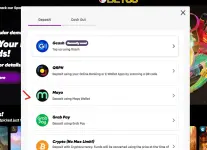
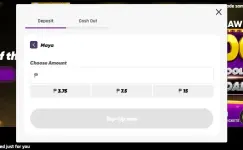
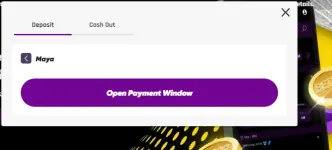
2. Then login and click "Top-up" located at top-right most corner of your screen, choose maya > enter amount > click top-up now > open payment window.
choose maya
enter amount
click top-up now
3. It will open a new window, do not scan with your phone. Just click the "maya" button as shown.
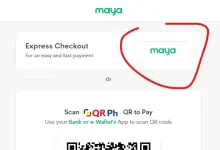
4. next input your maya account. then you will received an OTP.
5. after success, your money will then deposited to that gcash-owned You do not have permission to view the full content of this post. Log in or register now., click your profile and click WIthdraw.
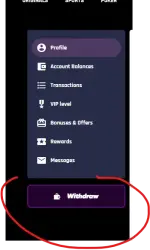
6. You can then choose from a list of banks and ewallets, like gcash, bpi etc.
To withdraw you must have at least ₱100.00. Withdrawal has no fee as in 0.
This is also what I used when transferring money from different provider that has "transfer fee".
- Laptop or desktop for steps.
- Phone for OTP
1. Register to this gcash-owned You do not have permission to view the full content of this post. Log in or register now..
2. Then login and click "Top-up" located at top-right most corner of your screen, choose maya > enter amount > click top-up now > open payment window.
choose maya
enter amount
click top-up now
3. It will open a new window, do not scan with your phone. Just click the "maya" button as shown.
4. next input your maya account. then you will received an OTP.
5. after success, your money will then deposited to that gcash-owned You do not have permission to view the full content of this post. Log in or register now., click your profile and click WIthdraw.
6. You can then choose from a list of banks and ewallets, like gcash, bpi etc.
To withdraw you must have at least ₱100.00. Withdrawal has no fee as in 0.
This is also what I used when transferring money from different provider that has "transfer fee".