PH
PHPHC - Raijin-X
꧁𓊈𒆜° ꒓ꆂꁹ-ꏝꂑ꒒ °𒆜𓊉꧂
You do not have permission to view the full content of this post.
Log in or register now.
 PLAY ON IN EVERY MISSION
all time
games

With ExitLag Off


However, it's possible that some antivirus programs may identify our activity as suspicious and trigger the firewall to block our application. This situation is easy to resolve and does not compromise the security of your device.
It's best to add ExitLag to the exceptions list (or whitelist) in your antivirus firewall. Since each antivirus company has specific procedures for adding exceptions to the firewall, we recommend contacting the support of your antivirus program for precise instructions.
After doing so, restart your device, and you should be able to optimize your gaming experience without any issues.
You do not have permission to view the full content of this post. Log in or register now.
 5 min. read
 Updated on July 17, 2025
Readers help support Windows Report. We may get a commission if you buy through our links.

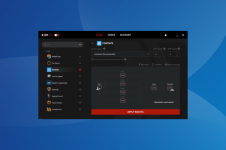
If you’re getting no connection through Exitlag, it’s most likely due to You do not have permission to view the full content of this post. Log in or register now., You do not have permission to view the full content of this post. Log in or register now., server outages, or configuration problems.
Whether you play Fortnite, Valorant, or CSGO, these issues will prevent optimization. Luckily, with a few simple tweaks, you can fix the problem.
Follow the steps below to cut your downtime as soon as possible.
Read more about this topic
Also, find the You do not have permission to view the full content of this post. Log in or register now., and try these if ExitLag doesn’t deliver optimal results. And if you enjoy You do not have permission to view the full content of this post. Log in or register now., rest assured that our tips can help you.
No less important, here are the You do not have permission to view the full content of this post. Log in or register now.reduce ping and rest assured, these suggestions are also great for several other games.
Download Link:
Latest Version:
[Updated & Fix With Repositories]:
You do not have permission to view the full content of this post. Log in or register now.
For Android:
You do not have permission to view the full content of this post. Log in or register now.
For PC Version:
You do not have permission to view the full content of this post. Log in or register now.
Previous Version:
You do not have permission to view the full content of this post. Log in or register now.
View attachment 3874332
You do not have permission to view the full content of this post. Log in or register now.
View attachment 3874333
Tapos Po Skip All Mo Lang Po If Error Occured!., Then Saka Mo Po Ilagay Itong Account Key Code:
8NHUB-GY7DC-5RE4S-WSXED-CRFBG
Y8HU9-8BY7V-C5RE4-XWZ34-SEDCR
TFG8H-YUNBG-Y7DC5-RE4SZ-W4EXD
5CTFV-GY7B8-H7GTF-VDCES-X4SWX
For Best Results Follow See This Guide:
[Cracked Version:]
For PC:
For PC:
For PC Ac†ïvâ†ør:
Password Is exitlag If It's Asked! ... 
Or
[For APK Version:]
Special Features
 Mod Info:
◉ Pro / ρáíd Features Unlocked
◉ CPU Arch.: armeabi-v7a, arm64-v8a,
◉ All Unnecessary Garbage Folders & Files Removed
◉ Languages : En, Bn, Gu, Mr
◉ Use gmail Account to get 3 day trials simple [No Need To Create New After 3 Days]
◉ Signin Required
If You Want To Used It On PC!., Used It With This App.
[Download:]
As Of August. 24, 2025 At 8:42 AM ., The Said Exitlag APK & PC Version Is Still Working And Smoothly Functional! ... 
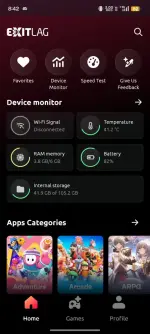

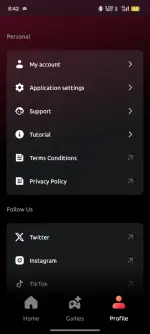
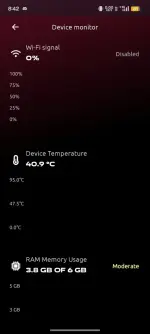
Tested by PTT – Neon-An
– WORKING –
ExitLag [Trial] ...
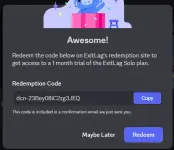
~/~/~/~/~
No Game Ping Tunnel:
With Cracked Accounts:

- You do not have permission to view the full content of this post. Log in or register now.
- You do not have permission to view the full content of this post. Log in or register now.
- You do not have permission to view the full content of this post. Log in or register now.
- You do not have permission to view the full content of this post. Log in or register now.
- You do not have permission to view the full content of this post. Log in or register now.
- You do not have permission to view the full content of this post. Log in or register now.
- You do not have permission to view the full content of this post. Log in or register now.
PLAY ON IN EVERY MISSIONREDUCE LAG IN GAMES
PLAY ON SUMMER 2K25
SCORE UP TO
EXITLAG - THE ESSENTIAL BRAND FOR GAMERS
*See terms and conditions.Multipath
30M
Users Trustall time
3K
Optimizedgames
Features
One software
With ExitLag OnEstimated ping
12msFPS
130With ExitLag Off
Estimated ping
87msFPS
68
Real-time Optimization
ExitLag ensures better and faster connection routes to game servers, eliminating connection issues with a single button press.
Traffic Shaper
ExitLag shapes and optimizes your traffic data to flow through the fastest routes available, ensuring efficient data transmission.
Multi-Internet
Utilize multiple connections for uninterrupted gameplay, automatically switching to a working connection in case of failure.
FPS Boost
Enhance your gaming experience by optimizing your PC's operating system settings, increasing frames and maximizing performance.What to do if the firewall blocks ExitLag?
Our service is safe for both your computer and the games you select, as we only operate on connections made by the applications you choose while ExitLag is active.However, it's possible that some antivirus programs may identify our activity as suspicious and trigger the firewall to block our application. This situation is easy to resolve and does not compromise the security of your device.
It's best to add ExitLag to the exceptions list (or whitelist) in your antivirus firewall. Since each antivirus company has specific procedures for adding exceptions to the firewall, we recommend contacting the support of your antivirus program for precise instructions.
After doing so, restart your device, and you should be able to optimize your gaming experience without any issues.
How to Fix ExitLag Not Working or No Connection Through (Step-by-Step)
Make sure to add an exception for ExitLag in FirewallYou do not have permission to view the full content of this post. Log in or register now.
Readers help support Windows Report. We may get a commission if you buy through our links.
If you’re getting no connection through Exitlag, it’s most likely due to You do not have permission to view the full content of this post. Log in or register now., You do not have permission to view the full content of this post. Log in or register now., server outages, or configuration problems.
Whether you play Fortnite, Valorant, or CSGO, these issues will prevent optimization. Luckily, with a few simple tweaks, you can fix the problem.
Follow the steps below to cut your downtime as soon as possible.
How to fix ExitLag Not Working
Table of contents
- You do not have permission to view the full content of this post.
Log in or register now.
- You do not have permission to view the full content of this post. Log in or register now.
- You do not have permission to view the full content of this post. Log in or register now.
- You do not have permission to view the full content of this post. Log in or register now.
- You do not have permission to view the full content of this post. Log in or register now.
- You do not have permission to view the full content of this post. Log in or register now.
- You do not have permission to view the full content of this post. Log in or register now.
- You do not have permission to view the full content of this post. Log in or register now.
- You do not have permission to view the full content of this post. Log in or register now.
- You do not have permission to view the full content of this post. Log in or register now.
1. Modify the ExitLag settings
- Launch ExitLag and navigate to the Tools tab from the top.You do not have permission to view the full content of this post. Log in or register now.
- Ensure that the Accuracy in route optimization slider is towards the extreme right, i.e., set to High.You do not have permission to view the full content of this post. Log in or register now.
- Next, click on the Protocol to analyze routes dropdown menu, and select UDP/TCP SYN from the list of options.You do not have permission to view the full content of this post. Log in or register now.
2. Enable ExitLag after starting the game
- Close the game that’s not working too well, go to ExitLag, and click on the toggle near the top-left to disable it.You do not have permission to view the full content of this post. Log in or register now.
- Start the game again, head to ExitLag, and enable the same toggle.You do not have permission to view the full content of this post. Log in or register now.
Read more about this topic
- You do not have permission to view the full content of this post. Log in or register now.
- You do not have permission to view the full content of this post. Log in or register now.
- You do not have permission to view the full content of this post. Log in or register now.
- You do not have permission to view the full content of this post. Log in or register now.
- You do not have permission to view the full content of this post. Log in or register now.
3. Add an exception for ExitLag in Firewall
- Press Windows + S to launch the Search menu, enter Control Panel in the text field, and click on the relevant search result.
- Click on System and Security from the options here.You do not have permission to view the full content of this post. Log in or register now.
- Next, click on Allow an app through Windows Firewall under the Windows Defender Firewall option.
- Click on the Change settings button.You do not have permission to view the full content of this post. Log in or register now.
- Now, click on Allow another app at the bottom.You do not have permission to view the full content of this post. Log in or register now.
- Click Browse in the Add an app window that appears
- Navigate to the location of the ExitLag launcher. Select it, and click on Open.You do not have permission to view the full content of this post. Log in or register now.
- Next, click on Add.You do not have permission to view the full content of this post. Log in or register now.
- Finally, click on OK to save the changes.You do not have permission to view the full content of this post. Log in or register now.
4. Flush DNS
- Type CMD in the Taskbar and select Run as Administrator.
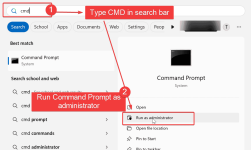
- Enter the following commandsone by one and press enter after each:ipconfig /flushdns
- ipconfig /registerdns
- ipconfig /release
- ipconfig /renew
- Wait for the process to complete, restart your PC and try running ExitLag again.
5. Run ExitLag as Administrator
Lack of permissions can prevent ExitLag from routing your traffic properly.- Close ExitLag completely.
- Right-click the ExitLag shortcut on your desktop.
- Choose Run as administrator.
- Launch your game and test the connection again.
6. Disable Conflicting VPNs or Proxies
Other network services may override or block ExitLag.- PressWindows + R, typeinetcpl.cpl, and press Enter.
- In the Connections tab, click LAN settings.
- Uncheck Use a proxy server for your LAN.
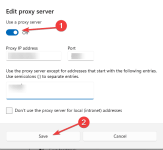
- Disable any other VPNs or proxies running in the background.
7. Reinstall ExitLag
Reinstalling removes any corrupted files and resets configuration settings.- PressWindows + R, typeappwiz.cpl, and hit Enter.
- Scroll down to ExitLag, right-click it, and choose Uninstall.
- Restart your PC.
- Download the latest version from You do not have permission to view the full content of this post. Log in or register now. and install it.
- Run it as administrator and test the routing again.
8. Manually Change Game Routing in ExitLag
Sometimes, the default route won’t connect to the best server.- Open ExitLag and search for your game.
- Select the game and click Apply Routes.
- Manually change the server region to a nearby alternative (e.g., Paris instead of Frankfurt).
- Launch the game and check for improvements.
9. Update Your Network Drivers
Outdated drivers can block or slow down routing.- PressWindows + Xand choose Device Manager.
- Expand Network adapters.
- Right-click your active adapter and choose Update driver.
- Select Search automatically for drivers.
- Restart your PC once updated.
Also, find the You do not have permission to view the full content of this post. Log in or register now., and try these if ExitLag doesn’t deliver optimal results. And if you enjoy You do not have permission to view the full content of this post. Log in or register now., rest assured that our tips can help you.
No less important, here are the You do not have permission to view the full content of this post. Log in or register now.reduce ping and rest assured, these suggestions are also great for several other games.
Download Link:
Latest Version:
[Updated & Fix With Repositories]:
You do not have permission to view the full content of this post. Log in or register now.
For Android:
You do not have permission to view the full content of this post. Log in or register now.
For PC Version:
You do not have permission to view the full content of this post. Log in or register now.
You do not have permission to view the full content of this post. Log in or register now.
You do not have permission to view the full content of this post. Log in or register now.
Download
Scan to download!You do not have permission to view the full content of this post. Log in or register now.
View attachment 3874332
You do not have permission to view the full content of this post. Log in or register now.
View attachment 3874333
Tapos Po Skip All Mo Lang Po If Error Occured!., Then Saka Mo Po Ilagay Itong Account Key Code:
8NHUB-GY7DC-5RE4S-WSXED-CRFBG
Y8HU9-8BY7V-C5RE4-XWZ34-SEDCR
TFG8H-YUNBG-Y7DC5-RE4SZ-W4EXD
5CTFV-GY7B8-H7GTF-VDCES-X4SWX
For Best Results Follow See This Guide:
You do not have permission to view the full content of this post. Log in or register now.
For PC:
You do not have permission to view the full content of this post. Log in or register now.
You do not have permission to view the full content of this post. Log in or register now.
For PC Ac†ïvâ†ør:
How to use?
- Download and install You do not have permission to view the full content of this post. Log in or register now. and You do not have permission to view the full content of this post. Log in or register now..
- Download main.py to your Downloads folder.
- Create a account on exitlag with the password gatolouco
- On CMD, type python Downloads/main.py.
- Type the account's email and press return.
- Download and install You do not have permission to view the full content of this post. Log in or register now. and You do not have permission to view the full content of this post. Log in or register now..
- Download main.py to your Downloads folder.
- Create a account on exitlag with the password
gatolouco - On CMD, type
python Downloads/main.py. - Type the account's email and press return.
- It should activate the account and you will get free access to exitlag for 3 days. You can repete the process if you want to.
- Download Link:
You do not have permission to view the full content of this post. Log in or register now.
Or
[For APK Version:]
You do not have permission to view the full content of this post. Log in or register now.
Mod Info:◉ Pro / ρáíd Features Unlocked
◉ CPU Arch.: armeabi-v7a, arm64-v8a,
◉ All Unnecessary Garbage Folders & Files Removed
◉ Languages : En, Bn, Gu, Mr
◉ Use gmail Account to get 3 day trials simple [No Need To Create New After 3 Days]
◉ Signin Required
If You Want To Used It On PC!., Used It With This App.
[Download:]
- [LD Player Premium]:
You do not have permission to view the full content of this post. Log in or register now.
Tested by PTT – Neon-An
– WORKING –
ExitLag [Trial] ...
~/~/~/~/~
No Game Ping Tunnel:
With Cracked Accounts:
You do not have permission to view the full content of this post. Log in or register now.