PH
PHHello PHC,
I was browsing my fb and a feed showed about video clipping, so naisip ko na gumawa ng app kanina with free resources para naman maka contribute sa community, at eto n nga sya.
A Windows application designed to make finding and creating highlights from videos easier.
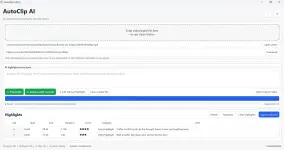
The idea is simple: instead of manually watching an entire video just to find the best moments, AutoClip AI can transcribe the content, use local AI to identify potential highlights, and let you review and export the selected moments as individual clips.
It’s still a personal/independent development project, but I thought I’d share it with anyone who might find it useful.
Video & Audio Import
Open a local file or simply drag and drop it into the application.
Automatic Transcription
Uses Faster-Whisper to transcribe the audio locally on your computer.
Local AI Highlight Analysis
Uses Ollama + Qwen to analyze the transcript and suggest interesting parts based on your instructions.
For example, you can ask it to find:
 Highlight & Clip Export
Review the suggested timestamps, select the moments you want, and export them as separate video clips.
 Highlight Scoring & Categories
AI-generated suggestions include scores, categories, titles, and timestamps to make reviewing them easier.
 Drag & Drop
Just drag your video or audio file directly into AutoClip AI and start processing.
 Online Video Support
AutoClip AI also includes support for authorized online video downloads where technically available and permitted by the platform.
 Customizable Interface
Includes light, dark, and custom themes, configurable output folders, startup options, and other settings.
 Portable Windows Application
Designed to be simple to run without a traditional installation process.
The basic workflow is:
Video → Transcribe → AI Analyze → Review Highlights → Export Clips
Although AutoClip AI includes an online video download option, I recommend using local video files whenever possible.
Online platforms such as YouTube regularly change their restrictions, formats, authentication requirements, and download methods. Because of this, an online link that works today may not necessarily work later, and some videos may return errors or be unavailable for processing.
For the most reliable experience:
Download or save your video first using an authorized method → Drag & drop the local file into AutoClip AI → Transcribe → Analyze → Export
Local files avoid most of the restrictions and compatibility problems associated with online video platforms.
Before you download
This is a free personal project that I'm sharing with the community.
Because of that:
Important! before extracting Just right click the zip file, properties, and unblock
I hope it helps someone else the way it's helping me.
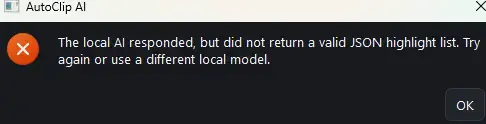
AutoClip AI can transcribe videos locally using Faster-Whisper, but the “Analyze with Local AI” feature requires Ollama + Qwen2.5 to be installed on your computer.
Note: Ollama/Qwen is only required for AI highlight analysis. You can still use AutoClip AI for transcription and manual highlight functions without it.
Install Ollama for Windows
Ollama supports Windows 10 or later.
Recommended:
AutoClip itself isn't necessarily the biggest part. Additional space can be used by the AI components and your working videos.
Ollama alone requires at least 4 GB for its Windows binary installation, according to its Windows documentation. AI models require additional storage.
AutoClip's recommended Qwen2.5:3b model is approximately 1.9 GB.
Faster-Whisper also downloads the selected transcription model when required, and AutoClip needs space for exported clips, temporary/working files, and your source videos.
There’s no charge — this is a free personal project that I'm sharing with the community.
You do not have permission to view the full content of this post. Log in or register now.
I was browsing my fb and a feed showed about video clipping, so naisip ko na gumawa ng app kanina with free resources para naman maka contribute sa community, at eto n nga sya.
AutoClip AI-Assisted Video Highlights & Clip Export
A Windows application designed to make finding and creating highlights from videos easier.
The idea is simple: instead of manually watching an entire video just to find the best moments, AutoClip AI can transcribe the content, use local AI to identify potential highlights, and let you review and export the selected moments as individual clips.
It’s still a personal/independent development project, but I thought I’d share it with anyone who might find it useful.
 What AutoClip AI can do
Video & Audio Import
Open a local file or simply drag and drop it into the application.
Automatic Transcription
Uses Faster-Whisper to transcribe the audio locally on your computer.
Local AI Highlight Analysis
Uses Ollama + Qwen to analyze the transcript and suggest interesting parts based on your instructions.
For example, you can ask it to find:
Engaging 30–60 second moments suitable for social media.
Highlight & Clip ExportReview the suggested timestamps, select the moments you want, and export them as separate video clips.
Highlight Scoring & CategoriesAI-generated suggestions include scores, categories, titles, and timestamps to make reviewing them easier.
Drag & DropJust drag your video or audio file directly into AutoClip AI and start processing.
Online Video SupportAutoClip AI also includes support for authorized online video downloads where technically available and permitted by the platform.
Customizable InterfaceIncludes light, dark, and custom themes, configurable output folders, startup options, and other settings.
Portable Windows ApplicationDesigned to be simple to run without a traditional installation process.
The basic workflow is:
Video → Transcribe → AI Analyze → Review Highlights → Export Clips
 Local videos are recommended
Although AutoClip AI includes an online video download option, I recommend using local video files whenever possible.
Online platforms such as YouTube regularly change their restrictions, formats, authentication requirements, and download methods. Because of this, an online link that works today may not necessarily work later, and some videos may return errors or be unavailable for processing.
For the most reliable experience:
Download or save your video first using an authorized method → Drag & drop the local file into AutoClip AI → Transcribe → Analyze → Export
Local files avoid most of the restrictions and compatibility problems associated with online video platforms.
Before you download
This is a free personal project that I'm sharing with the community.
Because of that:
Important! before extracting Just right click the zip file, properties, and unblock
- The first run may install a few required Python components if they aren't already on your PC.
- If Windows or Microsoft Defender shows an "Unknown Publisher" warning, that's expected because I don't have a commercial code-signing certificate.
- Everything you need is included in the package, along with step-by-step instructions.
- If you run into any issues during setup, just send me a message and I'll be happy to help.
I hope it helps someone else the way it's helping me.
Important — Local AI Requirement (The app is designed to check the components, if it fails, install manually)
AutoClip AI can transcribe videos locally using Faster-Whisper, but the “Analyze with Local AI” feature requires Ollama + Qwen2.5 to be installed on your computer.
Note: Ollama/Qwen is only required for AI highlight analysis. You can still use AutoClip AI for transcription and manual highlight functions without it.
Install Ollama for Windows
Ollama supports Windows 10 or later.
- Install the Qwen2.5 model
After installing Ollama, open Command Prompt or PowerShell and run:
ollama run qwen2.5:3b
The model will download automatically the first time. The 3B model is about 1.9 GB, making it considerably lighter than the standard 7B/latest Qwen2.5 model, which is about 4.7 GB.
- Once the model is installed, keep Ollama available/running and open AutoClip AI. Ollama normally provides its local API at You do not have permission to view the full content of this post. Log in or register now., which is what applications such as AutoClip AI can connect to.
 System Requirements
Recommended:
- OS: Windows 10 22H2 or Windows 11, 64-bit. Ollama officially requires Windows 10 22H2 or newer.
- Processor: Modern Intel or AMD 64-bit processor; 4+ cores recommended
- Memory: 8 GB RAM minimum recommended; 16 GB+ preferred, especially when transcription and Local AI are being used.
- GPU: Not required. AutoClip can perform Faster-Whisper transcription on the CPU. A compatible NVIDIA GPU can accelerate transcription, but GPU use has additional CUDA/cuDNN requirements.
- Internet: Required for initial component/model downloads and online-video features. Once the necessary local models are downloaded, the core AI processing can operate locally.
- Storage: I recommend having at least 10–15 GB of free disk space, with more available if you regularly process large videos.
 Why does it need that much space?
AutoClip itself isn't necessarily the biggest part. Additional space can be used by the AI components and your working videos.
Ollama alone requires at least 4 GB for its Windows binary installation, according to its Windows documentation. AI models require additional storage.
AutoClip's recommended Qwen2.5:3b model is approximately 1.9 GB.
Faster-Whisper also downloads the selected transcription model when required, and AutoClip needs space for exported clips, temporary/working files, and your source videos.
 Want to try it? just react
There’s no charge — this is a free personal project that I'm sharing with the community.
You do not have permission to view the full content of this post. Log in or register now.