PH
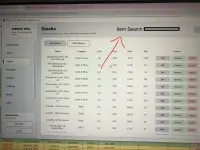
PHJust made an updated version of my previous POS (https://phcorner.org/threads/2445788/)
This time, i used C# for the system app (this is all vibecoded lol). I implemented almost all the suggestions na rin from my previous build. Kahapon ko lang kasi ulit naalala ko HAHAHA dapat matagal ko na siya nagawan ng version 2.
Anyways, baka makatulong sa mga may small business here. This is free and walang hidden chuchu na kung ano. feel free to drop some suggestions na rin para mas lalong ma-improve and makatulong hehe.
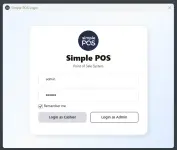
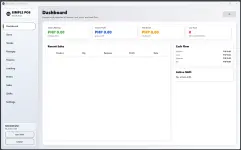
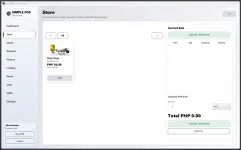
If gusto niyo i try, ill leave it down here
You do not have permission to view the full content of this post. Log in or register now.
username: admin
password: admin
This time, i used C# for the system app (this is all vibecoded lol). I implemented almost all the suggestions na rin from my previous build. Kahapon ko lang kasi ulit naalala ko HAHAHA dapat matagal ko na siya nagawan ng version 2.
Anyways, baka makatulong sa mga may small business here. This is free and walang hidden chuchu na kung ano. feel free to drop some suggestions na rin para mas lalong ma-improve and makatulong hehe.
Core Features
- Standalone Windows App
- Runs as SimplePOS.exe
- No server required
- Can be distributed as one folder with the app, database, config, and required assets
- Role-Based Login
- Supports admin and cashier accounts
- Passwords use BCrypt hashing
- Deactivated accounts cannot log in
- Default admin bootstrap if no admin exists
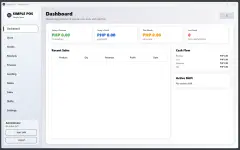
- Dashboard
- Today’s revenue
- Today’s profit
- Monthly net income
- Low-stock count
- Recent sales table
- Monthly cash flow summary
- Active shift status and income
- Store / POS Screen
- Product search
- Category filtering
- Product cards with image, category, price, and stock
- Cart management
- Quantity handling for pieces and kilograms
- Discounts by peso amount or percentage
- Current sale total and subtotal
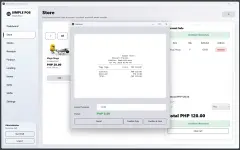
- Checkout window with receipt preview
- Amount tendered and change calculation
- Confirm sale only or confirm and print
- Automatic stock deduction after checkout
- Shift-aware receipt recording
- Inventory / Stocks
- Add products
- Edit products
- Delete/deactivate products
- Product category assignment
- Product image/photo support
- Cost price and selling price tracking
- Stock quantity tracking
- Restock support
- Low-stock detection
- Category management
- Receipts
- Receipt history
- View receipt details
- Print receipts
- Admin-only receipt deletion
- Receipt number generation
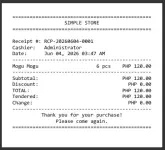
- Receipt stores cashier, date/time, items, totals, tendered amount, and change
- Receipt template support
- Finance
- Date-range filtering
- Revenue summary
- Profit summary
- Expense summary
- Net income calculation
- Transaction count
- Add expenses
- Delete expenses
- Expense history table
- Lending / Credit Records
- Add lending records for borrowers
- Add products to lending records
- Tracks total amount, amount ρáíd, balance, and status
- Mark lending as ρáíd
- Undo payment
- Delete lending records
- Stock is deducted when items are lent
- Prevents lending more than available stock
- Notes
- Add operational notes
- View notes
- Delete notes
- Cashiers see their own notes
- Admin can view broader note records
- Sales Reports
- Line-level sales reporting
- Shows product, unit, cost, price, quantity, revenue, and profit
- Calculates total cost, revenue, and profit
- Admin can view broader sales data
- Cashiers are limited to their own sales
- Shift Management
- Start shift
- End shift
- Tracks cashier name, start time, end time, and duration
- Tracks shift income
- Shifts tab lists all shift history
- App prevents logout or closing while a shift is active
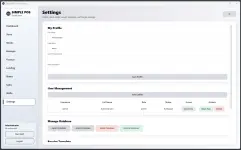
- User Management
- Admin can add cashier accounts
- Reset passwords
- Activate/deactivate accounts
- Delete accounts
- Prevents admin from deactivating or deleting their own account
- Deactivated users cannot log in
- Database Management
- Export database
- Import database
- Delete database
- Restore previously deleted database
- Creates restore points before destructive database actions
- Blocks database import/delete/restore while a shift is active
- Export filename format: Simple POS - yyyy-MM-dd.db
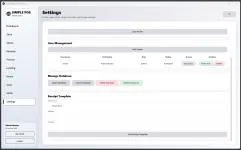
- Receipt Template Settings
- Store name
- Store address
- Store contact
- Receipt header/footer support in the data model
- Receipt printing integration
Previews:
Sample Receipt (PDF View):
If gusto niyo i try, ill leave it down here
You do not have permission to view the full content of this post. Log in or register now.
username: admin
password: admin