 PH
PH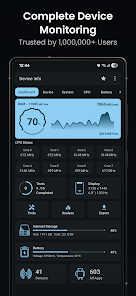
Application Overview
Device Info is an Android application that provides comprehensive, real-time hardware monitoring and system diagnostics. It features advanced user interfaces to track performance, run hardware benchmarks, and analyze device configurations with no tracking or data collection.Core Metrics & Specifications
- Downloads: 1M+
- Target Environment: Android 12L and above
- Privacy: Zero tracking or data collection
Detailed Feature Breakdown
| Category | Monitored Data & Capabilities |
|---|---|
| Dashboard | Real-time overview of RAM, internal/external storage, battery status, CPU usage, available sensors, and installed apps. |
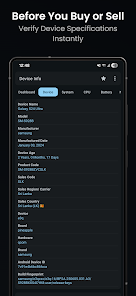
| Device Information | Model, manufacturer, brand, hardware, board, build fingerprint, device age, manufacture date, USB host, SIM/network details, and IMEI. |
| System Information | Codename, API level, released version, One UI version, bootloader, baseband, Java VM, Android version, security ρá†ch level, kernel, Google Play Services, Vulkan, OpenGL ES, Treble, seamless updates, uptime, root apps, and language. |
| CPU & GPU | System on Chip (SoC), processors, CPU architecture, supported ABIs, hardware, governor, core count, frequency, GPU renderer, GPU vendor, and GPU version. |
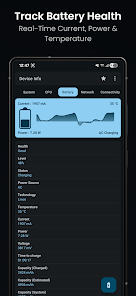
| Battery | Real-time health, level, status, power source, technology, temperature, voltage, power (watts), current (mA), and capacity. |
| Network & Connectivity | IP address, gateway, subnet mask, DNS, lease duration, interface, frequency, Wi-Fi standard, security, link speed, Bluetooth, NFC, Ultra-Wideband, and USB. |
| Display | Resolution, pixel density, font scale, physical size, refresh rates, HDR support, brightness, screen timeout, and orientation. |
| Memory | Detailed RAM usage, RAM type, RAM frequency, storage capacity, and internal/external storage real-time statistics. |
| Sensors | Sensor name, vendor, type, power consumption, wake-up/dynamic sensor status, and maximum range. |
| Camera | Aperture, focal length, ISO range, RAW capability, resolution, crop factor, focus modes, flash modes, image formats, and face detection modes. |
| Temperature | Comprehensive thermal zone value monitoring. |
Advanced Tools & Diagnostics
- App Analyzer: Detailed info on user and installed apps (version, min/target OS, permissions, activities, services, providers, receivers, APK extraction). Includes advanced graphs to group applications by target SDK, min SDK, install location, platform, installer, and signature.
- Wi-Fi Analyzer: Built-in tool to scan nearby networks and analyze signal strength, channels, Wi-Fi standards, security protocols, and estimated distance.
- Device Tests & Benchmarks: Hardware diagnostic tests for Display, Multi-touch, Flashlight, Loudspeaker, Ear Speaker, Microphone, Ear Proximity, Light, Accelerometer, Charging, Headset, Vibration, Bluetooth, Fingerprint, and Volume buttons.
- Floating Monitor: Screen overlay providing real-time data for RAM, battery, and temperature.
- UI & Customization: Material You light and dark themes with custom color schemes and customizable home screen widgets.
- Export Reports: Generates diagnostic reports of system information in text or PDF formats.
- Additional Tools: Permission Analyzer, Data Usage tracker, and Compass.
Release Notes
What's New
- Added Floating Monitor tool (BETA)
- Implemented widget improvements
- General bug fixes and performance enhancements
Modification Specifications
- Premium / Donate / ρáíd features unlocked
- Disabled/Removed unwanted Permissions, Receivers, Providers, and Services
- Removed advertising permissions, services, providers, layouts, and links
- Removed debug code and feedback dialog on exit
- Disabled Analytics, Crashlytics, and Firebase tracking

.webp "(ditto) :(ditto):")
