 PH
PH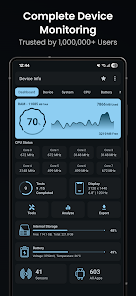
Device Info - Technical Overview & Feature Set
Device Info is a comprehensive hardware and software monitoring utility for Android 7.0+. It provides real-time diagnostics, hardware benchmarking, and detailed system reporting through a Material You interface.Core Specifications
| Category | Technical Details Monitored |
|---|---|
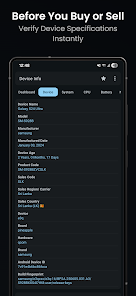
| System | Codename, API level, Bootloader, Baseband, Java VM, Security ρá†ch level, Kernel, Google Play Services, Vulkan, OpenGL ES, Treble, Root status, Uptime. |
| CPU/SoC | Architecture, Supported ABIs, CPU Governor, Core count, Real-time frequency, GPU Renderer/Vendor/Version. |
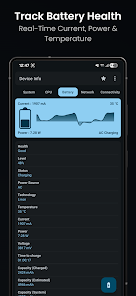
| Battery | Health, Status, Power source, Technology, Temperature, Voltage, Wattage, Current (mA), and Capacity. |
| Display | Resolution, PPI, Font scale, Physical size, Refresh rates (Hz), HDR support, Brightness levels, Orientation. |
| Memory | RAM type, Frequency, RAM usage, Internal/External storage capacity, and I/O statistics. |
| Network | IP Address, Gateway, Subnet Mask, DNS, Lease duration, Interface, Wi-Fi Standard, Security protocols, Link speed. |
| Sensors | Name, Vendor, Type, Power consumption, Wake-up/Dynamic status, Maximum range. |
| Camera | Aperture, Focal length, ISO range, RAW support, Resolution, Crop factor, Focus/Flash modes, Image formats. |
Key Utilities & Analysis Tools
- App Analyzer: Analyzes applications using advanced graphs; groups by Target SDK, Min SDK, Install location, Platform, and Signature.
- Wi-Fi Analyzer: Scans nearby networks to evaluate signal strength, channels, security protocols, and estimated distance.
- Device Benchmarks: Functional testing for Display, Multi-touch, Flashlight, Speakers, Microphone, Proximity, Light, Accelerometer, Charging, Biometrics, and Physical buttons.
- Thermal Monitoring: Real-time tracking of all system-defined thermal zones.
- Report Export: Generates technical diagnostic reports in Text or PDF formats.
Application Management & Tools
- App Details: Detailed breakdown of Permissions, Activities, Services, Providers, and Receivers. Includes APK extraction capability.
- Toolbox: Features Permission Analyzer, Data Usage monitor, Compass, and customizable Material You Widgets.
Version Information & Mod Features
- Current Updates: Resolved incorrect CPU reporting; general bug fixes and performance optimizations.
- Modifications:
- Premium/ρáíd features unlocked.
- Analytics, Crashlytics, and Firebase components disabled.
- Removed advertising permissions, services, and providers.
- Optimization of AndroidManifest by removing unwanted receivers and services.
- Debug code stripped for cleaner execution.
- Removed exit feedback prompts.