 PH
PH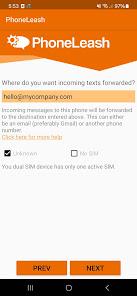
PhoneLeash: SMS Auto Forwarder v6.75 b275 [Premium]
PhoneLeash facilitates the automated forwarding of SMS, MMS, and call notifications to email, enabling users to view and reply to text conversations directly from an email inbox.Core Technical Specifications
| Category | Details |
|---|---|
| Version | v6.75 b275 [Premium] |
| Android OS | 7.0+ |
| Compatibility | Gmail, Outlook, Yahoo, and all standard email providers |
| Sim Support | Dual-SIM (automatic reply via the receiving SIM) |
| Architecture | Redundant server infrastructure; no local server setup required |
Functional Features
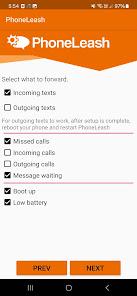
Messaging & Forwarding- Bidirectional Sync: Forwards both incoming and outgoing SMS/MMS to create complete mirrors in email.
- Media Support: MMS attachments and images are forwarded as email attachments.
- Group Messaging: Forwards group texts with full participant lists; replies are routed back to the entire group.
- RCS Support: Compatible with Google Messages.
- Email-to-SMS: Initiate new conversations by emailing specific contact handles or phone numbers.
- Signature Stripping: Automatically removes email signatures from outgoing text replies.
- Call Logs: Email notifications for incoming, outgoing, and missed calls, including duration data.
- Voicemail: Forwards voicemail notifications to the linked email address.
- Remote Status: Monitor battery levels, charging status, and device power cycles (boot/shutdown) via email.
- Remote Control: Toggle forwarding services via SMS commands.
- Keyword Filtering: Selective forwarding based on specific text strings.
- Contact Filtering: Whitelist or blacklist specific contacts.
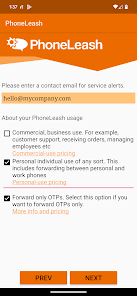
- OTP Mode: Specialized configuration to forward only one-time passwords and verification codes.
Comparison of Forwarding Methods
| Feature | Email Forwarding | SMS Forwarding (Second Phone) |
|---|---|---|
| Reply Support | Full bidirectional support | SMS relay |
| Threading | Gmail-optimized threads | Sequential SMS |
| Attachments | Full MMS/Picture support | SMS text only |
| Data Requirement | Internet connection required | No internet/app required on receiver |
Setup & Usage Scenarios
- Installation: Grants necessary permissions and links a target email address.
- Enterprise: Integration of customer SMS into shared team inboxes for record-keeping.
- Security: Forwarding OTP codes to secondary devices or remote locations.
- Travel: Accessing local carrier messages from an international location via email.
- Archiving: Maintaining a permanent, searchable cloud backup of all SMS and call logs.