 PH
PH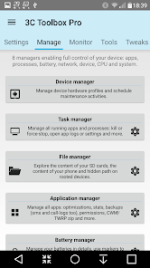
3C All-in-One Toolbox | Professional System Management Suite
3C All-in-One Toolbox is a comprehensive utility suite designed for Android 6.0 and higher, integrating extensive monitoring and fine-tuning capabilities into a unified interface. The application utilizes Accessibility services to manage background processes on non-rooted devices, though full functionality for several advanced modules requires root access and specific kernel support.Core Management Modules
The toolbox provides a centralized environment for hardware and software control:- Device Manager: Implements task scheduling, watchdog triggers, and performance profiles.
- File Explorer: Supports Samba network shares, media streaming, and advanced permission management.
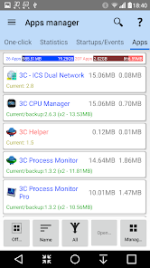
- Application Manager: Facilitates app security tuning, automated backups, and batch processing.
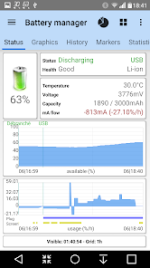
- Battery Manager: Tracks consumption statistics for dual-battery configurations and specialized hardware.
- Network Manager: Configures WiFi access point priority, DNS settings, TCP Congestion, and firewall rules.
System Optimization and Monitoring
Advanced users can access low-level system variables and real-time data tracking:- CPU Manager: Controls thermal limits and multi-core configurations for up to octa-core processors.
- System Manager: Edits
build.propandsysctlsettings to optimize SD card performance and memory allocation. - Monitoring and Recording: Logs application activity and component states with Xposed framework integration.
- Terminal and Logs: Includes a script editor with boot-run options and a filtered Logcat/Kernel reader.
Technical Specifications & Mod Info
| Feature | Details |
| Version | v3.1.6d (Build 200663d) |
| License | Pro / Mod Extra |
| Android OS | 6.0 and higher |
| Root Requirement | Optional (Required for advanced modules) |
| Ad-Free | Yes (Links and layouts removed) |
Pro Features & Modifications
The Pro version and applied modifications unlock the following capabilities:- Advanced Automation: Create multiple schedules, watchers, and profiles for automated device management.
- Application Security: Enhanced tools to secure, tune, and optimize all installed applications.
- Performance Optimization: Profiles to control CPU, I/O, and device states for battery savings or high-performance gaming.
- Component Toggles: Manual or automatic switching for over 20 device components (WiFi, Bluetooth, etc.) via widgets or profiles.
- Clean Interface: All unnecessary Permissions, Receivers, Providers, and Services have been removed or disabled.
- Optimized Code: Debug code removed and manifest cleaned for better performance and privacy.
Download