PH
PHWhat Is The Ghost Tool
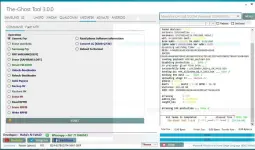
The Ghost Tool Is A Professional Mobile Repair Program Designed To Help You Bypass Locks Reset Frp Repair Imei Manage Csc Settings And Handle Carrier Or Network Configurations. Think Of It Like A Swiss Army Knife For Android Devices.
Unlike Traditional Methods That Need Multiple Tools Drivers And Flashing Boxes This Single Program Covers Everything From Mtp Operations To Adb Commands. Whether You Need To Remove Samsung Frp Unlock Lg Carriers Or Reset Micloud On Xiaomi The Ghost Tool Does It Without Unnecessary Hassle.
Supported Devices & Brands
The Ghost Tool Isn’t Just For One Company. It’s Compatible With A Wide Range Of Android Brands And Chipsets.
Samsung: Full Mtp, Adb, Frp, Csc, And Odin Flash Support.
Xiaomi: Micloud Bypass, Factory Reset, Qualcomm Edl, Anti-relock.
Lg: Unlock Menu, Port Functions, Imei Repair, Arabic Setup.
Vivo: Bootloader Unlock, Demo Remove, Frp Bypass.
Qualcomm & Mediatek: Diag Mode, Qcn Write, Baseband Fix, Bootloader Options.
Because It Supports Multiple Platforms, Repair Shops Don’t Need To Install Five Different Tools. Everything Works Under One Dashboard.
Pros & Cons Of Using The Ghost Tool
Pros:
Wide Support For Samsung, Xiaomi, Lg, Vivo, And More.
Simple Interface Compared To Professional Flashing Boxes.
Free To Download And Use.
Frequent Updates With New Features.
Saves Time And Cost For Repair Shops.
Cons:
Some Advanced Features May Require Drivers That Are Tricky To Install.
Incorrect Use Can Risk Data Loss.
Not An Official Oem Tool, So Warranty Devices May Not Be Supported.
Key Features of The Ghost Tool
Samsung
Test Mode
MTP PORT
MTP Read Information
Reboot
Factory Reset
MTP Disable Knox
REPAIR
Enable Secret Codes
OPEN Diag VZW
Fix 3G
FRP
MTP Remove FRP (new)
MTP Remove FRP
MTP Remove FRP USA
MTP Remove FRP QR Code
CSC Samsung
Change_CSC
Change_CSC 2
ADB
Arabic
Set Arabic
Set Arabic No Theme
Remove Arabic
Install Arabic Keyboard
Remove Account
ADB Frp (Old)
ADB Frp (New)
Remove Samsung Acc
Network
Get List Supported CSC
Enable Mobile Data Toggle
HandFree, Wifi, 3G, Update
ADB_Convert TO Verizon
System
Delete Bloatwares
Disable OTA Update
Hide Developer Option
Battery Information
Alliance Shield X
Download
Exit Download Mode
Frp Android 5/6 (#1)
Frp Android 5/6 (#2)
SoftBrick Fix
ODIN
Odin Flash
Recent (File Selection)
BL (Bootloader) – Open
AP (Application Processor) – Open
CP (Modem/Radio) – Open
CSC (Country/Carrier Code) – Open
DATA – Open
Options:
Reboot
Check MD5
NAND erase
Flash
Clear
Lg
ADB
Commands
Unlock Menu
Unlock Stylo 4 Sprint (Old Sec)
Unlock SPRINT (ADB)
Change Carrier To Glopal
Chnge Carrier To CDMA
Fix Hand Free, Wifi, 3G, Update
Start
Arabic LG
Arabic TracFon (FAST)
Arabic TracFon (FILLES)
SERIAL-PORT
Port
Read info LG
MEID Repair
Write IMEI
Read QCN
Write QCN
Normal Mode
Download Mode
Factory reset
MODEM
Commands
Open HiddenMenu
Enable Diag
Skip ScreenLock
Reset Modem
Enable ADB
Open LG Port
Edl (Qc 9008)
Choose Mode
Remove FRP
Factory reset
UniSPD
FRP
Operation
RECOVERY WIPE DATA I + FRP
RECOVERY WIPE DATA II + FRP
RECOVERY FORMAT DATA + FRP
RECOVERY WIPE APP DATA + FRP
RECOVERY WIPE DATA ONLY + FRP
ERASE DATA + FRP
ERASE FRP ONLY
Diag Function
Action
Start Connect
Turn On Backlight
Factory Reset
Power Off
Reboot
Options
IMEI 1 / IMEI 2 (Read / Write)
BT Addr (Bluetooth Address)
Wi-Fi Addr (Read / Write)
Init Phase Check
SN 1 / SN 2 (Read / Write)
Extra
AT Command (Send)
Fast Connect (checkbox)
Charging Battery (checkbox)
XIAOMI
ADB
Bypass Mi iCloud OS 8.1
[ROOT] Enable Diag mode
[Direct] Enable Diag mode
Sideload
Read offline MiCloud information
Remove FRP
Factory reset
Reset MiCloud lock
[QUALCOMM] Bypass MiCloud lock (Anti relock)
[QUALCOMM] Bypass MiCloud lock
Fastboot
Command
[UNLOCKED] Remove FRP
MI FLASH
Reboot EDL [OLD]
Reboot EDL [NEW]
Reboot System
Flash
Read OEM
Browse flash .bat file…
QUALCOMM
QCN
Read QCN from Mobile
Write QCN to Mobile
ADB
Unlock Menu
Test Connection
Start Unlock
Unlock for Multi User
Lock Back
Uninstall Carrier Programs (test) OPTIONAL
Return All Carrier Programs Back (test)
MDM + Soft Unlock User
Start
OTA Flash (From Recovery)
adb reboot recovery
OTA Flash (Only For Flash Ota From Recovery)
Start
MEDIATEK
Generic FRP
Erase userdata
Samsung FRP
FRP SAMSUNG [OEM]
Erase [SAMSUNG LOST]
Reset MiCLOUD
Unlock Bootloader
Relock Bootloader
Auto Bypass
Backup NV
Restore NV
Erase NV
Read RPMB
Erase RPMB
Write RPMB
Read phone Software information
Convert LG [K500-Q730]
Reboot to Normal
Start
4G/VoLTE
4G
Network & Band Settings
Auto 4g / Manual 4g Selection
Enable Specific Bands (3, 20, 28 Shown)
Option To Fix 4g When Replacing Sim (samsung-specific)
Fix 4g For All 5g Android Devices
Authentication & Security
Send Spc (000000 Default)
Send Pwd (fffffffffffff Default)
Send 16-digit Code
Zero Spc (reset Security Code)
Carrier Policy Management
Read Carrier_policy From Phone
Edit Carrier_policy
Write Carrier_policy Back To Phone
Create Policyman Folder
Device Operations
Delete 4g
Enable Bands (3,20,28 Quick Option)
Read 4m Phone
Reboot Device
Disconnect Port / Port On / Port Off
Control Buttons
Start (to Execute Selected Action)
Port Control Buttons: On / Off
Send Spc / Send Pwd Execution
4G_Bands + EFS2
Network & Band Management
Read Lte Band
Enable Bands (1, 3, 20, 28 Shown)
Disable Enabled Bands
Reset Settings 4g Back To Default (all Brands, 5g Included)
Auto 4g / Manual 4g Selection
Enable Specific Bands (3, 20, 28 Quick Option)
Carrier & Csc Policy
Read 4g_csc From Phone
Write 4g_csc To Phone
Read Carrier_policy From Phone
Edit Carrier_policy
Write Carrier_policy To Phone
Delete Carrier_policy
Create Policyman Folder
Delete Policyman Folder
Backup Policyman Folder
Restore Policyman Folder
Nv & Security
Read Nv From Phone
Write Nv To Phone
Send Spc (000000 Default)
Send Pwd (fffffffffffff Default)
Send 16-digit Code
Zero Spc (reset Security Code)
Device Operations
Reboot Device
Sim Slot Selection (sim-1 / Sim-2)
Fix 4g After Sim Replacement (samsung & All Brands/5g)
Fix 4g For All 5g Android Devices
Delete 4g
Baseband Repair
Fix Baseband Via Diag
Fix Baseband Via Download
Fix Baseband Via Fastboot
VOLTE
Enable / Remove VoLTE (select device options like Samsung, MTK, UniSPD, etc.)
Open IMS Settings directly [Samsung]
Open IMS Settings via secret code [Samsung]
Open Engineer Mode via secret code [MTK]
Open Engineer Mode via secret code [MTK+UniSPD]
Open Engineer Mode via secret code [UniSPD]
Enable VoLTE via Shizuku
Open MTK Engineer mode directly
Open Engineer Misc mode directly
Open LG Hiddenmenu mode directly
Open LG Hiddenmenu mode [modem]
Enable VoLTE directly [Root]
Android
ADB
Information / Utility
Read Info
Read Info (New)
Check Root
Open Network Mode
Open APN
Screenshot capture
DIAG (Diagnostic)
Diag No Root
Super Diag No Root [Xiaomi]
LT Diag
Diag Need Root
Diag QC [Oppo]
Fix Hand Free, WiFi, 3G, Update
Repair Functions
Reset EFS (Root)
Backup EFS (Root)
ADB Format
Magisk Install
Fix Waiting Debugger
Coolpad Exit Fastboot Mode
Apps / Bloatware Management
Remove Update Oppo
Remove Update Vivo
Remove Update Samsung
Remove Bloatware Vivo
Remove Bloatware Mi Global
Remove Bloatware Mi CN
Remove Bloatware Mi CN Global
Uninstall Vivo Daemon Service
Accounts / FRP / Security
Bypass FRP 2
Bypass FRP 1
Bypass Mi Cloud
Sony Bypass Anti Theft
Anti Relock MIUI Android 11, 12, 13
Disable Mi CloudShot
Mi Cloud Anti Relock 1
Mi Cloud Anti Relock 2
Sign Out Mi (Root)
Bypass Mi Cloud OS 9, 10 (#)
Sidload
Mi Assistant Mode Read Info
Sideload Reboot to Normal
Sideload Reboot to Recovery
Mi Account Bypass or FRP 1
Mi Account Bypass or FRP 2
Disable Dm-Verity 1
Disable Dm-Verity 2
Universal Boot Patcher
Fastboot
Read Info
Mi OS 6,7 Bypass
Mi OS 8 Bypass
Mi OS 9,10,11 Bypass 1
Mi OS 9,10,11 Bypass 2
Universal Mi
Universal MiCloud New Method
Disable Dm-Verity 1
Disable Dm-Verity 2
Universal Boot Patcher
Sideload Reboot to Normal
Sideload Reboot to Recovery
Vivo Section
Unlock Bootloader
Remove Demo after Unlock BL
Reboot to EDL after Unlock BL
General Section
Read Information [General]
ERASE FRP (SPD, MTK, Qualcomm, Nokia, Motorola)
ERASE FRP + PIN (MTK, Qualcomm, Nokia)
Unlock OEM
Relock OEM
Reboot
How to Install
Download And Extract The Ghost Tool To Your Computer.
Now Extract The Tool Using Winrar Or 7zip,
Run the The Ghost Tool.exe as Administrator.
Go To The Desktop Of Your Pc And Open The Tool.
Now The Tool Will Open Successfully.
Link:
You do not have permission to view the full content of this post. Log in or register now.
The Ghost Tool Is A Professional Mobile Repair Program Designed To Help You Bypass Locks Reset Frp Repair Imei Manage Csc Settings And Handle Carrier Or Network Configurations. Think Of It Like A Swiss Army Knife For Android Devices.
Unlike Traditional Methods That Need Multiple Tools Drivers And Flashing Boxes This Single Program Covers Everything From Mtp Operations To Adb Commands. Whether You Need To Remove Samsung Frp Unlock Lg Carriers Or Reset Micloud On Xiaomi The Ghost Tool Does It Without Unnecessary Hassle.
Supported Devices & Brands
The Ghost Tool Isn’t Just For One Company. It’s Compatible With A Wide Range Of Android Brands And Chipsets.
Samsung: Full Mtp, Adb, Frp, Csc, And Odin Flash Support.
Xiaomi: Micloud Bypass, Factory Reset, Qualcomm Edl, Anti-relock.
Lg: Unlock Menu, Port Functions, Imei Repair, Arabic Setup.
Vivo: Bootloader Unlock, Demo Remove, Frp Bypass.
Qualcomm & Mediatek: Diag Mode, Qcn Write, Baseband Fix, Bootloader Options.
Because It Supports Multiple Platforms, Repair Shops Don’t Need To Install Five Different Tools. Everything Works Under One Dashboard.
Pros & Cons Of Using The Ghost Tool
Pros:
Wide Support For Samsung, Xiaomi, Lg, Vivo, And More.
Simple Interface Compared To Professional Flashing Boxes.
Free To Download And Use.
Frequent Updates With New Features.
Saves Time And Cost For Repair Shops.
Cons:
Some Advanced Features May Require Drivers That Are Tricky To Install.
Incorrect Use Can Risk Data Loss.
Not An Official Oem Tool, So Warranty Devices May Not Be Supported.
Key Features of The Ghost Tool
Samsung
Test Mode
MTP PORT
MTP Read Information
Reboot
Factory Reset
MTP Disable Knox
REPAIR
Enable Secret Codes
OPEN Diag VZW
Fix 3G
FRP
MTP Remove FRP (new)
MTP Remove FRP
MTP Remove FRP USA
MTP Remove FRP QR Code
CSC Samsung
Change_CSC
Change_CSC 2
ADB
Arabic
Set Arabic
Set Arabic No Theme
Remove Arabic
Install Arabic Keyboard
Remove Account
ADB Frp (Old)
ADB Frp (New)
Remove Samsung Acc
Network
Get List Supported CSC
Enable Mobile Data Toggle
HandFree, Wifi, 3G, Update
ADB_Convert TO Verizon
System
Delete Bloatwares
Disable OTA Update
Hide Developer Option
Battery Information
Alliance Shield X
Download
Exit Download Mode
Frp Android 5/6 (#1)
Frp Android 5/6 (#2)
SoftBrick Fix
ODIN
Odin Flash
Recent (File Selection)
BL (Bootloader) – Open
AP (Application Processor) – Open
CP (Modem/Radio) – Open
CSC (Country/Carrier Code) – Open
DATA – Open
Options:
Reboot
Check MD5
NAND erase
Flash
Clear
Lg
ADB
Commands
Unlock Menu
Unlock Stylo 4 Sprint (Old Sec)
Unlock SPRINT (ADB)
Change Carrier To Glopal
Chnge Carrier To CDMA
Fix Hand Free, Wifi, 3G, Update
Start
Arabic LG
Arabic TracFon (FAST)
Arabic TracFon (FILLES)
SERIAL-PORT
Port
Read info LG
MEID Repair
Write IMEI
Read QCN
Write QCN
Normal Mode
Download Mode
Factory reset
MODEM
Commands
Open HiddenMenu
Enable Diag
Skip ScreenLock
Reset Modem
Enable ADB
Open LG Port
Edl (Qc 9008)
Choose Mode
Remove FRP
Factory reset
UniSPD
FRP
Operation
RECOVERY WIPE DATA I + FRP
RECOVERY WIPE DATA II + FRP
RECOVERY FORMAT DATA + FRP
RECOVERY WIPE APP DATA + FRP
RECOVERY WIPE DATA ONLY + FRP
ERASE DATA + FRP
ERASE FRP ONLY
Diag Function
Action
Start Connect
Turn On Backlight
Factory Reset
Power Off
Reboot
Options
IMEI 1 / IMEI 2 (Read / Write)
BT Addr (Bluetooth Address)
Wi-Fi Addr (Read / Write)
Init Phase Check
SN 1 / SN 2 (Read / Write)
Extra
AT Command (Send)
Fast Connect (checkbox)
Charging Battery (checkbox)
XIAOMI
ADB
Bypass Mi iCloud OS 8.1
[ROOT] Enable Diag mode
[Direct] Enable Diag mode
Sideload
Read offline MiCloud information
Remove FRP
Factory reset
Reset MiCloud lock
[QUALCOMM] Bypass MiCloud lock (Anti relock)
[QUALCOMM] Bypass MiCloud lock
Fastboot
Command
[UNLOCKED] Remove FRP
MI FLASH
Reboot EDL [OLD]
Reboot EDL [NEW]
Reboot System
Flash
Read OEM
Browse flash .bat file…
QUALCOMM
QCN
Read QCN from Mobile
Write QCN to Mobile
ADB
Unlock Menu
Test Connection
Start Unlock
Unlock for Multi User
Lock Back
Uninstall Carrier Programs (test) OPTIONAL
Return All Carrier Programs Back (test)
MDM + Soft Unlock User
Start
OTA Flash (From Recovery)
adb reboot recovery
OTA Flash (Only For Flash Ota From Recovery)
Start
MEDIATEK
Generic FRP
Erase userdata
Samsung FRP
FRP SAMSUNG [OEM]
Erase [SAMSUNG LOST]
Reset MiCLOUD
Unlock Bootloader
Relock Bootloader
Auto Bypass
Backup NV
Restore NV
Erase NV
Read RPMB
Erase RPMB
Write RPMB
Read phone Software information
Convert LG [K500-Q730]
Reboot to Normal
Start
4G/VoLTE
4G
Network & Band Settings
Auto 4g / Manual 4g Selection
Enable Specific Bands (3, 20, 28 Shown)
Option To Fix 4g When Replacing Sim (samsung-specific)
Fix 4g For All 5g Android Devices
Authentication & Security
Send Spc (000000 Default)
Send Pwd (fffffffffffff Default)
Send 16-digit Code
Zero Spc (reset Security Code)
Carrier Policy Management
Read Carrier_policy From Phone
Edit Carrier_policy
Write Carrier_policy Back To Phone
Create Policyman Folder
Device Operations
Delete 4g
Enable Bands (3,20,28 Quick Option)
Read 4m Phone
Reboot Device
Disconnect Port / Port On / Port Off
Control Buttons
Start (to Execute Selected Action)
Port Control Buttons: On / Off
Send Spc / Send Pwd Execution
4G_Bands + EFS2
Network & Band Management
Read Lte Band
Enable Bands (1, 3, 20, 28 Shown)
Disable Enabled Bands
Reset Settings 4g Back To Default (all Brands, 5g Included)
Auto 4g / Manual 4g Selection
Enable Specific Bands (3, 20, 28 Quick Option)
Carrier & Csc Policy
Read 4g_csc From Phone
Write 4g_csc To Phone
Read Carrier_policy From Phone
Edit Carrier_policy
Write Carrier_policy To Phone
Delete Carrier_policy
Create Policyman Folder
Delete Policyman Folder
Backup Policyman Folder
Restore Policyman Folder
Nv & Security
Read Nv From Phone
Write Nv To Phone
Send Spc (000000 Default)
Send Pwd (fffffffffffff Default)
Send 16-digit Code
Zero Spc (reset Security Code)
Device Operations
Reboot Device
Sim Slot Selection (sim-1 / Sim-2)
Fix 4g After Sim Replacement (samsung & All Brands/5g)
Fix 4g For All 5g Android Devices
Delete 4g
Baseband Repair
Fix Baseband Via Diag
Fix Baseband Via Download
Fix Baseband Via Fastboot
VOLTE
Enable / Remove VoLTE (select device options like Samsung, MTK, UniSPD, etc.)
Open IMS Settings directly [Samsung]
Open IMS Settings via secret code [Samsung]
Open Engineer Mode via secret code [MTK]
Open Engineer Mode via secret code [MTK+UniSPD]
Open Engineer Mode via secret code [UniSPD]
Enable VoLTE via Shizuku
Open MTK Engineer mode directly
Open Engineer Misc mode directly
Open LG Hiddenmenu mode directly
Open LG Hiddenmenu mode [modem]
Enable VoLTE directly [Root]
Android
ADB
Information / Utility
Read Info
Read Info (New)
Check Root
Open Network Mode
Open APN
Screenshot capture
DIAG (Diagnostic)
Diag No Root
Super Diag No Root [Xiaomi]
LT Diag
Diag Need Root
Diag QC [Oppo]
Fix Hand Free, WiFi, 3G, Update
Repair Functions
Reset EFS (Root)
Backup EFS (Root)
ADB Format
Magisk Install
Fix Waiting Debugger
Coolpad Exit Fastboot Mode
Apps / Bloatware Management
Remove Update Oppo
Remove Update Vivo
Remove Update Samsung
Remove Bloatware Vivo
Remove Bloatware Mi Global
Remove Bloatware Mi CN
Remove Bloatware Mi CN Global
Uninstall Vivo Daemon Service
Accounts / FRP / Security
Bypass FRP 2
Bypass FRP 1
Bypass Mi Cloud
Sony Bypass Anti Theft
Anti Relock MIUI Android 11, 12, 13
Disable Mi CloudShot
Mi Cloud Anti Relock 1
Mi Cloud Anti Relock 2
Sign Out Mi (Root)
Bypass Mi Cloud OS 9, 10 (#)
Sidload
Mi Assistant Mode Read Info
Sideload Reboot to Normal
Sideload Reboot to Recovery
Mi Account Bypass or FRP 1
Mi Account Bypass or FRP 2
Disable Dm-Verity 1
Disable Dm-Verity 2
Universal Boot Patcher
Fastboot
Read Info
Mi OS 6,7 Bypass
Mi OS 8 Bypass
Mi OS 9,10,11 Bypass 1
Mi OS 9,10,11 Bypass 2
Universal Mi
Universal MiCloud New Method
Disable Dm-Verity 1
Disable Dm-Verity 2
Universal Boot Patcher
Sideload Reboot to Normal
Sideload Reboot to Recovery
Vivo Section
Unlock Bootloader
Remove Demo after Unlock BL
Reboot to EDL after Unlock BL
General Section
Read Information [General]
ERASE FRP (SPD, MTK, Qualcomm, Nokia, Motorola)
ERASE FRP + PIN (MTK, Qualcomm, Nokia)
Unlock OEM
Relock OEM
Reboot
How to Install
Download And Extract The Ghost Tool To Your Computer.
Now Extract The Tool Using Winrar Or 7zip,
Run the The Ghost Tool.exe as Administrator.
Go To The Desktop Of Your Pc And Open The Tool.
Now The Tool Will Open Successfully.
Link:
You do not have permission to view the full content of this post. Log in or register now.