 PH
PHArissa ofuma
Contributor
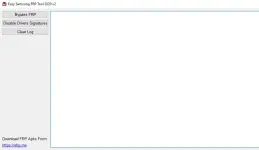
Easy Samsung FRP Tool 2020 (v1, v2, and v2.7) helps you to bypass the FRP lock on your Samsung devices. Comparatively, it is a lightweight and the best application for removing the Factory Reset Protection lock.
You will find the official link to download Easy Samsung FRP Tool 2020 for windows (64 and 86-bit) on the current page. We have shared it as a zip package, including the USB Driver and Tutorial.
Download Easy FRP Tool 2020
Easy FRP Tool helps you to bypass the Factory Reset Protection (FRP) on your Samsung devices.Tool Name: EasySamsungFrp2020.zip
Author: easy-firmware.com
| VERSION | LINK:1 | LINK:2 |
|---|---|---|
| 2020 v2.7 (Latest) | You do not have permission to view the full content of this post. Log in or register now. | You do not have permission to view the full content of this post. Log in or register now. |
| 2020 v2 | You do not have permission to view the full content of this post. Log in or register now. | You do not have permission to view the full content of this post. Log in or register now. |
| 2020 v1 | You do not have permission to view the full content of this post. Log in or register now. | You do not have permission to view the full content of this post. Log in or register now. |
How To Use?
- Firstly, download Easy Samsung FRP Tool on your computer.
- Extract the tool using WinRAR or 7zip.
- Secondly, install the Samsung USB Driver on your computer.
- Open the tool (SamsungFrp2020.exe).
- Connect your Samsung device to MTP Mode. Then follow the following steps.
- Now, click on the Bypass FRP button.
- Now, look at your Samsung device and click on View.