na try mo na remove yun battery? i don't know if may reset button yun laptop mo, pwede mo din try yun. baka lang naman. otherwise, check this:
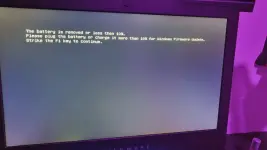
The error you encountered earlier ("The battery is removed or less than 10%") is unrelated to the operating system itself and more about hardware (specifically the battery or power supply).
- The error is hardware-related: It indicates that your laptop either doesn't have a battery installed, or the battery is too low (below 10%) for the firmware update to proceed. This is not an issue with Windows itself but with the battery status.
- Installing Windows would not bypass the battery issue: Even if you were to install Windows via CMD, the laptop will still require a sufficient battery charge to complete the installation, especially if there is a firmware update involved. The system will continue to require a battery level of more than 10% to perform the update successfully.
What you should do instead:
- Plug the laptop into power and make sure the battery is charged to at least 10%. If the battery is removable, check that it is correctly inserted.
- Continue the update after charging the battery to 10% or more. The error message suggests pressing F1 to continue the firmware update after ensuring that the battery charge meets the required level.
If the error persists even after charging the battery:
- Try restarting the laptop and ensuring it's plugged in during boot.
- If you can access the BIOS, check if there are any power settings affecting the battery.
- If the battery is faulty, you may need to replace it or have it inspected.
 PH
PH