❓ Help NEED HELP PLS! Alienware R4 15 Updated to W11 24H2

Status
Not open for further replies.

put0

Honorary Poster
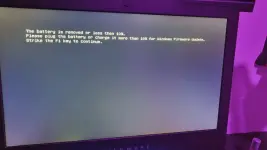
nag update po ako ng aking alienware r4 15 from windows 11 23H2 to 24H2, then ung sa picture ganyan na lumalabas everytime mag bootup ako, two times siya lalabas then mag bublue screen after that mag boboot up nman siya. pru kpag mag off na ako at bootup ulit, uulit naman po ung sa picture. pa help po please, kapag ganito lang po ba hindi ma aapektuhan ung unit? na try ko na disable ung adapter warning sa BIOS ganun parin.

ung unit ko nga pala wala ng battery kasi bloated na nremove ko at direct plug ung ginagamit ko.
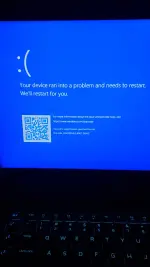
20250719_025217.webp
20250719_015335.webp
 
Nakakaintindi ako ng mga nararanasan mo sa iyong Alienware R4 15 pagkatapos mong mag-update mula sa Windows 11 23H2 patungo sa 24H2. Ang problema sa blue screen at ang dalawang beses na pagpapakita ng error message bago mag-boot up ay maaaring maging sanhi ng ilang isyu sa iyong operating system. Narito ang ilang mga posibleng solusyon na maaari mong subukan:

1. Pagsusuri ng System Files: Maaaring may nasirang system files matapos ang pag-update. Maaari mong subukan ang System File Checker tool sa Windows upang i-scan at i-restore ang mga nasirang file. Para gawin ito, buksan lamang ang Command Prompt bilang administrator at mag-type ng "sfc /scannow" at pindutin ang Enter.

2. Pag-roll back sa naunang bersyon: Kung hindi mo maresolba ang isyu, maaari mong subukan ang pag-roll back sa Windows 11 23H2. Pumunta sa Settings > Update & Security > Recovery, at hanapin ang option para mag-roll back sa naunang bersyon ng Windows.

3. Pagsusuri ng Device Drivers: Siguraduhing na-update ang lahat ng device drivers sa iyong laptop, lalo na ang graphics card at network adapter drivers. Maaari mong i-download ang mga pinakabagong drivers mula sa website ng Alienware o ng manufacturer ng bawat device.

4. Pagsusuri ng Event Viewer: I-check ang Event Viewer para makita ang detalye ng mga error logs sa bawat blue screen. Maaaring makatulong ito sa pagtukoy ng sanhi ng problema.

5. Pag-reinstall ng Windows 11 24H2: Kung wala nang ibang solusyon, maaaring subukan mong i-reinstall ang Windows 11 24H2. Siguraduhing mag-back up ka ng mahahalagang files bago mo ito gawin.

Tungkol naman sa iyong concern sa pagkawala ng battery at direktang pag-connect sa power source, hindi naapektuhan ang performance ng iyong unit dahil dito. Gayunpaman, para sa long-term health ng iyong laptop, maaaring ikonsidera ang pagbili ng bago o replacement battery para sa Alienware R4 15.

Sana makatulong ang mga mungkahi na ito sa pagresolba ng iyong isyu. Kung may iba ka pang mga tanong o kailangan ng karagdagang tulong, huwag kang mag-atubiling magtanong ulit.
 
via windows update mo inupgrade ver?
pwede rin may kinalaman sa legacy yan o yung mbr partioning

same sa HP Elite ko, pag upgrade nag bsod.
ginawa ko, ininstallan ko untouched iso via usb stick

mali ko, di ko muna binackup hahaha
try mo muna yung mga recovery tools, tulad nung sergei
 
via windows update mo inupgrade ver?
pwede rin may kinalaman sa legacy yan o yung mbr partioning

same sa HP Elite ko, pag upgrade nag bsod.
ginawa ko, ininstallan ko untouched iso via usb stick
yes po via windows update, hndi ko po kabesado ung BIOS :( kpag always po ba mag bsod mkaka apekto un sa hardware? kasi kpag nag bsod po siya next restart ko nag bobootup naman siya.

try ko po search ung untouched iso

my 10days pa nman po ako bago mkapag rollback to 23h2, kng hndi ko po ma fifix to mas mabuti ba na mag rollback na lng? kaso mag uupdate dn nman matic si windows :(
 
yes po via windows update, hndi ko po kabesado ung BIOS :( kpag always po ba mag bsod mkaka apekto un sa hardware? kasi kpag nag bsod po siya next restart ko nag bobootup naman siya.

try ko po search ung untouched iso

my 10days pa nman po ako bago mkapag rollback to 23h2, kng hndi ko po ma fifix to mas mabuti ba na mag rollback na lng? kaso mag uupdate dn nman matic si windows :(
kaya mahirap mag update sa mismong windows kahit yung security ρá†ch lang, pero alamin mo muna baka may driver incompatibility lang, kase often times yan ang reason ng bsod

di naman nakaka damage sa hardware yan pagkakaalam ko, baka meron sa yt try mo, wag mo muna close itong thread, marami dito master mas maalam sa mga ganyan 😁 at matulungan ka, marerevive pa yan
 
kaya mahirap mag update sa mismong windows kahit yung security ρá†ch lang, pero alamin mo muna baka may driver incompatibility lang, kase often times yan ang reason ng bsod

di naman nakaka damage sa hardware yan pagkakaalam ko, baka meron sa yt try mo, wag mo muna close itong thread, marami dito master mas maalam sa mga ganyan 😁 at matulungan ka, marerevive pa yan
kanina pa po ako search ng search sa issue na ito, my nababasa po ako BIOS firmware update dw po, hndi po mag titrigger ung update kasi wlang battery na dedetect for security reason dw ng dell. merun pong option na mag force update sa BIOS pru wla nmang firmware bios for windows 11 sa dell website kaya hndi ko po magawa. ung disable adapter warnings nakita ko po sa isang thread sa reddit same issue po sakin, prun ganun parin lumalabas parin ung sa attached picture.

maraming salamat po sa inyo! malaking tulong po ang forum na ito sa information godbless po, hoping na maging ok na mamaya 🙏

up 🙏

ito po ung probelma ko, merun pong option na to rollback to previous version, peru ung version is 2006 pa ok lang po ba un?
Screenshot 2025-07-19 154305.webp


hndi po talaga ma update ung BIOS kasi walang battery po, is it ok to force install the bios using /forceit on cmd?
 
This might help... You do not have permission to view the full content of this post. Log in or register now.

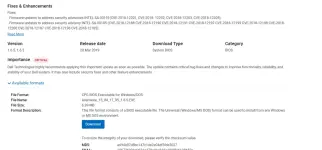
There's a critical update for your bios on the site. You do not have permission to view the full content of this post. Log in or register now. to download and follow the instruction above.View attachment 3841083
nega din po ung tut, na try ko na po ito "this program cannot run in DOS Mode" ngayun po na stuck ako sa 1.2.1 BIOS version, ung pinaka latest is 1.20.0

possible po ba na nag rollback ung bios ko after mag update ng 24h2? kasi ung UI ng 1.2.1 BIOS simple lang, d ko rin kasi na check kng anong version ng BIOS ko sa 23h2. kpag nag rollback pa ako 23h2 babalik din ang dating BIOS ko? kasi marami na talagang problema nga ung laptop ko huhuhu

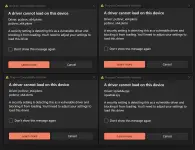
ito ung isang problema ngayun, everytime mag bootup ito na lumalabas huhuhu
Screenshot 2025-07-19 233619.webp
 
This might help with that error

The "pcdsrvc_x64.pkms" error on Windows, specifically "A driver cannot load on this device", is often associated with Dell SupportAssist software and can be resolved by uninstalling and reinstalling the software or by adjusting Core Isolation settings in Windows Security. - You can download this app on Dell's Website and reinstall it on your new OS.

The "iqvw64e.sys" error in Windows is a Blue Screen of Death (BSOD) error related to Intel network adapter drivers. This file is part of Intel's network connectivity software, and issues with it can cause system crashes, particularly during startup or when using network-related features. The error often appears when updating Windows or when Core Isolation's Memory Integrity feature is enabled. - Meaning you have to update your network Adapter Driver.

Probably this is the reason you experience the "Blue Screen of Death".
 
ni
This might help with that error

The "pcdsrvc_x64.pkms" error on Windows, specifically "A driver cannot load on this device", is often associated with Dell SupportAssist software and can be resolved by uninstalling and reinstalling the software or by adjusting Core Isolation settings in Windows Security. - You can download this app on Dell's Website and reinstall it on your new OS.

The "iqvw64e.sys" error in Windows is a Blue Screen of Death (BSOD) error related to Intel network adapter drivers. This file is part of Intel's network connectivity software, and issues with it can cause system crashes, particularly during startup or when using network-related features. The error often appears when updating Windows or when Core Isolation's Memory Integrity feature is enabled. - Meaning you have to update your network Adapter Driver.

Probably this is the reason you experience the "Blue Screen of Death".
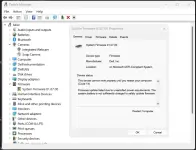
niroll back ko po ung system firmware sa device manager, kaya ngayun everytime na mag bootup ako hndi na nag aattemp na mag uodate ng firmware so wla na rn po ung battery warning at ung bsod. ung problema na lng po talaga outdated ng malala ung BIOS at my mga minor issues na po katuland ng keyboard minsan hndi ma read, ung bluetooth, at minsan nag fiflicker po ung screen pru hndi ko pa alam baka sa mga susunod na araw madagdagan po ang issue nito. ung bsod wla na po. ang sulosyun na lng po talaga sa thread na ito update BIOS :(
 
Status
Not open for further replies.

About this Thread

  • 31
    Replies
  • 738
    Views
  • 7
    Participants
Last reply from:
put0

Trending Topics

Online now

Members online
736
Guests online
1,573
Total visitors
2,309

Forum statistics

Threads
2,269,946
Posts
28,932,417
Members
1,240,738
Latest member
JohanLiebert
Back
Top