❓ Help PLDT CGNAT QUESTION

Status
Not open for further replies.
Screenshot 2025-07-14 201306.webp

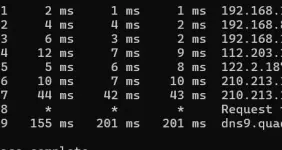
Naka static IP po ba ako or CGNAT? need ko lang static IP for OpenVPN and WireGuard server
 
Solution
madali lang malaman kung CGNAT o hindi based on your WAN IP address.

also note na kahit Dynamic and public IP address mo, it's not unusual in the industry for these to be sticky. not 100% of the time, pero kahit mag-reboot ka you get the same IP address assigned to you. pag nai-off ng matagal, or there was a wider outage in the network (lots of devices coming back online), syempre nagbabago.

tulad ni ceejay, nahihiwagaan rin ako kung bakit meron kang tatlong internal hops. you really want to avoid double NAT situations, ikaw apat. perhaps you can give us more info about your network setup?

Tbh yang nakuha kong results mismo sa modem/router ng ISP namin. Same results kung coconnect ako wired. Sa tingin ko sila may gawa nito...
Based on your need for a static IP address for your OpenVPN and WireGuard server, it is important to determine whether you are using a CGNAT (Carrier-Grade Network Address Translation) or a static IP address from your Internet Service Provider (ISP) like PLDT.

CGNAT is a method used by ISPs to extend the use of IPv4 addresses by allowing multiple customers to share a single public IP address. This can sometimes cause issues for services like VPN servers that require a dedicated, static IP address for consistent and reliable connections.

To check if you are on a CGNAT, you can try accessing your router's WAN IP address and see if it matches the public IP address assigned to you by your ISP. If the WAN IP address is a private IP address (e.g., 192.168.x.x or 10.x.x.x), then you are likely behind a CGNAT.

If you find that you are behind a CGNAT, you may need to contact your ISP (PLDT) to request a static public IP address. They may offer this as an additional service for an extra fee. Having a static IP address will ensure that your OpenVPN and WireGuard servers have a consistent and dedicated IP address for remote access.

In summary, if you are on a CGNAT, you may need to request a static IP address from PLDT to ensure the proper functionality of your VPN servers.
 
Definition of Terms muna.

Static means hindi nagbabago. Meaning, even if you restart the modem or even if the lease time ended/renewed, then your public IP will still be the same.
Dynamic is the complete opposite. Meaning, if you restart the modem or if the lease time ended/renewed, then your public IP will change.
CGNAT is the solution for the shortage of IPv4 address worldwide. Meaning, many users under a single private IP use the same public IP.

Now, as for the question whether your IP is static, if you are on residential plan, then no, your public IP is not static since PLDT is not offering a static IPv4 address to their residential subscribers. The static IPv4 is only available to Enterprise subscribers.

And as for the question whether it is CGNAT or not, it's not CGNAT. Hop #4 is your public IPv4's gateway. 112.203.x.1, probably.

But I just can't understand why you have multiple private IP hops before that? Normally, hop #1 is your modem/router's gateway, then hop #2 should be your public IPv4 (or CGNAT IP) gateway.

Triple NAT na yang scenario mo.
1st NAT is your Hop #1 (192.168.x.1) -> assuming this is your PLDT modem
2nd NAT is your Hop #2 (another 192.168.x.1) -> assuming this is your 2nd router connected to your modem
3rd NAT is your Hop #3 (another 192.168.x.1) -> assuming this is your 3rd router connected to your 2nd router

And since 3 hops yan before your public IPv4's gateway, then super strict NAT yan so a wireguard server inside your 3rd router (assuming the 1st hop is your modem, the 2nd hop is your 2nd router, and the 3rd hop is your 3rd router), cannot communicate with the outside since magkakaibang network yang tatlo na yan. Mahihirapang makita yung wireguard server mo on your 3rd router from the internet unless you port forward it from your modem to your PLDT modem, then to your 2nd router, then to your 3rd router, and finally to the device where the wireguard server is installed.

Port forwarding diagram:
Internet -> PLDT Modem (Port 51820) -> 2nd Router (Port 51820) -> 3rd router (Port 51820) -> Wireguard Server (Port 51820)
 
Definition of Terms muna.

Static means hindi nagbabago. Meaning, even if you restart the modem or even if the lease time ended/renewed, then your public IP will still be the same.
Dynamic is the complete opposite. Meaning, if you restart the modem or if the lease time ended/renewed, then your public IP will change.
CGNAT is the solution for the shortage of IPv4 address worldwide. Meaning, many users under a single private IP use the same public IP.

Now, as for the question whether your IP is static, if you are on residential plan, then no, your public IP is not static since PLDT is not offering a static IPv4 address to their residential subscribers. The static IPv4 is only available to Enterprise subscribers.

And as for the question whether it is CGNAT or not, it's not CGNAT. Hop #4 is your public IPv4's gateway. 112.203.x.1, probably.

But I just can't understand why you have multiple private IP hops before that? Normally, hop #1 is your modem/router's gateway, then hop #2 should be your public IPv4 (or CGNAT IP) gateway.

Triple NAT na yang scenario mo.
1st NAT is your Hop #1 (192.168.x.1) -> assuming this is your PLDT modem
2nd NAT is your Hop #2 (another 192.168.x.1) -> assuming this is your 2nd router connected to your modem
3rd NAT is your Hop #3 (another 192.168.x.1) -> assuming this is your 3rd router connected to your 2nd router

And since 3 hops yan before your public IPv4's gateway, then super strict NAT yan so a wireguard server inside your 3rd router (assuming the 1st hop is your modem, the 2nd hop is your 2nd router, and the 3rd hop is your 3rd router), cannot communicate with the outside since magkakaibang network yang tatlo na yan. Mahihirapang makita yung wireguard server mo on your 3rd router from the internet unless you port forward it from your modem to your PLDT modem, then to your 2nd router, then to your 3rd router, and finally to the device where the wireguard server is installed.

Port forwarding diagram:
Internet -> PLDT Modem (Port 51820) -> 2nd Router (Port 51820) -> 3rd router (Port 51820) -> Wireguard Server (Port 51820)
Sir ang galing niyo po, network engineer po ba kayo? bali naka GL-MT3000 ako gusto ko lang ma access network ko remotely using Wireguard server kapag aalis ako ng bahay. Yan siguro dahilan yung tatlong Hop kung bakit di ako maka connect sa Wireguard at OpenVPN. Hindi po ako expert pag dating sa ganito sa totoo lang naguumpisa pa lang ako

ceejaybassist btw yung ISP namin hindi directly sa PLDT, parang naka failover sila nagsiswitch sila kusa sa Globe Fibr kapag naka down PLDT
 
madali lang malaman kung CGNAT o hindi based on your WAN IP address.

also note na kahit Dynamic and public IP address mo, it's not unusual in the industry for these to be sticky. not 100% of the time, pero kahit mag-reboot ka you get the same IP address assigned to you. pag nai-off ng matagal, or there was a wider outage in the network (lots of devices coming back online), syempre nagbabago.

tulad ni ceejay, nahihiwagaan rin ako kung bakit meron kang tatlong internal hops. you really want to avoid double NAT situations, ikaw apat. perhaps you can give us more info about your network setup?
 
madali lang malaman kung CGNAT o hindi based on your WAN IP address.

also note na kahit Dynamic and public IP address mo, it's not unusual in the industry for these to be sticky. not 100% of the time, pero kahit mag-reboot ka you get the same IP address assigned to you. pag nai-off ng matagal, or there was a wider outage in the network (lots of devices coming back online), syempre nagbabago.

tulad ni ceejay, nahihiwagaan rin ako kung bakit meron kang tatlong internal hops. you really want to avoid double NAT situations, ikaw apat. perhaps you can give us more info about your network setup?
Tbh yang nakuha kong results mismo sa modem/router ng ISP namin. Same results kung coconnect ako wired. Sa tingin ko sila may gawa nito kasi once in a while nagswitch network ko from PLDT Fiber to Globe Fiber, parang may failover yung ISP namin kaya very reliable service nila kapag nagfi-fail yung isang network. Nakalimutan ko na name ng ISP namin pero very similar siya sa Fiberniwan pero mas reliable tong samin Php800 lang monthly namin 85Mbps Up/Down. Mahigit 1 year na kami naka kabit sa kanila so far wala kaming problem. Baka mag tailscale nalang siguro ako para maaccess ko home network ko remotely.
 
Solution
mahiwaga ito. directly connected ka sa router ng provider, pero ganito trace? directly connected na sa network ng provider ang router mo?

kasi tatlong hops ang nasa private subnet, which suggests na ganito ang path:
1752623941918.webp

kung hindi sa'yo 'yung tatlong 192.168.x.y na subnet, it's looking like your provider is running a network piggybacking on someone else's, that's piggybacking on someone else's.
 
Status
Not open for further replies.

Similar threads

About this Thread

  • 6
    Replies
  • 961
    Views
  • 3
    Participants
Last reply from:
nitro7

Trending Topics

Online now

Members online
1,292
Guests online
1,409
Total visitors
2,701

Forum statistics

Threads
2,268,299
Posts
28,921,454
Members
1,242,912
Latest member
Fujiaki
Back
Top