 PH
PHIf you’re a Globe Internet subscriber, you might be considering logging in to your admin dashboard to be able to manage your network. The only problem is that you don’t know your Globe admin password.
Whether you have a prepaid WiFi device or a home broadband connection, it’s highly recommended that you should login to your router admin dashboard. That way, you can change your WiFi password, block unknown users, set a firewall, and perform other tasks that ensure a fast and secure Internet.
Some Globe modems such as the You do not have permission to view the full content of this post. Log in or register now. come with unique admin passwords that are specific to each device. The login credentials and other device information are usually printed on a label at the back of the device.
However, some Globe modems or routers don’t have unique login credentials so you’ll need to determine the default admin password based on the brand or model. For example, the default admin password for Globe Huawei routers is @l03e1t3.
If you don’t know the Globe admin default password, either because you forgot it or it’s not included with your router, I’m here to help you. I have compiled a list of Globe admin default passwords and usernames that you can use to login to the administration dashboard.
The first thing you can do is to check the brand or model of your Globe router or modem. Your router’s brand/model is usually printed at the back or bottom of the device.
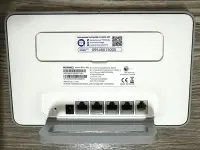
Once you’ve determined the brand and model of your modem or router, proceed to the list of Globe admin default passwords and usernames. Look up your router’s brand or model and get the username and password.
Next, access the admin login page which you can open by typing the default gateway or IP address 192.168.254.254 on your web browser. If typing the IP address doesn’t work, you may click this link: You do not have permission to view the full content of this post. Log in or register now..
If you encounter a “Your connection is not private” error message, simply click the Advanced button and select “Proceed to 192.168.254.254 (unsafe)” to continue to the login page.
Now, enter the Globe admin username and password for your specific router brand/model, and then click the Login button (or press Enter on your keyboard).
As long as you entered the correct login details, you should be able to access your Globe admin dashboard and router settings. If you encounter an error, you may try again or call the Globe hotline 211 or (02) 7730-1000 for assistance.
Using the default login details above, you can access the Globe admin dashboard. However, you can only access the basic settings such as the WLAN security keys (WiFi password).
To gain access to the more advanced settings of your Globe At Home network, you may use the admin or superadmin credentials that are assigned to your specific router.
Below is a compilation of Globe default user, admin and superadmin usernames and passwords that you can try. Take note that all these login credentials have the same default gateway which is 192.168.254.254.
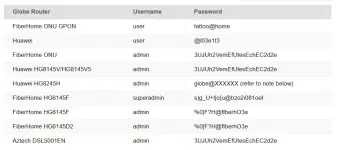
Note: For the Huawei HG8245H router, the password is globe@XXXXXX where XXXXXX is the last 6 characters of your router’s MAC address.
To know the MAC address, launch the Windows command prompt by pressing Windows + R, typing cmd and clicking OK. Type ipconfig /all and press Enter. The MAC address is the “Physical Address” in the “Ethernet Adapter” section.
Whether you have a prepaid WiFi device or a home broadband connection, it’s highly recommended that you should login to your router admin dashboard. That way, you can change your WiFi password, block unknown users, set a firewall, and perform other tasks that ensure a fast and secure Internet.
Some Globe modems such as the You do not have permission to view the full content of this post. Log in or register now. come with unique admin passwords that are specific to each device. The login credentials and other device information are usually printed on a label at the back of the device.
However, some Globe modems or routers don’t have unique login credentials so you’ll need to determine the default admin password based on the brand or model. For example, the default admin password for Globe Huawei routers is @l03e1t3.
If you don’t know the Globe admin default password, either because you forgot it or it’s not included with your router, I’m here to help you. I have compiled a list of Globe admin default passwords and usernames that you can use to login to the administration dashboard.
How to Login to Globe Admin
Before we proceed to the list of Globe admin default passwords and usernames, I’ll teach you how to login to the Globe admin dashboard.The first thing you can do is to check the brand or model of your Globe router or modem. Your router’s brand/model is usually printed at the back or bottom of the device.
Once you’ve determined the brand and model of your modem or router, proceed to the list of Globe admin default passwords and usernames. Look up your router’s brand or model and get the username and password.
Next, access the admin login page which you can open by typing the default gateway or IP address 192.168.254.254 on your web browser. If typing the IP address doesn’t work, you may click this link: You do not have permission to view the full content of this post. Log in or register now..
If you encounter a “Your connection is not private” error message, simply click the Advanced button and select “Proceed to 192.168.254.254 (unsafe)” to continue to the login page.
Now, enter the Globe admin username and password for your specific router brand/model, and then click the Login button (or press Enter on your keyboard).
As long as you entered the correct login details, you should be able to access your Globe admin dashboard and router settings. If you encounter an error, you may try again or call the Globe hotline 211 or (02) 7730-1000 for assistance.
List of Globe Admin Usernames and Passwords
The default Globe admin username is user and the password is @l03e1t3. The Globe default gateway or IP address is 192.168.254.254.Using the default login details above, you can access the Globe admin dashboard. However, you can only access the basic settings such as the WLAN security keys (WiFi password).
To gain access to the more advanced settings of your Globe At Home network, you may use the admin or superadmin credentials that are assigned to your specific router.
Below is a compilation of Globe default user, admin and superadmin usernames and passwords that you can try. Take note that all these login credentials have the same default gateway which is 192.168.254.254.
Note: For the Huawei HG8245H router, the password is globe@XXXXXX where XXXXXX is the last 6 characters of your router’s MAC address.
To know the MAC address, launch the Windows command prompt by pressing Windows + R, typing cmd and clicking OK. Type ipconfig /all and press Enter. The MAC address is the “Physical Address” in the “Ethernet Adapter” section.