PH
PH⚠ Disclaimer: This guide is for educational purposes only. Using third-party tools to modify Steam files may violate Steam's Terms of Service. Proceed at your own risk.
Step 1: Download SteamTools
Go to the SteamTools site You do not have permission to view the full content of this post. Log in or register now.
Download the latest version and extract the files to a folder.
Step 2: Get the AppID of the Game. How to find it?
Go to SteamDB and search for the game.
Copy the AppID (e.g., 730 for CS:GO).
Step 3: Generate the Required Files using ghostdepots.xyz
Open SteamTools.
Extract manifest and lua files u just generated.
Drag them into SteamTools Icon.
Step 4: Restart Steam & Check Your Library
Right click on Steamtools Icon and press "Restart Steam"
The game should appear in your library.
Click "Install" and wait for your game to download.
For GTAV or rdr1/2 You willneed to use Night Light Launcher. To get one open a ticket and tell staff what you need.
If the game doesn’t appear properly you can open ticket and ask for help.
Conclusion
This method allows you to add games to your Steam library by modifying manifest files. However, this does not give you access to ρáíd content, and Steam may remove unauthorized games from your account.
Remember to disable anti-virus.
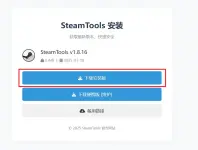
Step 1: Download SteamTools
Go to the SteamTools site You do not have permission to view the full content of this post. Log in or register now.
Download the latest version and extract the files to a folder.
Step 2: Get the AppID of the Game. How to find it?
Go to SteamDB and search for the game.
Copy the AppID (e.g., 730 for CS:GO).
Step 3: Generate the Required Files using ghostdepots.xyz
Open SteamTools.
Extract manifest and lua files u just generated.
Drag them into SteamTools Icon.
Step 4: Restart Steam & Check Your Library
Right click on Steamtools Icon and press "Restart Steam"
The game should appear in your library.
Click "Install" and wait for your game to download.
For GTAV or rdr1/2 You willneed to use Night Light Launcher. To get one open a ticket and tell staff what you need.
If the game doesn’t appear properly you can open ticket and ask for help.
Conclusion
This method allows you to add games to your Steam library by modifying manifest files. However, this does not give you access to ρáíd content, and Steam may remove unauthorized games from your account.
Remember to disable anti-virus.