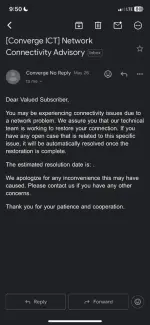
Hello! I'm sorry to hear about your internet outage. Seeing a red LOS (Loss of Signal) blinking light on your modem usually indicates a connection issue between your modem and the network. Here are some steps you can try to troubleshoot the problem:
1. Check Physical Connections:
- Ensure that all cables (power, Ethernet, coaxial) are securely connected to your modem and the wall outlet.
- If possible, try using a different Ethernet cable to rule out any cable issues.
2. Power Cycle:
- Turn off your modem and router (if you have one) for about 30 seconds, then power them back on. This can sometimes resolve connectivity issues.
3. Contact Customer Support:
- If the issue persists after checking the physical connections and power cycling, it's best to contact your Internet Service Provider's customer support. They can run diagnostics on their end and send a technician if needed.
4. Network Outage:
- There might be an outage in your area causing the connectivity problem. Check your ISP's outage status page or social media for any updates.
5. Reset Modem:
- As a last resort, you can try resetting your modem to its factory settings. However, be aware that this will erase any custom settings.
If none of these steps work, it's best to get in touch with your ISP for further assistance. They can provide more specific guidance based on your account and network setup. I hope your internet connection gets resolved soon!
 PH
PH