 PH
PHsir pa link ng firmware mo v1okay chineck ko now ung S2S connection ko na naka swap to ZTE F670L, gumana naman ang LAN ports, cguro may iba sa steps na ginawa mo during debranding ng firmware...
upload ko later mamaya ang firmware files at debranding steps.. pati din Hide SSID gumana.. cguro ung blue firmware mo ay naka restrict din ata
itry mo din ilipat sa ibang LAN ports, baka hardware defect yan sa port mismo..
-
Welcome to PHCorner Forums! Sign up for free to unlock full access and exclusive privileges, including:
- Asking questions about computer and mobile issues
- Discovering internet tips for your mobile network and computer
You are using an out of date browser. It may not display this or other websites correctly.
You should upgrade or use an alternative browser.
You should upgrade or use an alternative browser.
Converge Bida Fiber ZTE F679W modem to F670L???
hello sir working pa ba change sn ? willing to pay po paturo lang hindi ko kasi
masundan yung instruction
masundan yung instruction
install po muna kayo ng python po... python3: You do not have permission to view the full content of this post. Log in or register now.
requirement cya para ma run ang script, pde nyo i remove afterwards kun di nyo na need
View attachment 3603443
for more info, if meron kayo #forbidden#, join us a häçkgpon #forbidden# channel: https://#forbidden#.gg/efDzz8Dt
edit: bawal pala sa rules, pero search nyo lng sa google häçk GPON
uriedeomampo
Eternal Poster
boss pano po idownload yung number 1? medyo naguguluhan lang akohindi tlga yan gagana kasi iba ang GPON S/N ng dalawang modem/ONT. Hindi "linya" sa poste ang basehan sa Fiber pra ma ka pag connect ng modem sa network nila kundi ung GPON serial number. Tignan mo sticker sa likod mag kaiba ang GPON S/N.
Para ma change and F670L serial number
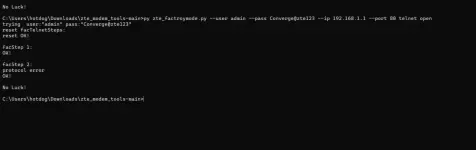
Unlock telnet:
1. Download tool: You do not have permission to view the full content of this post. Log in or register now.
2. Install requirements: "pip install -r requirements.txt"
3. Command: "python3 zte_factroymode.py --user admin--pass Converge@zte123 --ip 192.168.1.1 --port 80 telnet open"
4. Login to telnet: "telnet 192.1681.1", use login from step 3.
5. Change GPON S/N and Vendor id
"setmac 1 2176 xxxx" - Vendor ID
"setmac 1 2177 xxxxxxxxx" - Serial Number
6. Set VLAN ID to Surf2Sawa VLAN
Similar threads
About this Thread
-
46Replies
-
7KViews
-
12Participants
Last reply from:
ronden02
ronden02
New Topics
-
Help Pa Admin Access B312-939
- Started by DtctiveConan
- Replies: 0
- 📡 Broadband, Modem, & Networking
-
Help Pa Admin Access po B312-939
- Started by DtctiveConan
- Replies: 0
- 📡 Broadband, Modem, & Networking
-
PLDT FiberHome HG6245D Brazilian Firmware
- Started by weah05
- Replies: 1
- 📡 Broadband, Modem, & Networking
-
-
Admin at password para sa ZTE model ZXHN F679D
- Started by TOpKILL
- Replies: 1
- 📡 Broadband, Modem, & Networking
-
[FREE] [APK] Rain101 Unlocker + BUGOK101 CFW [SUPER EZ]
- Started by bugok101
- Replies: 63
- 📡 Broadband, Modem, & Networking
-
Youtube No Ads DNS
- Started by cleverian
- Replies: 24
- 📡 Broadband, Modem, & Networking
-
Public DNS Tutorial
- Started by VCODE
- Replies: 16
- 📡 Broadband, Modem, & Networking
-
Open line Globe at home 101 5G, it's reasonable price?
- Started by G O Z A R U
- Replies: 13
- 📡 Broadband, Modem, & Networking
Trending Topics
-
-
-
-
-
Rain101 (Anti TTL) Bypass Datamaxx 5GUnli / Sayall 5G Unli ( No Connection )
- Shuuuuuuuun
Replies: 70 -
-
-
-
Online now
- Members online
- 407
- Guests online
- 6,013
- Total visitors
- 6,420