 PH
PHdirtyfinger
Elite

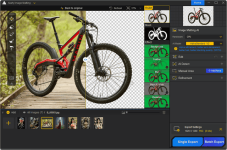
Welcome to Aiarty Image Matting, a state-of-the-art AI tool for your PC. Using advanced AI algorithms, it accurately isolates foreground objects and blends them smoothly with solid colors or other images. Whether you're working on a commercial product, a personal portfolio, or a social media post, Aiarty handles intricate details such as hair, fur, translucent objects, and low-light conditions, maintaining sharp edges and taking your work to the next level.
Aiarty Image Matting uses AI to automatically process complex images, making it easy to work with products, portraits, logos, and more. With a streamlined, easy-to-use interface, anyone can achieve professional-quality results in just a few clicks – no manual editing required.
Optimized for translucent object matting
Use deep convolutional layers to capture complex features in images such as wedding dresses, lace, tulle, glass, and water droplets. Professionally preserve translucent properties and optimize edge details for a more natural blend with new backgrounds.
Batch Replace Backgrounds for Product
Images Intelligent Object Recognition and Batch Replace Backgrounds. Identify and process up to 3000 product photos by replacing backgrounds at the same time.
High-precision alpha-matting
Take a step forward with dynamic transparency control and edge optimization, even in difficult edge cases. This guarantees excellent detail retention and makes background integration seamless.
Versatile Background
Effects Replace the background with transparency, solid colors, custom effects like blur, or other images. Highlight an object and create eye-catching compositions for e-commerce, personal projects, and more.
Supported Input Formats
• .jpg, .jpeg, .bmp, .png, .webp, .avif, .tif, .tiff, .jfif, .jp2, .j2k, .jpm, .jpg2, .j2c, .jpc, .jpx, .mj2,
• Adobe(.dng), Canon(.crw, .cr2, .cr3), Nikon(.nrw, .nef), Sony(.sr2, .arw, .arq), Fujifilm(.raf), Panasonic(.rw2), Olympus(.orf, .ori), Pentax(.pef, .ptx), Hasselblad(.3fr, .fff), Phase One(.iiq), Leica(.rwl),
• SamSung(.srw), Epson(.erf), Leaf Aptus(.mos), Mamiya(.mef), Minolta(.mrw, .mdc), Kodak(.dcr),
• Sony(.srf), Pentax(.ptx), Phase One(.cap, .eip), Kodak(.dcs, .drf, .k25), Casio(.bay), Logiteck(.pxn), RED Digital Cinema Camera Company(.r3d), Rawzor(.rwz).
Supported Output Formats .png (8-bit, 16-bit)
OS: Windows 10 (1809) or higher - x64
RAM: 8GB (Recommended: 16 GB or above)
GPU:
Requires a DirectX 12 capable device.
Examples of compatible hardware include:
• AMD GCN 1st Gen (Radeon HD 7000 series) and above
• Intel Haswell (4th-gen core) HD Integrated Graphics and above
• NVIDIA Kepler (GTX 600 series) and above
Download Digiarty AIArty Image Matting 2.5 (238.6 MB)
You do not have permission to view the full content of this post. Log in or register now.