 PH
PHThis tutorial contains a way that can activate Windows 10 and 11 in under 40 seconds. This method is compatible with home, home N, Home single lang, Home country specific, professional, education and enterprise versions of Windows.
Congratulations!
your Windows & MS Office has been activated.
now you can hit the enter key to exit the CMD and close PowerShell and check windows Activation menu
Step 1:
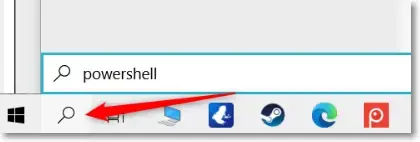
All you need to do is hit the start or search icon and type the "PowerShell" in the search box.Step 2:
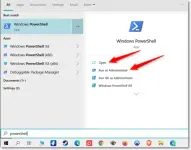
Next, you must click on the Run as Administrator to start PowerShell, in this case we need to run with administrative privileges.Step 3:
Now, after a brief pause to allow for execution, please copy this line:
Code:
irm https://get.activated.win | iexStep 4:
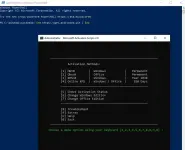
Now paste it (with right-click) and hit the enter key. In the newly opened window, there are several options available, from which we must select option 1 or option 2 and wait a few seconds to complete.Congratulations!
your Windows & MS Office has been activated.
now you can hit the enter key to exit the CMD and close PowerShell and check windows Activation menu