 PH
PHYou do not have permission to view the full content of this post.
Log in or register now.
Microsoft Activation Scripts (MAS)
Open-source Windows and Office ac†ïvâ†ør featuring HWID, Ohook, TSforge, and Online KMS activation methods, along with advanced troubleshooting.
How to Activate Windows / Office / Extended Security Updates (ESU)?
Method 1 - PowerShell 
- Click the Start Menu, type PowerShell, and open it.
- Copy and paste the code below and press Enter.
- For Windows 8.1, 10 and 11:
Spoiler contents are visible only to Established Members.
If the above is blocked (by ISP/DNS), try this (needs updated Windows 10 or 11):
Spoiler contents are visible only to Established Members.
- Script not launching? Use the below-listed Method 2.
- For Windows 8.1, 10 and 11:
- In the menu that appears, type the number corresponding to one of the Green options.
Method 2 - Traditional (Windows Vista and later)
- Download the script:
- You do not have permission to view the full content of this post. Log in or register now. (Direct script)
- You do not have permission to view the full content of this post. Log in or register now. (If the direct script is blocked by your browser)
- Run the MAS_AIO.cmd file.
- In the menu that appears, type the number corresponding to one of the Green options.
Tip
- Some ISPs/DNS providers block access to our domains. You can bypass this by enabling You do not have permission to view the full content of this post. Log in or register now. in your browser.
- Having trouble? Visit our You do not have permission to view the full content of this post. Log in or register now. or raise an issue on You do not have permission to view the full content of this post. Log in or register now..
- The irm command in PowerShell downloads a script from a specified URL, and the iex command executes it.
- Always double-check the URL before executing the command and verify the source is trustworthy when manually downloading files.
- Be cautious of third parties spreading malware disguised as MAS by altering the URL in the PowerShell command.
Homepage - You do not have permission to view the full content of this post.
Log in or register now.

 You do not have permission to view the full content of this post.
Log in or register now. You do not have permission to view the full content of this post.
Log in or register now. You do not have permission to view the full content of this post.
Log in or register now. You do not have permission to view the full content of this post.
Log in or register now. You do not have permission to view the full content of this post.
Log in or register now.
You do not have permission to view the full content of this post.
Log in or register now. You do not have permission to view the full content of this post.
Log in or register now. You do not have permission to view the full content of this post.
Log in or register now. You do not have permission to view the full content of this post.
Log in or register now. You do not have permission to view the full content of this post.
Log in or register now.
Proof po ginamit ko sa PC ko

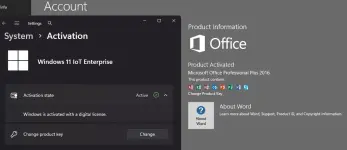


.webp "(ditto) :(ditto):")

