 PH
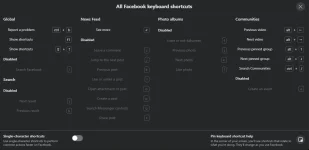
PHFacebook has shortcuts (access keys) for people who rely on their keyboards to navigate. Different web browsers (example: Firefox, Internet Explorer) may have different keyboard shortcuts.
Keyboard shortcuts only work if you aren't in a text box. If you have an issue while using keyboard shortcuts, please You do not have permission to view the full content of this post. Log in or register now..
Learn how to You do not have permission to view the full content of this post. Log in or register now..
Keyboard shortcuts may not work in video calls or video players.

Keyboard shortcuts only work if you aren't in a text box. If you have an issue while using keyboard shortcuts, please You do not have permission to view the full content of this post. Log in or register now..
Learn how to You do not have permission to view the full content of this post. Log in or register now..
Action Shortcuts
Some shortcuts help you do things such as like, comment or share something on Facebook. These shortcuts only use one keyboard key.- J and K - Scroll between Feed stories.
- enter/return - See more of the selected story.
- P - Post a new status.
- L - Like or unlike the selected story.
- C - Comment on the selected story.
- S - Share the selected story.
- O - Open an attachment from the selected story.
- / - Search.
- Q - Search chat contacts.
- ? - Open a list of these keyboard shortcuts while in Feed.
Keyboard shortcuts may not work in video calls or video players.