 PH
PH
File size: 15.8 MB
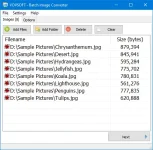
Vovsoft Batch Image Converter is a simple tool for converting between graphic formats in batches. With its help, you can easily obtain images in the desired format out of a folder containing pictures of diverse types.
Select your output image format, convert the original images by simply doing a batch convert in one go. The software supports JPEG, BMP, GIF, ICO, PNG, TIFF, WMP image filetypes.
You can use this highly intuitive and user-friendly application to quickly change the formats of multiple graphic files. You simply need to add one or more image files either via drag and drop, or by manually browsing to the location of each file.
Additionally, the installer can add shortcut to SendTo directory, so that users can right-click files or folders from the context menu and convert selected files all at once.
Screen :
What's New
Spoiler contents are visible only to Established Members.
HOMEPAGE
Code:
https://vovsoft.com
You do not have permission to view the full content of this post. Log in or register now.
You do not have permission to view the full content of this post. Log in or register now.
You do not have permission to view the full content of this post. Log in or register now.