PH
PHjericho0129
Grasshopper
Mga boss tulong naman di ko magamit yung LTE Mifi generic driver stucked ako
I am in Accra you my cell number is 0238621457 I'm on whtsppkobby where do you leave. Accra or Kumasi? And also which type of mifi do you have? L02B or L02C?. I can help you personally if u can make it to my place or drop your WhatsApp line here.
BUSY M028TI am in Accra you my cell number is 0238621457 I'm on whtspp
How did it go kobby?I am in Accra you my cell number is 0238621457 I'm on whtspp
Hello zedicus.Hi guys, I am addressing to those who have advanced knowledge on L02C and L02B Mifi, if you don't want to post here even inbox a person just gives us the method to perform firmware backup only with this I can find the solution for *WTPTP Error: FBF_VersionNotMatch*
Thank in advance !!!
I will post the guide for bypassing VersionNotMatch error this week. It's not a straight forward fix but if you follow the steps well, your mifi will be unlocked.How did it go kobby?
Quelles sont les etapes avec quel outils ...I will post the guide for bypassing VersionNotMatch error this week. It's not a straight forward fix but if you follow the steps well, your mifi will be unlocked.


thanks broVersionNotMatch Bypass for L02B and L02C (M028T)
(1) Download these 3 firmwares:
a)You do not have permission to view the full content of this post. Log in or register now.
b)You do not have permission to view the full content of this post. Log in or register now.
c)You do not have permission to view the full content of this post. Log in or register now.
d)Read the original information from the mifi with MIFI Tool before you proceed
(2) Extract the L02BUganda1_M023_LCD_V003_8801_2.144.000_20161117_1030_SIGN firmware. you will use this firmware to erase your.
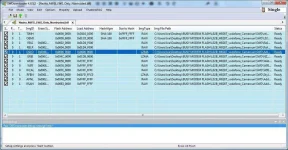
a) Open the SWDownloader.exe and select Nezha_MiFi5_LWG_Only_Nontrusted.blf file in SWD folder. Go to Options and choose Erase All Flash
b) Click start on the SWDownloader, remove the battery from the mifi and connect it to your PC/laptop
c)Keep your eye on the progress bar and when it reach 26% also or you see erase done and is about to start burning the images, disconnect the mifi from the usb cable. Insert the battery and check if it can turn On or not. If it turn On that means it did not erase and you must repeat the step A and B again.
(3)Extract the L02HSUN1_FXPR2_M028T_V003_8801_2.137.001_20160513_1130 firmware. Flash this firmware to your mifi with the Option Erase All Flash.
This firmware will enable you to flash the L02B_M028T_vodafone_Cameroun firmware without any errors.
NB. Dont repair imei,serial or mac address. This firmware won't work well on your mifi.
4 Extract the L02B_M028T_vodafone_Cameroun firmware. Open the SWDownloader with Erase All Flash option tick.
a) Double click on the OSLO file
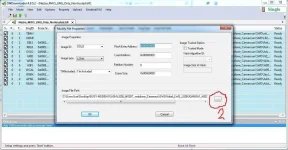
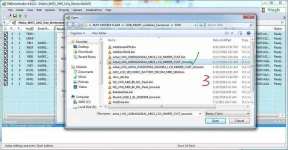
b) Browse and locate Arbel_LWG_L02BUGANDA1_M023_LCD_MMIFI5_CUST_lzma.bin by following image 2 and 3
c) After selecting the file in image 3, click ok and flash the mifi and wait for it to complete. Insert the battery and turn it On.
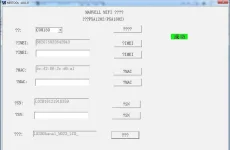
d) connect the mifi with the usb cable, launch the MIFI tools and repair your imei,mac address and serial no.
e) Reboot the mifi and login with username:smartbro password:smartbro. PN PIN to unlock the mifi is 123456
NOTE: LTE and SD card not working. Maybe with a little modification, they might work but i don't have this device anymore.sorry
How to download files from baidu? It was easy with spanduoduo.VersionNotMatch Bypass for L02B and L02C (M028T)
(1) Download these 3 firmwares:
a)You do not have permission to view the full content of this post. Log in or register now.
b)You do not have permission to view the full content of this post. Log in or register now.
c)You do not have permission to view the full content of this post. Log in or register now.
d)Read the original information from the mifi with MIFI Tool before you proceed
(2) Extract the L02BUganda1_M023_LCD_V003_8801_2.144.000_20161117_1030_SIGN firmware. you will use this firmware to erase your.
a) Open the SWDownloader.exe and select Nezha_MiFi5_LWG_Only_Nontrusted.blf file in SWD folder. Go to Options and choose Erase All Flash
b) Click start on the SWDownloader, remove the battery from the mifi and connect it to your PC/laptop
c)Keep your eye on the progress bar and when it reach 26% also or you see erase done and is about to start burning the images, disconnect the mifi from the usb cable. Insert the battery and check if it can turn On or not. If it turn On that means it did not erase and you must repeat the step A and B again.
(3)Extract the L02HSUN1_FXPR2_M028T_V003_8801_2.137.001_20160513_1130 firmware. Flash this firmware to your mifi with the Option Erase All Flash.
This firmware will enable you to flash the L02B_M028T_vodafone_Cameroun firmware without any errors.
NB. Dont repair imei,serial or mac address. This firmware won't work well on your mifi.
4 Extract the L02B_M028T_vodafone_Cameroun firmware. Open the SWDownloader with Erase All Flash option tick.
a) Double click on the OSLO file
b) Browse and locate Arbel_LWG_L02BUGANDA1_M023_LCD_MMIFI5_CUST_lzma.bin by following image 2 and 3
c) After selecting the file in image 3, click ok and flash the mifi and wait for it to complete. Insert the battery and turn it On.
d) connect the mifi with the usb cable, launch the MIFI tools and repair your imei,mac address and serial no.
e) Reboot the mifi and login with username:smartbro password:smartbro. PN PIN to unlock the mifi is 123456
NOTE: LTE and SD card not working. Maybe with a little modification, they might work but i don't have this device anymore.sorry