 PH
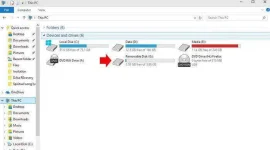
PHInsert the SD card on the card slot and check what is the drive letter name.
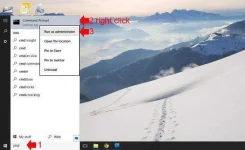
2.Run the command prompt as administrator, you can search it using the windows search bar, when it appears on the search, right-click and select run as administrator.Click Yes, if prompted to confirm running as administrator.
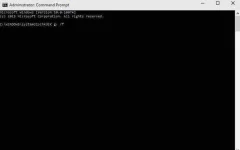
3.On the command prompt type “chkdsk g: /f” without quote, g: is the drive letter of your memory card, when finish typing hit enter. Chkdsk is a short for Check Disk a system tool in DOS that verifies the file system integrity of a volume and fixes logical file system errors. See the screenshot.
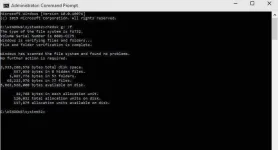
4.It will now check your memory card for errors and try to fix, it may take some time depending on the size of your SD card and the content, please be patient and wait until it finished. If it’s successful you will see in the result the errors and fixed sectors. In my case my SD card has no problem.
5
You will see the recovered data stored in directory name lost.dir inside SD card. If you’re corrupted memory or SD card cannot fix you may see this error.
The type of filesystem is RAW – This means that ChkDsk cannot identify the filesystem, which usually results from a corrupted SD card that ChkDsk cannot fix. If you receive this error, the problems are beyond ChkDsk’s ability to fix them.
If the solution above did not fix your corrupted Memory Card or your computer does not recognize it, your last resort is to format the memory card. But all the data will be lost.
Another solution is to perform a quick format and try to recover using a free data recovery program like You do not have permission to view the full content of this post. Log in or register now. to try to recover your files.
2.Run the command prompt as administrator, you can search it using the windows search bar, when it appears on the search, right-click and select run as administrator.Click Yes, if prompted to confirm running as administrator.
3.On the command prompt type “chkdsk g: /f” without quote, g: is the drive letter of your memory card, when finish typing hit enter. Chkdsk is a short for Check Disk a system tool in DOS that verifies the file system integrity of a volume and fixes logical file system errors. See the screenshot.
4.It will now check your memory card for errors and try to fix, it may take some time depending on the size of your SD card and the content, please be patient and wait until it finished. If it’s successful you will see in the result the errors and fixed sectors. In my case my SD card has no problem.
5
You will see the recovered data stored in directory name lost.dir inside SD card. If you’re corrupted memory or SD card cannot fix you may see this error.
The type of filesystem is RAW – This means that ChkDsk cannot identify the filesystem, which usually results from a corrupted SD card that ChkDsk cannot fix. If you receive this error, the problems are beyond ChkDsk’s ability to fix them.
If the solution above did not fix your corrupted Memory Card or your computer does not recognize it, your last resort is to format the memory card. But all the data will be lost.
Another solution is to perform a quick format and try to recover using a free data recovery program like You do not have permission to view the full content of this post. Log in or register now. to try to recover your files.