 PH
PH
Straightforward Tool to Use
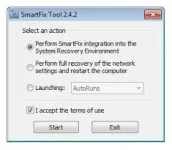
SmartFix Tool is very easy to use. You can start integrating it into the System Recovery Environment to make sure it runs every time you need it. That makes it possible for you to run this application even when Windows cannot be booted, allowing you to easily get rid of problems with your system.Sadly, there is no English documentation, but you still should be able to solve the issues.
Access the Program Quickly and Run It
The great thing about this tool is that it can be run very easily and quickly. All you need to do to run it is press F8, and the program will be launched. It would be best if you did that when you’re booting up your computer, though.You’ll need to follow the instructions inside to get the things done easily – there are only a couple of mouse clicks you need to do.
Features of SmartFix Tool 2023
Below are some noticeable features which you’ll experience after SmartFix Tool 2023 free download.- Resolve different system faults as well as remove malicious elements.
- Remedy the issues by conducting an entire restoration of the connection configuration and rebooting the machine.
- Lacks English paperwork making it impossible to determine which faults the application can solve.
- Reached by hitting the shortcut key F8 during boot-up and performing the on-screen instructions.
- Simple to operate since it just takes a couple of taps on the mouse to run the diagnostic tool.
- Allow you to execute the restoration process despite the fact that Windows is not booted.
You do not have permission to view the full content of this post. Log in or register now.
Spoiler contents are visible only to Established Members.
 Keep Sharing po