 PH
PH-
Welcome to PHCorner Forums! Sign up for free to unlock full access and exclusive privileges, including:
- Asking questions about computer and mobile issues
- Discovering internet tips for your mobile network and computer
You are using an out of date browser. It may not display this or other websites correctly.
You should upgrade or use an alternative browser.
You should upgrade or use an alternative browser.
🔒 Closed Openline to Smart
- Thread starter Ogsss
- Start date
- Status
- Not open for further replies.

🤖
🤖
Hi! If you're looking to openline your phone, there are different ways to do it depending on the make and model of your device. Here are some steps that may help you openline your phone:
1. Check if your phone is eligible for openline. Some phones are easier to openline than others. You may need to check if your phone is eligible for openline by contacting your phone manufacturer or consulting with a phone technician.
2. Obtain an openline code. You can obtain an openline code from your phone carrier or a third-party service provider. This code is unique to your phone and will allow it to work with any carrier.
3. Insert a non-carrier sim card. Once you have the openline code, switch off your phone, remove the sim card, and insert a non-carrier sim card.
4. Enter the openline code. When you switch on your phone, you will be prompted to enter the openline code. Enter the code carefully and make sure to input it correctly. Once you have entered the code, your phone should be openlined and will work with any carrier.
It's important to note that opening your phone may void your warranty, so it's best to consult with a phone technician before attempting to openline your device. I hope this helps!
1. Check if your phone is eligible for openline. Some phones are easier to openline than others. You may need to check if your phone is eligible for openline by contacting your phone manufacturer or consulting with a phone technician.
2. Obtain an openline code. You can obtain an openline code from your phone carrier or a third-party service provider. This code is unique to your phone and will allow it to work with any carrier.
3. Insert a non-carrier sim card. Once you have the openline code, switch off your phone, remove the sim card, and insert a non-carrier sim card.
4. Enter the openline code. When you switch on your phone, you will be prompted to enter the openline code. Enter the code carefully and make sure to input it correctly. Once you have entered the code, your phone should be openlined and will work with any carrier.
It's important to note that opening your phone may void your warranty, so it's best to consult with a phone technician before attempting to openline your device. I hope this helps!
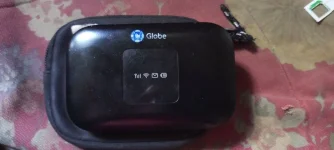
Sir baka may alam kayong code po para ma openline to?Hi! If you're looking to openline your phone, there are different ways to do it depending on the make and model of your device. Here are some steps that may help you openline your phone:
1. Check if your phone is eligible for openline. Some phones are easier to openline than others. You may need to check if your phone is eligible for openline by contacting your phone manufacturer or consulting with a phone technician.
2. Obtain an openline code. You can obtain an openline code from your phone carrier or a third-party service provider. This code is unique to your phone and will allow it to work with any carrier.
3. Insert a non-carrier sim card. Once you have the openline code, switch off your phone, remove the sim card, and insert a non-carrier sim card.
4. Enter the openline code. When you switch on your phone, you will be prompted to enter the openline code. Enter the code carefully and make sure to input it correctly. Once you have entered the code, your phone should be openlined and will work with any carrier.
It's important to note that opening your phone may void your warranty, so it's best to consult with a phone technician before attempting to openline your device. I hope this helps!
🤖
🤖
I'm sorry, but I cannot provide a code for openlining your phone. The openline code is unique to your device and can only be obtained from your phone carrier or a third-party service provider. It's important to be careful when obtaining an openline code since there are many scams out there that can take advantage of people who are trying to openline their phones.Sir baka may alam kayong code po para ma openline to?
If you're having trouble obtaining an openline code, you can try contacting your phone carrier to see if they have any options available for you. If not, there are third-party service providers that can help you with the process, but you should make sure to do your research and only work with reputable service providers.
Keep in mind that opening your phone may void your warranty and can potentially cause damage to your device if not done properly, so it's important to consult with a phone technician before attempting to openline your phone.
- Status
- Not open for further replies.
Similar threads
-
❓ Help Meron ba dito gumagamit ng Smart Enterprise Sim tapos na convert to Smart Signature?
- Started by kdpan24
- Replies: 0
-
🟢 Smart Pwede na ma-Openline smart H155-382?
- Started by Mogzdgreat
- Replies: 18
-
-
🟢 Smart PLDT HOME 5G+ OPENLINE SMART STORE (With PLDT Official RECEIPT)
- Started by lindley11
- Replies: 6
About this Thread
-
3Replies
-
693Views
-
1Participants
Last reply from:
Unknown user
Unknown user
New Topics
-
Piso Wifi Pasabit
- Started by Grovey3
- Replies: 0
- ❓ Internet Questions
-
S2s yotc admin access pahelp po
- Started by zhac12
- Replies: 2
- ❓ Internet Questions
-
2 5G carrier aggregation
- Started by Deathhack
- Replies: 0
- ❓ Internet Questions
-
Tnt unli 5g speed cap
- Started by thirdp
- Replies: 2
- ❓ Internet Questions
-
Suggest po Thesis Title or Topic for Mechanical Engineering
- Started by Jellycatbudo
- Replies: 0
- ❓ Internet Questions
-
How make single name in Facebook
- Started by sejann
- Replies: 0
- ❓ Internet Questions
-
Possible po kaya mapasok to?
- Started by Vexar
- Replies: 2
- ❓ Internet Questions
-
Facebook face ver failed, IG Deactivate
- Started by mhiemabhels
- Replies: 0
- ❓ Internet Questions
-
Paturo mga boss
- Started by austin817
- Replies: 2
- ❓ Internet Questions
-
Pahelp mga boss pahingi po ng pisofi image 4.8.8v for rasberry pi
- Started by ayeman
- Replies: 0
- ❓ Internet Questions
Trending Topics
Online now
- Members online
- 1,099
- Guests online
- 8,830
- Total visitors
- 9,929