PH
PHMagandang araw, mga ka-PHC!
Share ko lang itong detailed guide kung paano mag-request ng official device unlocking (Openline) mula sa Smart/PLDT, lalo na kung lagpas 2 years (24 months) na mula nang mabili ninyo ang device.
Under NTC Memorandum Circular No. 01-05-2019, mandatory para sa mga telcos na i-unlock ang mga devices upon request ng customer kapag tapos na ang lock-in period nito. Para mas mapabilis ang action ni Smart, isasali natin ang NTC Consumer complaint team sa email.
(Note: Kagaya ng nakikita natin sa mga threads like the PLDT Home 5G+ openline discussions, having the Official Receipt is a huge advantage).
Mga Kailangan (Requirements):
Step 1: I-ready ang mga attachments
Picturan o i-scan ang iyong Official Receipt at Valid ID. Siguraduhing malinaw at nababasa ang details. Kunin na rin ang IMEI/Serial number sa likod ng device o sa box.
Step 2: Gumawa ng Email requestMag-compose ng bagong email. I-send ito sa official Customer Care email ng Smart at i-CC (Carbon Copy) ang NTC para add as priority at agad nilang aksyunan agad.
Kopyahin ninyo na lang itong format sa ibaba at palitan ang mga details na nasa loob ng brackets [ ].
Step 4: Wait for Confirmation and Follow-up
Makakatanggap ka ng automated reply galing kay Smart na may kasamang Ticket Number. I-save niyo 'yan. Dahil naka-CC ang NTC, mas mabilis nilang ipapasa ito sa support team na nag-aasikaso ng unlocking. Mag-reply lang sa thread ng email kung nanghihingi pa sila ng additional details via Smart SAM.
Sana makatulong ito sa mga gustong mag-legit openline ng mga devices nila! Drop your questions below kung may nalilito.
PROOFS:
1. You do not have permission to view the full content of this post. Log in or register now.
2. You do not have permission to view the full content of this post. Log in or register now.
3. You do not have permission to view the full content of this post. Log in or register now.
Q: Paano kung sa Lazada o Shopee ko binili yung modem?
A: Kung binili mo ito mismo sa Official Smart/PLDT Store sa Lazada o Shopee, kadalasan ay may kasamang physical na Official Invoice o Receipt sa loob ng parcel mo. Kapag wala sa parcel, nagse-send din sila ng electronic receipt (e-OR) sa email na naka-link sa account mo. Iyon ang gagamitin mo! Kung nawala mo na ang physical copy at wala sa email, pwede kang mag-message directly sa official merchant store sa Lazada/Shopee para mag-request ng soft copy o reprint.
Note: Kung sa 3rd-party reseller (hindi official store) mo nabili, kailangan mo pa ring hingin sa kanila yung original na resibo galing Smart/PLDT dahil iyon ang hahanapin ng Customer Care.
Share ko lang itong detailed guide kung paano mag-request ng official device unlocking (Openline) mula sa Smart/PLDT, lalo na kung lagpas 2 years (24 months) na mula nang mabili ninyo ang device.
Under NTC Memorandum Circular No. 01-05-2019, mandatory para sa mga telcos na i-unlock ang mga devices upon request ng customer kapag tapos na ang lock-in period nito. Para mas mapabilis ang action ni Smart, isasali natin ang NTC Consumer complaint team sa email.
(Note: Kagaya ng nakikita natin sa mga threads like the PLDT Home 5G+ openline discussions, having the Official Receipt is a huge advantage).
Mga Kailangan (Requirements):
- Proof of Purchase: Official Receipt (OR) ng device. Dapat nakapangalan sa iyo o may authorization letter ka.
- Valid ID: 1 or 2 Government-issued IDs ng owner na nasa resibo.
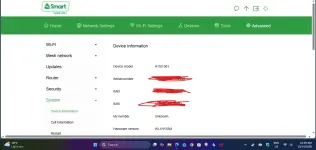
- Device Details: IMEI number (for phones/modems) at Serial Number ng device.
- Active Email Address
Step 1: I-ready ang mga attachments
Picturan o i-scan ang iyong Official Receipt at Valid ID. Siguraduhing malinaw at nababasa ang details. Kunin na rin ang IMEI/Serial number sa likod ng device o sa box.
Step 2: Gumawa ng Email requestMag-compose ng bagong email. I-send ito sa official Customer Care email ng Smart at i-CC (Carbon Copy) ang NTC para add as priority at agad nilang aksyunan agad.
- To: customercare@smart.com.ph (Note: If you have an active ticket from Smart SAM, mention it in the subject)
- CC: consumer@ntc.gov.ph
Kopyahin ninyo na lang itong format sa ibaba at palitan ang mga details na nasa loob ng brackets [ ].
Code:
Subject: Formal Request for Device Unlocking pursuant to NTC MC No. 01-05-2019 - [Your Name] / [Device Model]

To Smart Communications Customer Service,
CC: NTC Consumer Welfare Division,

Good day,

I am writing to formally request the network unlocking of my [Device Brand and Model], which was purchased from your network on [Date of Purchase].

As of this date, the device has successfully completed its 24-month (2 years) period from the date of purchase. Pursuant to the NTC Memorandum Circular No. 01-05-2019 (Rules and Regulations on the Unlocking of Mobile Phones and Devices), telecommunications companies are mandated to unlock eligible devices upon the request of the customer after the lock-in period has expired.

Below are the details of my device for your reference:
- Name of Registered Owner: [Your Full Name]
- Contact Number: [Your Active Contact Number]
- Device Brand and Model: [e.g., PLDT Home 5G+ WiFi / iPhone 13]
- IMEI Number: [15-digit IMEI]
- Serial Number: [Device Serial Number]
- Date of Purchase: [Exact Date from Receipt]

I have attached a clear copy of my Official Receipt (OR) and my valid Government ID to verify my identity and ownership of the device.

I kindly request the unlock code or the remote unlocking procedure for this device as soon as possible. Thank you and I look forward to your prompt action on this matter.

Respectfully,

[Your Name]
[Your Contact Number]
Step 4: Wait for Confirmation and Follow-up
Makakatanggap ka ng automated reply galing kay Smart na may kasamang Ticket Number. I-save niyo 'yan. Dahil naka-CC ang NTC, mas mabilis nilang ipapasa ito sa support team na nag-aasikaso ng unlocking. Mag-reply lang sa thread ng email kung nanghihingi pa sila ng additional details via Smart SAM.
Sana makatulong ito sa mga gustong mag-legit openline ng mga devices nila! Drop your questions below kung may nalilito.
PROOFS:
1. You do not have permission to view the full content of this post. Log in or register now.
2. You do not have permission to view the full content of this post. Log in or register now.
3. You do not have permission to view the full content of this post. Log in or register now.
Q: Paano kung sa Lazada o Shopee ko binili yung modem?
A: Kung binili mo ito mismo sa Official Smart/PLDT Store sa Lazada o Shopee, kadalasan ay may kasamang physical na Official Invoice o Receipt sa loob ng parcel mo. Kapag wala sa parcel, nagse-send din sila ng electronic receipt (e-OR) sa email na naka-link sa account mo. Iyon ang gagamitin mo! Kung nawala mo na ang physical copy at wala sa email, pwede kang mag-message directly sa official merchant store sa Lazada/Shopee para mag-request ng soft copy o reprint.
Note: Kung sa 3rd-party reseller (hindi official store) mo nabili, kailangan mo pa ring hingin sa kanila yung original na resibo galing Smart/PLDT dahil iyon ang hahanapin ng Customer Care.