 PH
PH1. Run the program
2. Prompt to input your password
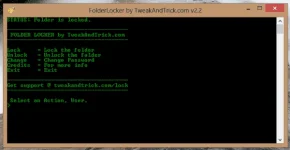
lalabas ang SecuredFiles Folder sa desktop
SecuredFiles folder - dito mo lagay mga importan files
Note: It's undetected at hindi makiktia kahit show hidden folders pa
To hide
Run the program, input your password and type lock
To unhide
Run the program, input your password and type unlock
To change the password
Run the program, input your password and type change
Download link:
You do not have permission to view the full content of this post. Log in or register now.
2. Prompt to input your password
lalabas ang SecuredFiles Folder sa desktop
SecuredFiles folder - dito mo lagay mga importan files
Note: It's undetected at hindi makiktia kahit show hidden folders pa
To hide
Run the program, input your password and type lock
To unhide
Run the program, input your password and type unlock
To change the password
Run the program, input your password and type change
Download link:
You do not have permission to view the full content of this post. Log in or register now.