PH
PHSteps
Message=InputBox("Enter text","Speak")
Set Speak=CreateObject("sapi.spvoice")
Speak.Speak Message
3. Click on File Menu, Save As, select All Types in Save as Type option, and save the file as anyname.vbs or "*.vbs".
4. Double click on the saved file, a window will open like the one in the image. Enter some text in enter text column and click OK.
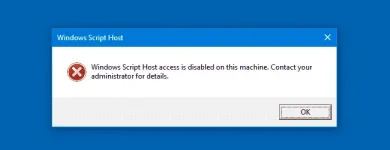
If you encounter this error

Solution:
1. Run
2. Regedit
3. Locate this address
HKEY_CURRENT_USER\SOFTWARE\Microsoft\Windows Script Host\Settings
or
HKEY_LOCAL_MACHINE\SOFTWARE\Microsoft\Windows Script Host\Settings
4. Find Enable
5. then Delete

Hit like kung nag enjoy ka! : )
- Open Notepad.
- Copy and paste the exact code given below.
Message=InputBox("Enter text","Speak")
Set Speak=CreateObject("sapi.spvoice")
Speak.Speak Message
3. Click on File Menu, Save As, select All Types in Save as Type option, and save the file as anyname.vbs or "*.vbs".
4. Double click on the saved file, a window will open like the one in the image. Enter some text in enter text column and click OK.
If you encounter this error
Solution:
1. Run
2. Regedit
3. Locate this address
HKEY_CURRENT_USER\SOFTWARE\Microsoft\Windows Script Host\Settings
or
HKEY_LOCAL_MACHINE\SOFTWARE\Microsoft\Windows Script Host\Settings
4. Find Enable
5. then Delete
Hit like kung nag enjoy ka! : )