PH
PH- Requirements:
Windows 7 / Windows 8 / Windows 10 / Windows XP64 / Vista64 / Windows 7 64 / Windows 8 64 / Windows 10 64 / Windows 11
Complete Internet Repair is a lightweight one-click solution network diagnostic utility that can troubleshoot your Internet connection for a wide variety of issues that can prevent you from connecting to the worldwide internet.
With a simple press of a button, you will be able to scan your networking settings, including many deep features known to network specialists, solve connection issues, and provide an easy way to monitor your connection in the future so that your internet connection can be properly maintained 24/7.
Features and Highlights
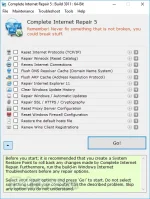
Complete Internet Repair presents to you easy to use UI that is separated into four tabs – File, Maintenance, Troubleshoot, and Tools. The basic screen showcases the main diagnostic listing of all the separate networking settings that could impact the stability of your internet connection, a detailed description of each networking item, and a button “Go!” for starting the full diagnostic test. It is important to mention that Complete Internet Repair can only handle networking issues that can arise on your PC. It cannot handle software or hardware faults that are under the oversight of your ISP.
Here is the list of the most common issues that Complete Internet Repair can routinely fix:
- Internet or local network connection issues caused by uninstalling hostile software such as adware, spyware, virus, worm, Trojan horses, and others.
- Internet connection issues after uninstalling various network-altering apps such as firewalls, VPNs, antivirus suites, and other networking programs.
- Limited or no connection message issues.
- Loss of access to a specific website, or all websites.
- Loss of access to secure websites (such as online banking, business websites, etc.).
- DNS lookup issues.
- Registry errors that affect networking.
- Windows Update issues.
- Proxy server issues.
- Networking-related pop-up windows.
- Browser crashing.
- Limited management of your router/modem issues, including renewing IP address or solving DHCP errors.
Download link:You do not have permission to view the full content of this post. Log in or register now.