 PH
PHSoftware for phone / laptop repair technicians: open the board of any model, click one pad and instantly see every other pad on the same net, together with component names and pre-measured resistance values — instead of tracing by hand on the physical board.
1. The whole board, both sides
Open a model and you get the complete board: component pads, component outlines, net names. Scroll to zoom, drag to pan.
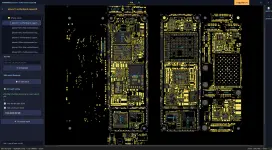
2. Click one pad → the whole net lights up
Click any pad and every pad on the same net turns red across both sides of the board. The red dots grow automatically as you zoom out, so however tiny a pad is, you can still see where that net runs at full-board zoom.
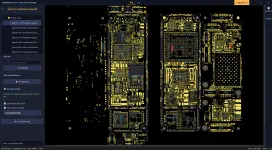
3. Component names and resistance readings right on the board
Zoom in and you get pin numbers, net names, component names (C1801, U1401…) and the pre-measured resistance of each pad — no separate lookup table needed.
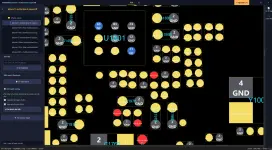
4. Fault guide — measurement steps for each symptom
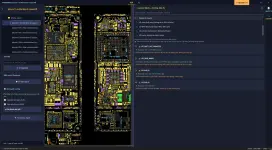
Pick a symptom (no power, no signal, Wi-Fi fault, camera fault…) and the software lists the measurement steps in order. Each step states what a good reading looks like and what to check when it is wrong, and it highlights those exact pads on the board in the matching colour so you know where to put your probes.
1. Download the installer
2. Windows says "Windows protected your PC" — this is normal, not a virus
The software does not yet have a Microsoft code-signing certificate, so Windows shows this warning for any new program. To continue:
Click More info → click Run anyway.
If Chrome/Edge blocks the download itself: click the downloaded file in the browser's download bar → choose Keep.
3. If Windows Security reports "Threats found" and deletes the file
This is a false positive, not a virus. Because the software is not code-signed, Windows Defender treats it as an "unknown, rarely downloaded file" and quarantines it to be safe. We have already submitted a false-positive report to Microsoft.
Restore the deleted file:
Open Windows Security (type "Windows Security" in the search box next to Start)
Go to Virus & threat protection
Click Protection history
Find the entry mentioning VNboards → click it
Click Actions → choose Restore
Then tell Windows this program is trusted (otherwise it will be removed again):
Still in Virus & threat protection
Under Virus & threat protection settings → click Manage settings
Scroll down to Exclusions → click Add or remove exclusions
Click Add an exclusion → choose Folder
Select the folder where VNboards is installed (default: C:\Users\<your user name>\AppData\Local\Programs\VNboards)
4. Install
Run VNboards_Setup.exe → Next → choose the install location (the default is fine) → Install.
No Administrator rights required.
The app opens itself when installation finishes. After that, launch it from the VNboards icon on the Desktop or in the Start Menu.
5. Create an account (required, to unlock board content)
Open the app → Register tab → enter your real email address.
The password is sent automatically to your inbox within a few seconds — if you do not see it, check Spam / Promotions. Sign in with that email and password and you are ready to go.
⚠ Type your email carefully. The password is sent only to the address you enter, and "Forgot password" also sends to that same address — so a typo means the account cannot be recovered.
Uninstall: Settings → Apps → Installed apps → VNboards → Uninstall.
Requirements
Windows 10/11 (64-bit).
An account is required to unlock board content: register inside the app with your email, and the password is sent to your inbox automatically.
Each account can be signed in on one machine at a time.
Link:
1. The whole board, both sides
Open a model and you get the complete board: component pads, component outlines, net names. Scroll to zoom, drag to pan.
2. Click one pad → the whole net lights up
Click any pad and every pad on the same net turns red across both sides of the board. The red dots grow automatically as you zoom out, so however tiny a pad is, you can still see where that net runs at full-board zoom.
3. Component names and resistance readings right on the board
Zoom in and you get pin numbers, net names, component names (C1801, U1401…) and the pre-measured resistance of each pad — no separate lookup table needed.
4. Fault guide — measurement steps for each symptom
Pick a symptom (no power, no signal, Wi-Fi fault, camera fault…) and the software lists the measurement steps in order. Each step states what a good reading looks like and what to check when it is wrong, and it highlights those exact pads on the board in the matching colour so you know where to put your probes.
1. Download the installer
2. Windows says "Windows protected your PC" — this is normal, not a virus
The software does not yet have a Microsoft code-signing certificate, so Windows shows this warning for any new program. To continue:
Click More info → click Run anyway.
If Chrome/Edge blocks the download itself: click the downloaded file in the browser's download bar → choose Keep.
3. If Windows Security reports "Threats found" and deletes the file
This is a false positive, not a virus. Because the software is not code-signed, Windows Defender treats it as an "unknown, rarely downloaded file" and quarantines it to be safe. We have already submitted a false-positive report to Microsoft.
Restore the deleted file:
Open Windows Security (type "Windows Security" in the search box next to Start)
Go to Virus & threat protection
Click Protection history
Find the entry mentioning VNboards → click it
Click Actions → choose Restore
Then tell Windows this program is trusted (otherwise it will be removed again):
Still in Virus & threat protection
Under Virus & threat protection settings → click Manage settings
Scroll down to Exclusions → click Add or remove exclusions
Click Add an exclusion → choose Folder
Select the folder where VNboards is installed (default: C:\Users\<your user name>\AppData\Local\Programs\VNboards)
4. Install
Run VNboards_Setup.exe → Next → choose the install location (the default is fine) → Install.
No Administrator rights required.
The app opens itself when installation finishes. After that, launch it from the VNboards icon on the Desktop or in the Start Menu.
5. Create an account (required, to unlock board content)
Open the app → Register tab → enter your real email address.
The password is sent automatically to your inbox within a few seconds — if you do not see it, check Spam / Promotions. Sign in with that email and password and you are ready to go.
⚠ Type your email carefully. The password is sent only to the address you enter, and "Forgot password" also sends to that same address — so a typo means the account cannot be recovered.
Uninstall: Settings → Apps → Installed apps → VNboards → Uninstall.
Requirements
Windows 10/11 (64-bit).
An account is required to unlock board content: register inside the app with your email, and the password is sent to your inbox automatically.
Each account can be signed in on one machine at a time.
Link:
You do not have permission to view the full content of this post. Log in or register now.