R281 Firmware Orbit Pro Theme Based

Need ba iedit sir ung sa network properties ng lan mo?


Eedit ung network properties ng lan sir?
hindi sir, sundan mo yung pangatlong video nashare ko. mali yung pangalawa. disregard mo nalang yun

hindi sir, sundan mo yung pangatlong video nashare ko. mali yung pangalawa. disregard mo nalang yun
e2 sir open mo putty tapos telnet login
type mo to
NOTE: If connection refuse sa WinSCP follow the step below

1. Open PuTTY application
  • Type "192.168.1.1" in the Host Name or IP address section
  • Select "Other" in Connection type and choose "Telnet" in drop-down menu
  • Then click "Open" to open the PuTTY command prompt

CPE Login: root
Password: $Passworld143

1st code: ubus call router set_dropbear_info '{"dropbear_mode":"1","dropbear_key_type":"99"}'

2nd code: passwd
root
root


3rd code: fw_setenv dropbear_password root
 
hindi sir, sundan mo yung pangatlong video nashare ko. mali yung pangalawa. disregard mo nalang yun


e2 sir open mo putty tapos telnet login
type mo to
NOTE: If connection refuse sa WinSCP follow the step below

1. Open PuTTY application
  • Type "192.168.1.1" in the Host Name or IP address section
  • Select "Other" in Connection type and choose "Telnet" in drop-down menu
  • Then click "Open" to open the PuTTY command prompt

CPE Login: root
Password: $Passworld143

1st code: ubus call router set_dropbear_info '{"dropbear_mode":"1","dropbear_key_type":"99"}'

2nd code: passwd
root
root


3rd code: fw_setenv dropbear_password root
Sir pati ba ung password sa www dedelete q dn?

hindi sir, sundan mo yung pangatlong video nashare ko. mali yung pangalawa. disregard mo nalang yun


e2 sir open mo putty tapos telnet login
type mo to
NOTE: If connection refuse sa WinSCP follow the step below

1. Open PuTTY application
  • Type "192.168.1.1" in the Host Name or IP address section
  • Select "Other" in Connection type and choose "Telnet" in drop-down menu
  • Then click "Open" to open the PuTTY command prompt

CPE Login: root
Password: $Passworld143

1st code: ubus call router set_dropbear_info '{"dropbear_mode":"1","dropbear_key_type":"99"}'

2nd code: passwd
root
root


3rd code: fw_setenv dropbear_password root
Ok na sir na flash q na salamat sir,salamat din sa creator ng firmware,medyo naguguluhan kasi nung una,meron kasi .tgz tpos meron dn .bin,parehas lang pla ng proccess sa winscp magkaiba lang na gagamiting command sa putty,thank you sir
 
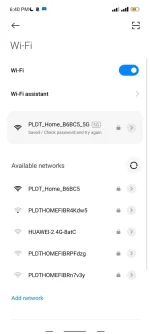
Di sir yung kapag coconnect kpa lng sa wifi.yan kasi lumabas sa akin

Screenshot_2023-01-15-18-40-42-647_com.android.settings.webp
 

About this Thread

  • 432
    Replies
  • 35K
    Views
  • 71
    Participants
Last reply from:
crow91

Online now

Members online
570
Guests online
1,173
Total visitors
1,743

Forum statistics

Threads
2,272,162
Posts
28,940,645
Members
1,238,044
Latest member
gabooph
Back
Top